

💜 Novaryn Queue Bar

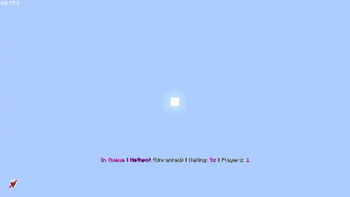
Novaryn Queue Bar is a lightweight StrikePractice addon that displays live queue and fight information directly in each player's action bar.
While players wait in a ranked or unranked queue, the bar shows their selected kit, queue type, elapsed wait time, and queued-player count. When a fight begins, it can switch automatically to a configurable duel, party-versus-party, or party-split display with live scores, team counts, and native player-head icons.
Novaryn Queue Bar is designed for practice servers that want a cleaner, more informative experience without extra menus, chat messages, or resource packs. Every bar is configurable, including per-kit queue formats, fight formats, colors, labels, fallback icons, and LingoJam Minecraft Small Font styling.

-
💜 Clean action bar design Present queue and fight information using a polished purple-themed default layout.
-
⏱️ Live queue status Show the selected kit, ranked or unranked mode, elapsed wait time, and live queue count.
-
⚔️ Live fight bars Display configurable action bars for duels, party-versus-party fights, and party splits.
-
👤 Native player-head icons Render each fighter's real Minecraft skin head in supported clients without requiring a resource pack.
-
🟣 Automatic head fallbacks Use configurable alive and eliminated symbols when native head rendering is unavailable.
-
🧮 Scores and team status Show duel scores, current rounds, team totals, and the number of players still alive.
-
🔠 LingoJam Minecraft Small Font Convert supported text using the Minecraft Small Font mapping while preserving colors, placeholders, numbers, and symbols.
-
⚙️ Fully configurable formats Customize queue, duel, party-versus-party, and party-split action bars with built-in placeholders.
-
🎯 Per-kit queue formats Use a different queue bar format for any kit while retaining a global default.
-
👁️ Per-player toggle Let players enable or disable all Novaryn action bars for themselves.
-
💾 Persistent preferences Save player toggle states in
toggled.yml, including across restarts. -
🔌 PlaceholderAPI expansion Includes eight built-in placeholders for scoreboards, tab lists, holograms, and other plugins.
-
📢 Action bar priority Keep the relevant queue or fight status visible while Novaryn Queue Bar is active.
-
⚡ Lightweight architecture Uses efficient shared scheduled tasks and caches fight formatting work.
📦 Dependencies
| Dependency | Type |
|---|---|
| StrikePractice | Required |
| PlaceholderAPI | Optional |
Native player-head text is supported on Minecraft 1.21.9+. Older or unsupported clients automatically receive the configured fallback symbols.
🔑 Commands
| Command | Permission | Default | Description |
|---|---|---|---|
/nqb reload |
novarynqueuebar.reload |
OP | Reloads the configuration without resetting queue timers |
/nqb toggle |
novarynqueuebar.toggle |
Everyone | Toggles queue and fight bars on or off |
/nqb placeholder |
None | Everyone | Lists the available formatting placeholders |
/placeholder |
None | Everyone | Alias for the placeholder list |
🧩 PlaceholderAPI Placeholders
| Placeholder | Example |
|---|---|
%novarynqueuebar_inqueue% |
true / false |
%novarynqueuebar_kit% |
Nodebuff |
%novarynqueuebar_type% |
Ranked / Unranked |
%novarynqueuebar_time% |
45 |
%novarynqueuebar_count% |
3 |
%novarynqueuebar_status% |
In queue: Nodebuff (Ranked) / Not in queue |
%novarynqueuebar_queueinfo% |
Nodebuff (Ranked) |
%novarynqueuebar_toggled% |
enabled / disabled |
⚔️ Fight Bar Placeholders
Duels
%player_one_head%, %player_one%, %player_one_score%, %player_two_head%, %player_two%, %player_two_score%, %round%, %rounds%, %kit%
Party vs. Party
%party_one_heads%, %party_one%, %party_one_alive%, %party_one_total%, %party_two_heads%, %party_two%, %party_two_alive%, %party_two_total%, %kit%
Party Split
%team_one_heads%, %team_one_alive%, %team_one_total%, %team_two_heads%, %team_two_alive%, %team_two_total%, %kit%
The plural head placeholders automatically render every player on that side, keeping party formats short and easy to configure.
⚙️ Example Configuration
# How often the queue bar updates.
# 10 ticks = 0.5 seconds
check-interval: 10

# Queue placeholders: %kit%, %type%, %time%, %count%
queue-format: "&dIn Queue &8| &5%kit% &8(&7%type%&8) &8| &7Waiting: &d%time%s &8| &7Players: &d%count%"

# Optional per-kit queue formats.
kit-formats:
  Nodebuff: "&dNodebuff %type% &8| &7%time%s &8| &7%count% &dplayers"
  BuildUHC: "&dBUHC %type% &8| &7%time%s"
  Classic: "&dClassic %type% &8| &7%time%s &8| &7%count% queued"
  Sumo: "&dSumo %type% &8| &7%time%s"

ranked-label: "Ranked"
unranked-label: "Unranked"

# Uses the LingoJam Minecraft Small Font mapping.
small-caps: true

fight-bars:
  check-interval: 10

  head-icons:
    enabled: true

  duels:
    enabled: true
    format: "%player_one_head% &d%player_one% &f%player_one_score% &8- &f%player_two_score% &d%player_two% %player_two_head% &8| &7Round &f%round%&7/&f%rounds%"

  party-vs-party:
    enabled: true
    format: "%party_one_heads% &5%party_one% &d%party_one_alive%&7/&f%party_one_total% &8- &f%party_two_alive%&7/&f%party_two_total% &5%party_two% %party_two_heads%"

  party-split:
    enabled: true
    format: "&5Party Split &8| %team_one_heads% &dTeam 1: &f%team_one_alive%&7/&f%team_one_total% &8- &dTeam 2: &f%team_two_alive%&7/&f%team_two_total% %team_two_heads%"

head-icon-fallback:
  alive-symbol: '&d●'
  eliminated-symbol: '&8○'
  separator: ''

toggle:
  enabled-message: "&5Novaryn Queue Bar &8| &fQueue bar &aenabled"
  disabled-message: "&5Novaryn Queue Bar &8| &fQueue bar &cdisabled"

reload-message: "&5Novaryn Queue Bar &8| &fConfiguration reloaded."
no-permission: "&cYou don't have permission to use this command."
Existing configurations are migrated automatically. Custom head fallback values from early development builds are preserved and moved into head-icon-fallback.
❤️ Perfect For
- Practice servers
- Ranked and unranked queues
- StrikePractice setups
- Competitive PvP networks
- Party and team fights
- Servers using action bar UI systems
- Servers that want a cleaner queue and match experience
🚀 Why Use Novaryn Queue Bar?
Novaryn Queue Bar keeps players informed throughout the full practice flow—from joining a queue to finishing a duel or team fight. Queue details, real player heads, scores, rounds, and team status remain visible without filling chat or requiring players to open a menu.
With per-kit formats, configurable fight layouts, PlaceholderAPI support, correct Minecraft Small Font styling, persistent toggles, and lightweight updates, it is a simple but polished addition to any StrikePractice server.
Built by Novaryn Studios 🚀
| Version | Minecraft | Loader | Download |
|---|---|---|---|
|
Novaryn Queue Bar 1.0.2 1.0.2 |
1.20.4, 1.20.5, 1.20.6, 1.21, 1.21.1, 1.21.10, 1.21.11, 1.21.2, 1.21.3, 1.21.4, 1.21.5, 1.21.6, 1.21.7, 1.21.8, 1.21.9, 26.1, 26.1.1, 26.1.2
|
bukkit, paper, purpur, spigot
|
Download |
|
Novaryn Queue Bar 1.0.1 1.0.1 |
1.20.4, 1.20.5, 1.20.6, 1.21, 1.21.1, 1.21.10, 1.21.11, 1.21.2, 1.21.3, 1.21.4, 1.21.5, 1.21.6, 1.21.7, 1.21.8, 1.21.9, 26.1, 26.1.1, 26.1.2
|
bukkit, paper, purpur, spigot
|
Download |
|
Novaryn Queue Bar 1.0.0 1.0.0 |
1.21, 1.21.1, 1.21.10, 1.21.11, 1.21.2, 1.21.3, 1.21.4, 1.21.5, 1.21.6, 1.21.7, 1.21.8, 1.21.9, 26.1, 26.1.1, 26.1.2
|
bukkit, paper, purpur, spigot
|
Download |