🏛️ OCK Blueprint Builder
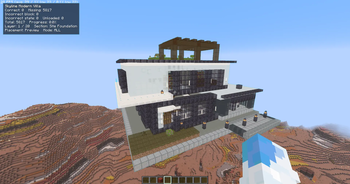
OCK Blueprint Builder is a client-side building guide mod for Minecraft Java Edition. It imports structured OCK Blueprint (.ockbp) files and projects them as real-time 3D holograms directly into your world—allowing you to accurately recreate complex builds and AI-designed structures with ease!
⚠️ 100% Client-Side & Server-Friendly: The mod runs entirely on your client and never modifies world blocks, auto-builds, or sends placement packets. It is completely safe to use on singleplayer worlds and multiplayer vanilla servers.
🤖 How the AI Blueprint Workflow Works
OCK Blueprint Builder does not generate structures inside Minecraft. Instead, it bridges the gap between external AI models and your Minecraft world:
- Prompt the AI: Provide an external AI (e.g. ChatGPT, Claude, DeepSeek, or custom-trained Minecraft models) with the OCK Blueprint format prompt.
- Generate Structure JSON: The AI converts your text description into a structured OCK JSON blueprint containing coordinates, block types, and states.
- Import & Visualize: Paste the JSON into the in-game editor or load an
.ockbpfile. The mod validates the blocks against the game registry and renders an interactive 3D holographic guide. - Build Manually: Walk around the hologram, check required materials, and place blocks by hand while the HUD tracks your progress!
💡 AI Quality Note: The quality and accuracy of the generated structure depend on the AI model and prompt used. While general-purpose LLMs excel at simple/medium structures, models specialized in Minecraft coordinate logic and the OCK JSON specification yield the best architectural results.
✨ Key Features
- 🌟 3D Holographic Projection: Displays translucent ghost blocks in-world with custom shaders, culling, and color-coded accuracy feedback.
- 🪵 Stick Area Capture: Hold a standard wooden stick and right-click two corner blocks to capture, compress, and export any existing build into an
.ockbpblueprint. - 📝 In-Game Code & JSON Editor: Built-in editor with syntax validation, line numbers, coordinate bounds checking, and instant clipboard paste.
- 📊 Real-Time HUD & Progress Tracker: Dynamically monitors placed blocks, missing blocks, wrong block states (e.g., wrong stair orientation), and completion percentage.
- 📦 Smart Material Calculator: Breaks down all required materials and compares them directly against what you currently carry in your inventory.
- 🪜 Layer-by-Layer Slicing: Isolate individual Y-levels (
CURRENT_LAYER) or construction sections so you can comfortably build complex multi-story interiors. - 🎮 Smooth In-World Movement: Move and rotate your hologram on-the-fly using directional arrow keys without interrupting normal player walking.
🎮 Default Keybinds
All keys can be rebound in Options > Controls > Key Binds:
| Key | Action |
|---|---|
B |
Open OCK Main Menu (Capture, Load, Edit Movement) |
P |
Open Placement & Material Screen |
H |
Toggle Hologram Visibility (Show / Hide) |
L |
Lock / Unlock Blueprint Placement |
Arrow Keys |
Move Hologram (while in Movement Mode) |
Page Up / Page Down |
Next / Previous Layer (or Rotate in Movement Mode) |
R / Shift + R |
Rotate 90° Clockwise / Counterclockwise |
M / Shift + M |
Mirror X / Mirror Z |
N |
Select & Highlight Next Nearest Missing Block |
🚀 Step-by-Step Tutorial
1. Generating & Loading an AI Blueprint
- Press
B➔ Click Load / Edit Blueprint JSON. - Click Prompt help and click Copy prompt to grab the format template.
- Paste the prompt into your AI model, describe what you want to build, and copy the generated JSON.
- Back in the Minecraft editor, click Paste (or
Ctrl + V). - Click Validate (
Ctrl + Enter) to verify block registry states, then click Load hologram. (Tip: Click the Example button in the editor anytime to test the bundled small oak house!)
2. Capturing an Existing Build In-Game
- Press
Band choose Select Area. - Hold a normal Stick and Right-Click Corner 1, then Right-Click Corner 2.
- Once captured, press
Band choose:- Copy Selected Build to immediately project it as a movable hologram.
- Save Selected Build to name and export it to your local library.
3. Positioning & Building
- Press
B➔ choose Edit Hologram Movement. - Use your Arrow Keys to move the hologram and Page Up / Page Down to rotate it.
- Press
L(or click Lock) so the placement stays fixed while you build. - Press
Pto view your material checklist and toggle display modes (e.g.CURRENT_LAYERorMISSING_ONLY). - Place blocks manually—the HUD will update in real time as you complete your build!
📋 Requirements & Installation
- Install Fabric Loader (
0.19.3or newer) for Minecraft 1.21.11. - Install Fabric API (
0.141.4+1.21.11or newer). - Place
ock-blueprint-builder-1.3.0.jarinto your.minecraft/modsdirectory. - Launch the game and press
Bto start building!