

⚔️ Open Parties and Claims: Warfare
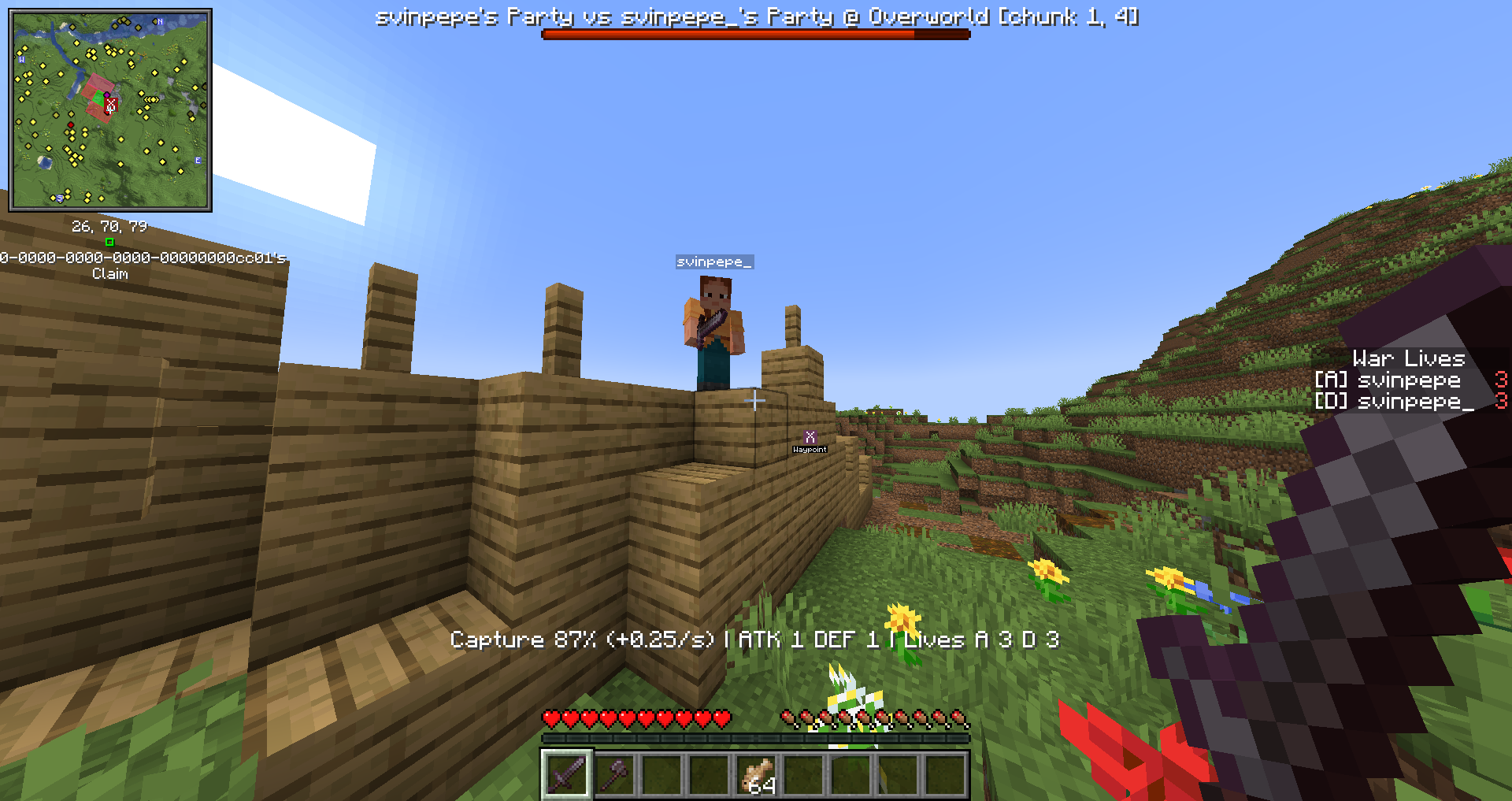
Turn your peaceful Open Parties and Claims (OPaC) server into an epic arena of territorial conquest, tactical sieges, and diplomatic warfare!
Open Parties and Claims: Warfare bridges the gap between peaceful claim protection and thrilling faction PvP. Players can declare wars against rival claims, engage in dynamic chunk-by-chunk sieges, track active conflicts on their minimap, and fight for land while keeping offline bases safe with configurable raid windows.
📚 Guides & Documentation
- 🔄 Migration & Upgrade Guide (1.x to 2.0) — Step-by-step upgrade instructions from 1.x (1.6.7.2) or early 2.0 builds.
- 📖 Server Admin Guide — Installation, lifecycle, raid hours, and live server operations.
- ⚙️ Configuration Reference — Complete options reference, allowed ranges, and defaults for
opac_warfare-*.toml. - 🧩 Companion Mod: Better Protection — Mechanical contraption protection (Create drills/saws), cannon impacts, and
/claimrules. - ⚔️ Companion Mod: Combat Log (Modrinth / CurseForge) — Prevents combat logging and blocks fleeing into safe territories during PvP and sieges.
- 🏗️ Architecture & WarfareBridge — Developer notes, platform abstraction, and external mod integration.
🌟 Key Features
🚩 Tactical Chunk Wars & Conquest
- Border-Based Warfare: Declare war on neighboring hostile claims from the border. Deep core territory cannot be bypassed without securing border chunks first!
- Sector Wedge Conquest: Take control of strategic wedges of connected territory in a single, hard-fought campaign.
🛡️ Balanced Capture & Anti-Zerg Mechanics
- Presence-Driven Capture: Attackers advance the siege progress bar by holding the contested zone; defenders push it back by defending the territory.
- Anti-Zerg Protection: Diminishing returns prevent massive zergs from instantly steamrolling smaller, well-fortified teams. Skill and endurance decide the victor!
- AFK Protection: Idle players do not contribute to siege progress.
⏰ Fair-Play Raid Windows & Cooldowns
- No 4 AM Offline Raids: Define exact server raid hours (e.g.,
18:00 - 22:00) so battles only happen when players are online and ready to fight. - Strategic Cooldowns: Configurable attack and defense cooldowns prevent spam declarations and give defeated parties time to regroup.
❤️ War Lives & Live Scoreboard
- High-Stakes Combat: Every warrior receives limited war lives per siege. Lose your lives, and you're out of the battle!
- Sidebar HUD: Real-time scoreboard display keeps everyone informed of remaining lives and combat status.
🗺️ Full Xaero's Map Integration
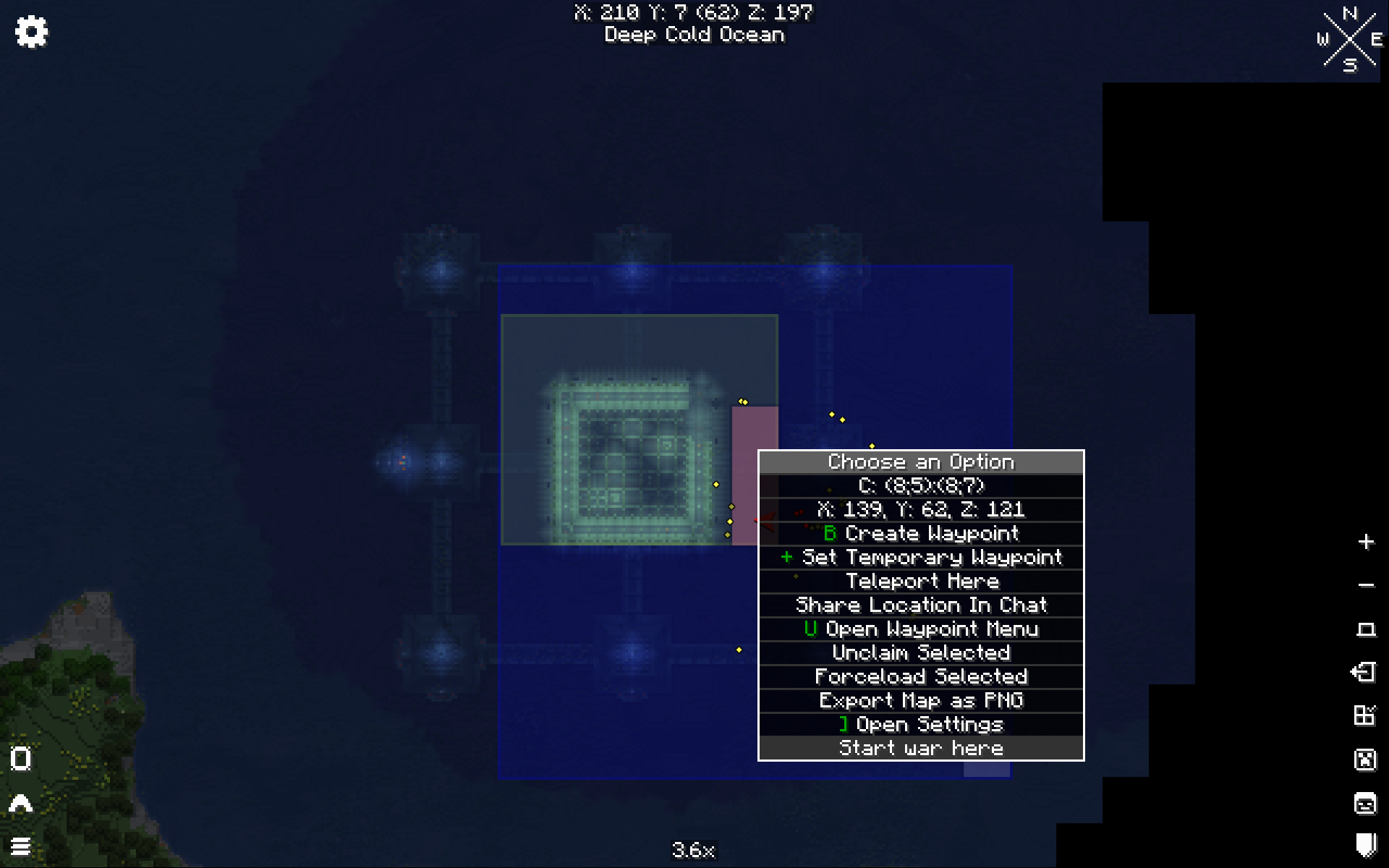
- Fair-Play War Markers: View active conflict zones and timers directly on Xaero's Minimap and Xaero's World Map.
- Right-Click War Start: Simply right-click any eligible enemy border chunk directly on Xaero's World Map to initiate a siege!
🔔 Discord Webhooks
- Automatically broadcast war declarations, phase transitions, and final siege outcomes directly to your server's Discord channel with rich embeds.
⚔️ How Sieges Work
  [ /war start ] ────► [ Preparation Phase ] ────► [ Active Battle ] ────► [ Resolution ]
  Target border chunk     Defenders & attackers      Fight for zone;           100% = Captured!
  or Xaero right-click    gear up & rally           drain enemy lives         Timeout = Defended!
- Declaration: A party declares war on an adjacent rival chunk using
/war startor the Xaero World Map menu. - Preparation: A countdown gives defenders time to rally their allies, build fortifications, and prepare gear.
- Active Phase: The chunk becomes contested! Normal claim restrictions relax for combatants:
- Stand inside the zone to capture or defend.
- Watch the capture bossbar and sidebar lives.
- Glowing effects keep combatants visible and prevent hiding in corners.
- Resolution:
- If attackers reach 100% progress, the chunk is claimed by the attackers!
- If defenders hold out until time expires or deplete enemy lives, the siege fails and peace is restored.
🧩 Mod Compatibility & Ecosystem
🛡️ Official Companion Mod: Better Protection
Looking for Create contraption support, cannon warfare, and custom block-damage rules during sieges? 👉 Open Parties and Claims: Better Protection
- When installed together, siege zones automatically allow Create drills, cannon impacts (Create Big Cannons), and tactical breaching in actively contested chunks while keeping peaceful claims 100% secure!
⚔️ Official Companion Mod: Combat Log
Prevent combat logging and tactical escapes into safe territory during wars and PvP: 👉 Open Parties and Claims: Combat Log (Modrinth | CurseForge)
- Anti-Safezone Fleeing: Blocks tagged players from retreating into safe claims, peaceful territories, or non-PvP zones mid-fight.
- Fair Sieges: Tags combatants during PvP and territorial wars, punishing combat logging and ensuring contested battles are fought to the finish!
🌍 Multi-Loader & Multi-Version
Warfare supports your favorite mod loader and version out of the box:
- Minecraft 1.20.1: Forge & Fabric
- Minecraft 1.21.1: NeoForge & Fabric
- Minecraft 26.1: NeoForge
📦 Installation & Requirements
- Install Open Parties and Claims (CurseForge / Modrinth) for your loader and Minecraft version.
- Download the matching Open Parties and Claims: Warfare jar:
opac-warfare-1.20.1-forge.jaropac-warfare-1.20.1-fabric.jaropac-warfare-1.21.1-neoforge.jaropac-warfare-1.21.1-fabric.jaropac-warfare-26.1-neoforge.jar
- Drop the jar into your server's (and client's)
mods/directory. - (Optional) Install Xaero's Minimap or Xaero's World Map for waypoint and map features.
📖 Commands & Guides
| Command | Permission | Description |
|---|---|---|
/war start |
opac.warfare.start |
Declare war on the eligible border chunk you are standing in. |
/war status |
opac.warfare.status |
Display status and capture progress of your active wars. |
/war list |
opac.warfare.status |
Show active wars and ongoing sieges visible to you. |
/war near [radius] |
opac.warfare.status |
Find wars within a chunk radius (default: 8, max: 32). |
/waradmin list |
opac.warfare.admin |
View all active and preparing wars across all dimensions. |
/waradmin stop <uuid|chunk> |
opac.warfare.admin |
Force stop a war and restore claims to original owners. |
/waradmin setprogress <uuid|chunk> <0-100> |
opac.warfare.admin |
Administratively modify capture progress. |
/waradmin skip_preparation <chunk> |
opac.warfare.admin |
Skip the preparation countdown and activate the siege immediately. |
(Legacy customclaims.* permissions remain supported as aliases for backwards compatibility).
For advanced server configuration, raid window setups, and permission nodes, check our Documentation Wiki.
| Version | Minecraft | Loader | Download |
|---|---|---|---|
|
OPaC Warfare v2.0.0 [1.20.1 Forge] 2.0.0+1.20.1-forge |
1.20, 1.20.1
|
forge
|
Download |
|
OPaC Warfare v2.0.0 [1.21.1 Fabric] 2.0.0+1.21.1-fabric |
1.21, 1.21.1
|
fabric
|
Download |
|
OPaC Warfare v2.0.0 [1.20.1 Fabric] 2.0.0+1.20.1-fabric |
1.20, 1.20.1
|
fabric
|
Download |
|
OPaC Warfare v2.0.0 [1.21.1 NeoForge] 2.0.0+1.21.1-neoforge |
1.21, 1.21.1
|
neoforge
|
Download |
|
OPaC Warfare v2.0.0 [26.1 NeoForge] 2.0.0+26.1.2-neoforge |
26.1, 26.1.1, 26.1.2, 26.2, 26.3
|
neoforge
|
Download |
|
Open Parties and Claims: Warfare 1.6.7.2 1.6.7.2 |
26.1, 26.1.1, 26.1.2, 26.2
|
neoforge
|
Download |
|
Open Parties and Claims: Warfare 1.6.7.2 1.6.7.2 |
1.21.1, 1.21.10, 1.21.11, 1.21.2, 1.21.3, 1.21.4, 1.21.5, 1.21.6, 1.21.7, 1.21.8, 1.21.9
|
neoforge
|
Download |
|
Open Parties and Claims: Warfare 1.6.7.1 1.6.7.1 |
1.21.1, 1.21.10, 1.21.11, 1.21.2, 1.21.3, 1.21.4, 1.21.5, 1.21.6, 1.21.7, 1.21.8, 1.21.9
|
neoforge
|
Download |
|
Open Parties and Claims: Warfare 1.6.7 1.6.7 |
1.21.1, 1.21.10, 1.21.11, 1.21.2, 1.21.3, 1.21.4, 1.21.5, 1.21.6, 1.21.7, 1.21.8, 1.21.9, 26.1, 26.1.1, 26.1.2, 26.2
|
neoforge
|
Download |
|
Open Parties and Claims: Warfare 1.6.6 1.6.6 |
1.21.1, 1.21.10, 1.21.11, 1.21.2, 1.21.3, 1.21.4, 1.21.5, 1.21.6, 1.21.7, 1.21.8, 1.21.9
|
neoforge
|
Download |
|
Open Parties and Claims: Warfare 1.6.4 1.6.4 |
1.21.1, 1.21.10, 1.21.11, 1.21.2, 1.21.3, 1.21.4, 1.21.5, 1.21.6, 1.21.7, 1.21.8, 1.21.9, 26.1, 26.1.1, 26.1.2, 26.2
|
neoforge
|
Download |
|
Open Parties and Claims: Warfare 1.6.3 1.6.3 |
1.21.1, 1.21.10, 1.21.11, 1.21.2, 1.21.3, 1.21.4, 1.21.5, 1.21.6, 1.21.7, 1.21.8, 1.21.9, 26.1, 26.1.1, 26.1.2, 26.2
|
neoforge
|
Download |
|
Open Parties and Claims: Warfare 1.6.2 1.6.2 |
1.21.1
|
neoforge
|
Download |
|
Open Parties and Claims: Warfare 1.6.1 1.6.1 |
1.21.1
|
neoforge
|
Download |