

pdb_mod
Drop a .pdb / .ent structure file into a folder and build it in your world, block by block, atom by atom.
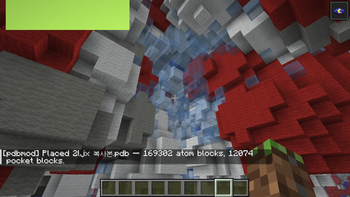
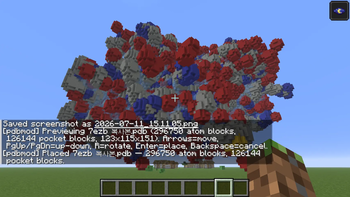
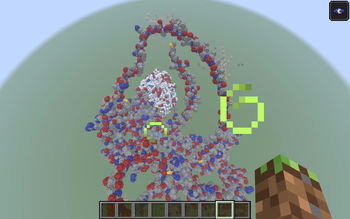
pdb_mod reads real Protein Data Bank files and voxelizes them into a space-filling (CPK-style) model made of colored wool — then lets you preview, move, and rotate the structure before placing it, Litematica-style. It also detects internal cavities (binding pockets) using a classic grid-based algorithm and marks them separately.
This is a visualization / education tool for looking at real molecular structures at a 1-block-per-voxel scale, not a chemistry simulator.
Features
- Real PDB parsing — reads
ATOM/HETATMrecords (coordinates, element) from standard.pdb/.entfiles. - Space-filling model — each atom is expanded to its van der Waals radius and voxelized at 0.5 Å resolution, so the final shape reflects the molecule's actual volume, not just its backbone.
- Standard CPK coloring — element colors follow the standard Jmol/CPK reference palette, mapped to the closest of Minecraft's 16 wool colors (H=white, C=light gray, N=blue, O=red, S=yellow, P=orange, halogens=lime, etc.).
- Pocket / cavity detection — a LIGSITE-style algorithm (Hendlich, Rippmann & Barnickel, 1997) scans the empty voxels around the structure and flags enclosed cavities, rendered as light-blue stained glass so you can see where a ligand-binding pocket might be.
- Litematica-style placement — spawning a molecule opens a movable/rotatable preview (shown as a particle wireframe) before you commit any blocks:
- Arrow keys — move the structure (X/Z)
- Page Up / Page Down — move up/down
R— rotate 90°Enter— confirm and placeBackspace— cancel
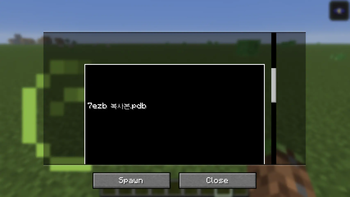
- In-game file picker — a scrollable GUI list of every
.pdb/.entfile in your folder. - No hard atom cap — large structures (full proteins, multi-chain assemblies) are voxelized in full; very large files will take longer and place more blocks.
Usage
- Launch the game once so the mod creates its folder:
.minecraft/pdbmod/ - Drop any
.pdb/.entfile in there (e.g. from RCSB PDB). - Open the picker in-game, pick a file, hit Spawn.
- Move/rotate the preview into position, then confirm to place.
Keybinds (rebindable in Controls)
| Key | Action |
|---|---|
O |
Open molecule picker |
P |
Quick-spawn last picked / first available molecule |
| Arrow keys | Move preview (horizontal) |
| Page Up / Page Down | Move preview (vertical) |
R |
Rotate preview 90° |
| Enter | Confirm placement |
| Backspace | Cancel placement |
Commands
/pdb scan— rescan the folder for files/pdb list— list available files/pdb open— open the picker GUI/pdb spawn <name>— start a preview for a specific file/pdb folder— print the folder path
Notes & limitations
- Client-side only — no server installation needed, safe for singleplayer and any server that allows client-side mods.
- 16 wool colors can't distinguish every element 1:1 — some less-common atoms share a color (documented in the source).
- Pocket detection is a simple grid-morphology heuristic, not a validated druggability tool — it doesn't distinguish surface-accessible pockets from fully buried cavities, and won't rank or score them the way fpocket/CASTp do. Treat it as "here's a plausible cavity," not a docking prediction.
- Very large structures (thousands+ atoms) can take a noticeable moment to voxelize and place.
Requirements
- Minecraft 1.21.11
- Fabric Loader ≥ 0.18.1
- Fabric API
- Java 21+
| Version | Minecraft | Loader | Download |
|---|---|---|---|
|
Pdb_viewer 1.0.0 1.0.0 |
1.21.11
|
fabric
|
Download |