

PieMotd
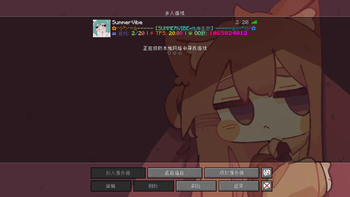
Dynamic MOTD, server icon and join welcome title plugin for Paper 1.20.4+, with a built-in WebUI for managing the entire configuration from a browser.
v2.1.0 · Paper 1.20.4+ · Java 21 · MIT License
Features
- MOTD supports MiniMessage format (gradients, rainbow, hex colors) with multiple rotating messages
- Rotation is time-driven — the configured interval is honored exactly regardless of ping frequency; rotation method (random/sequential) and rotation timing (interval/per ping) can be combined independently
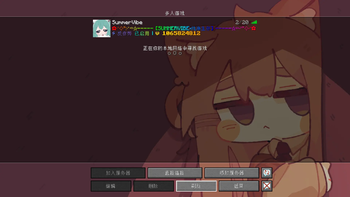
- Server icon rotation with three modes: random, sequential, hourly; the rotation list is automatically taken from all images in the icons directory
- Join welcome title and sound with three display modes: every join, first join only, once per day (persisted in player data, survives restarts)
- Multi-language support; language files are split under
lang/and switching only requires a config change - Built-in WebUI — no need to edit YAML by hand (see below)


WebUI

After startup the plugin runs a local HTTP service. Open it in a browser to manage the entire configuration — saving reloads automatically.
It mainly solves two day-to-day hassles:
Live MiniMessage preview. Gradients, rainbow and variables of the MOTD and welcome title are rendered directly on the page as they will appear in-game. Variables are shown as readable labels (%online% becomes "online players", hover to see the raw form). Changing a MOTD no longer means the edit → reload → open-the-server-list loop; broken tags are visible immediately.
Upload icons from the browser. Images of any size are automatically scaled to 64x64, named icon1, icon2… in order and added to the rotation list; unwanted ones can be deleted from the same page. No image editor for resizing, no FTP, no manual config edits.

Other details:
- Every option in config.yml has a matching control — no manual file editing required
- Saving writes to the original config file and keeps comments; numeric ranges, path validity and enum values are validated, invalid values keep the original and produce a warning
- The top bar shows the plugin version, MC version, online players and TPS
Security:
- Login tokens can only be generated from the server console — 128-bit random, single use, 10 minute expiry by default
- Sessions use an HttpOnly + SameSite=Strict cookie, 12 hours by default with sliding renewal
- The login endpoint is rate limited: 10 consecutive failures blocks the IP for 60 seconds
- File read and delete endpoints are restricted to the plugin directory; config writes validate ranges and enum values against whitelists
Two deployment modes
Switch via webui.mode in config.yml.
PORT (default): the WebUI listens on its own port — for VPS or dedicated servers, access http://serverIP:8080/ directly.
PATH: the WebUI is mounted under a sub-path, for panel hosts with only one open port. A reverse proxy forwards the external path to the plugin:
location /piemotd/ {
    proxy_pass http://127.0.0.1:8080/piemotd/;
}
The routing / reverse-proxy features of panels like MCSManager and Pterodactyl work the same way. Frontend assets and APIs use relative paths, so both modes work without changing the page.
For this scenario it is recommended to set webui.bind to 127.0.0.1, so only the panel's local forwarding can reach the service.
Installation
- Server: Paper 1.20.4+ (or forks), Java 21+
- Drop
PieMotd-2.1.0.jarintoplugins/and restart the server - The following files are generated automatically:
plugins/PieMotd/
├── config.yml          # main configuration
├── lang/
│   ├── zh_cn.yml       # 简体中文
│   └── en_us.yml       # English
└── icons/
    └── default.png     # default icon
Configuration
Full config.yml
motd:
  enabled: true                # enable MOTD
  update-interval: 10          # rotation interval (seconds)
  update-enabled: true         # true=rotate by interval / false=switch on every ping
  random: true                 # true=pick randomly / false=sequential
  messages: []                 # MOTD list, supports MiniMessage and variables

server-icon:
  enabled: true                # enable icon rotation
  default: "icons/default.png" # default icon (used when the icons folder is empty)
  rotation-interval: 10.0      # rotation interval (seconds)
  rotation-mode: "RANDOM"      # RANDOM / SEQUENTIAL / TIME(hourly)
  # the rotation list = every image in the icons folder (upload/delete in the WebUI)

welcome:
  enabled: true
  display-mode: "EVERY_TIME"   # EVERY_TIME / FIRST_JOIN / ONCE_PER_DAY
  title:
    main: ""                   # main title, supports %player%
    subtitle: ""               # subtitle
    fade-in: 20                # fade in (ticks)
    stay: 100                  # stay (ticks)
    fade-out: 20               # fade out (ticks)
  sound:
    enabled: true
    sound: "entity.player.levelup"
    volume: 1.0
    pitch: 1.0

settings:
  language: "zh_cn"            # file name inside lang/

webui:
  enabled: true                # enable the WebUI
  mode: "PORT"                 # PORT(standalone) / PATH(sub-path)
  bind: "0.0.0.0"              # listen address
  port: 8080                   # listen port
  base-path: "/piemotd"        # sub-path in PATH mode
  token-expire-minutes: 10     # login token validity (minutes, single use)
  session-expire-hours: 12     # session validity after login (hours)
Variables
| Variable | Description |
|---|---|
%online% / %max_players% |
online players / max players |
%tps% |
server TPS |
%time% / %date% |
current time / date |
%memory_used% / %memory_max% |
used / max memory (MB) |
%server_version% |
server version |
%player% / %player_count% |
player name / player count (welcome title only) |
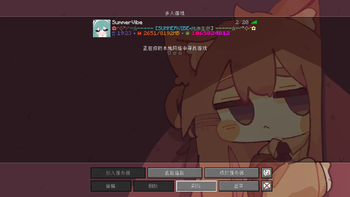
Variables are substituted on every ping. /piemotd preview and the WebUI preview show placeholder labels; the server list shows real values.
Commands
| Command | Description | Permission |
|---|---|---|
/piemotd reload |
reload the entire configuration (aliases /pmotd, /pm) |
piemotd.reload |
/piemotd preview |
preview the current MOTD in chat | piemotd.admin |
/piemotd webui token |
generate a WebUI login token, console only | piemotd.admin |
/piemotd help |
show help | none |
Permissions
| Permission | Description | Default |
|---|---|---|
piemotd.reload |
reload the configuration | OP |
piemotd.admin |
admin permission | OP |
piemotd.* |
all permissions | — |
WebUI usage
- Run
/piemotd webui tokenin the console — the token and access URL are printed - Open the URL in a browser (PATH mode: the reverse proxy address)
- Enter the token; tokens are single use — generate a new one if it expires or you mistype it
- Edit the configuration; MOTD and welcome title render live
- Click "Save and apply" — changes take effect immediately
FAQ
The WebUI doesn't open?
Check that webui.enabled is true, the port is not in use and the firewall allows it; in PATH mode make sure the reverse proxy path matches base-path.
Token expired or mistyped?
Run /piemotd webui token in the console again — old tokens are invalidated automatically.
Are there image size requirements for uploads? No — any size is scaled to 64x64 and stored as PNG. Keep in mind the server list renders icons at 64x64, so very small sources will look blurry when upscaled.
Console banner or Chinese text garbled?
A terminal encoding issue; make sure the startup script contains -Dfile.encoding=UTF-8 (included in Paper's default startup script).
Why aren't variables replaced in the preview? Variables are substituted on every ping. Previews show placeholder labels; the server list shows real values.
License
[MIT License](LICENSE) © 2026 R3_141
| Version | Minecraft | Loader | Download |
|---|---|---|---|
|
PieMotd 2.1.0 2.1.0 |
1.20, 1.20.1, 1.20.2, 1.20.3, 1.20.4, 1.20.5, 1.20.6, 1.21, 1.21.1, 1.21.10, 1.21.11, 1.21.2, 1.21.3, 1.21.4, 1.21.5, 1.21.6, 1.21.7, 1.21.8, 1.21.9, 26.1, 26.1.1, 26.1.2, 26.2, 26.3
|
paper
|
Download |
|
PieMotd 1.0.0 1.0.0 |
1.20.4, 1.20.5, 1.20.6, 1.21, 1.21.1, 1.21.10, 1.21.2, 1.21.3, 1.21.4, 1.21.5, 1.21.6, 1.21.7, 1.21.8, 1.21.9
|
paper
|
Download |