

Playerautoma
Record and replay player actions. Also, re-stack blocks when used up like Inventory tweaks. The mod works on servers but can be regarded as cheating by some.
<iframe frameborder="0" allowfullscreen="true" src=https://www.youtube.com/embed/FE1yiPbejaU></iframe>The following actions are recorded:
- movement
- block placement and breaking
- item interactions
- moving items around in the inventory, chests and crafting tables as well as crafting itself
The mod will not add support to record chat actions like commands or writing messages as it would allow for the creation of spam bots.
Any troubles?
This mod is still early in development. If you encounter any bugs or problems or you have a new feature request please let me know here and if you want to contribute feel free to create a pull request.
Alternatively create an issue on discord.
Installation
This mod requires Minecraft Fabric. Simply put the playerautoma-vx.x.jar and Fabric API JAR in .minecraft/mods.
Usage
The mod has a menu which should be self-explanatory and can be opened using the O Key.
Other than that the default keybindings are as follows.
GStart RecordingHStop RecordingJStart ReplayBPause ReplayKCancel ReplayLStart looped ReplayUStore RecordingILoad Recording0Menu PreventionCTRL + [1..9]Store to QuickSlotALT + [1..9]Store to QuickSlot
Commands
From v0.4.3 and onwards commands are available and allow you to control the mod using them. The commands should be self-explanatory and are as follows. See this for detailed documentation.
/record <start|stop|clear>
/record <store> <name> <json|rec>
/record <load> <name>
/record quickslot <store|load> <slot>
/replay <start|stop|loop|togglepause>
Recording Commands
You can also record commands entered. This option is turned off by default. This specifies to track commands not to replay them. Meaning if you have a replay that contains commands they will be replayed regardless of the option specified. You can also black-list specific commands. Again this only black list them for the recording.
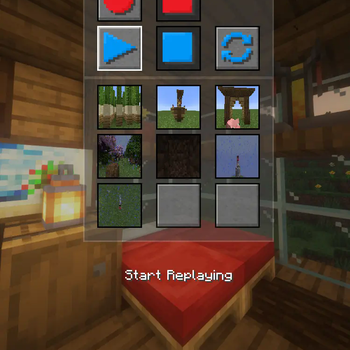
The Quickmenu allows for fast controll of the Playercontroller and optionally the quickslots
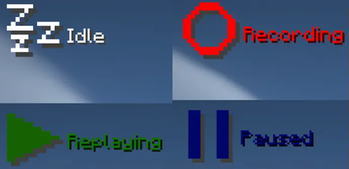
Whether you're recording, replaying or doing nothing. The state of the recorder can always be displayed!
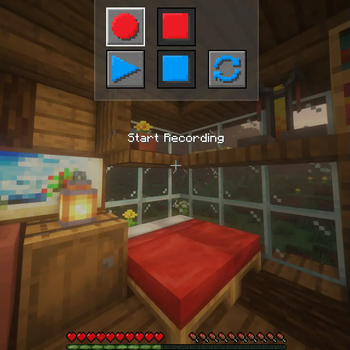
If you like a simpler QuickMenu you can remove the QuickSlots via the Mod-Options
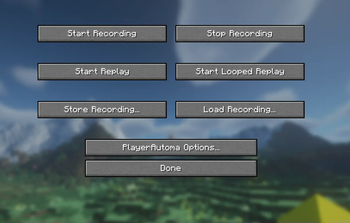
The Mod-Menu that shows all interactions possible with this mod. It can be opened by defautl by using the `O` key
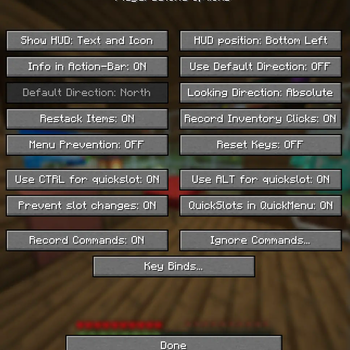
The Options-Menu allows for lots of customization of the usage of the mod
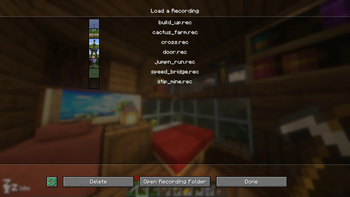
This shows the mod screen used to load a stored recording
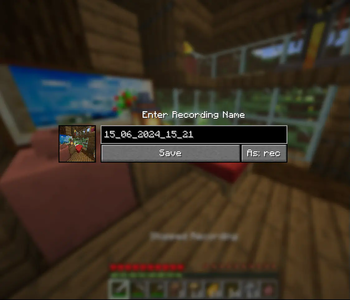
This shows the pop-up dialog used to store a recording
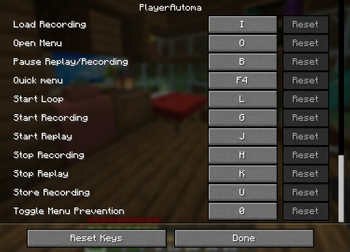
The mod allows different key bindings to be assigned to the most common actions
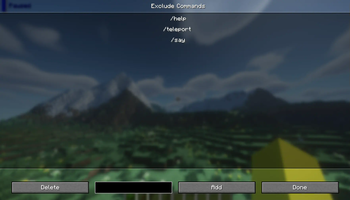
You can black list certains commands and prevent them from being recorded
| Version | Minecraft | Loader | Download |
|---|---|---|---|
|
Playerautoma v1.0.2+1.21.11 v1.0.2+1.21.11 |
1.21.11
|
fabric
|
Download |
|
Playerautoma v1.0.1+1.21.10 v1.0.1+1.21.10 |
1.21.10
|
fabric
|
Download |
|
Playerautoma v1.0.0+1.21.8 v1.0.0+1.21.8 |
1.21.8
|
fabric
|
Download |
|
Playerautoma v1.0.0+1.21.7 v1.0.0+1.21.7 |
1.21.7
|
fabric
|
Download |
|
Playerautoma v1.0.0+1.21.6 v1.0.0+1.21.6 |
1.21.6
|
fabric
|
Download |
|
Playerautoma v1.0.0+1.21.4 v1.0.0+1.21.4 |
1.21.4
|
fabric
|
Download |
|
Playerautoma v1.0.0+1.21.5 v1.0.0+1.21.5 |
1.21.5
|
fabric
|
Download |
|
Playerautoma v0.5.3+1.21.5 v0.5.3+1.21.5 |
1.21.5
|
fabric
|
Download |
|
Playerautoma v0.5.2+1.21.4 v0.5.2+1.21.4 |
1.21.4
|
fabric
|
Download |
|
Playerautoma v0.5.2+1.21.3 v0.5.2+1.21.3 |
1.21.3
|
fabric
|
Download |
|
Playerautoma v0.5.2+1.21.2 v0.5.2+1.21.2 |
1.21.2
|
fabric
|
Download |
|
Playerautoma v0.5.2+1.21.1 v0.5.2+1.21.1 |
1.21.1
|
fabric
|
Download |
|
Playerautoma v0.5.2+1.20.6 v0.5.2+1.20.6 |
1.20.5, 1.20.6
|
fabric
|
Download |
|
Playerautoma v0.5.2+1.21 v0.5.2+1.21 |
1.21
|
fabric
|
Download |
|
Playerautoma v0.5.1+1.20.6 v0.5.1+1.20.6 |
1.20.5, 1.20.6
|
fabric
|
Download |
|
Playerautoma v0.5.1+1.21 v0.5.1+1.21 |
1.21
|
fabric
|
Download |
|
Playerautoma v0.5.0+1.21 v0.5.0+1.21 |
1.21
|
fabric
|
Download |
|
Playerautoma v0.5.0+1.20.6 v0.5.0+1.20.6 |
1.20.5, 1.20.6
|
fabric
|
Download |
|
Playerautoma v0.4.6+1.20.6 v0.4.6+1.20.6 |
1.20.5, 1.20.6
|
fabric
|
Download |
|
Playerautoma v0.4.5+1.20.6 v0.4.5+1.20.6 |
1.20.5, 1.20.6
|
fabric
|
Download |
|
Playerautoma v0.4.4+1.20.6 v0.4.4+1.20.6 |
1.20.5, 1.20.6
|
fabric
|
Download |
|
Playerautoma v0.4.4+1.20 v0.4.4+1.20 |
1.20
|
fabric
|
Download |
|
Playerautoma v0.4.4+1.20.1 v0.4.4+1.20.1 |
1.20.1
|
fabric
|
Download |
|
Playerautoma v0.4.4+1.20.2 v0.4.4+1.20.2 |
1.20.2
|
fabric
|
Download |
|
Playerautoma v0.4.4+1.20.4 v0.4.4+1.20.4 |
1.20.3, 1.20.4
|
fabric
|
Download |
|
Playerautoma v0.4.3+1.20 v0.4.3+1.20 |
1.20
|
fabric
|
Download |
|
Playerautoma v0.4.3+1.20.1 v0.4.3+1.20.1 |
1.20.1
|
fabric
|
Download |
|
Playerautoma v0.4.3+1.20.2 v0.4.3+1.20.2 |
1.20.2
|
fabric
|
Download |
|
Playerautoma v0.4.3+1.20.4 v0.4.3+1.20.4 |
1.20.3, 1.20.4
|
fabric
|
Download |
|
Playerautoma v0.4.2+1.20 v0.4.2+1.20 |
1.20
|
fabric
|
Download |
|
Playerautoma v0.4.2+1.20.1 v0.4.2+1.20.1 |
1.20.1
|
fabric
|
Download |
|
Playerautoma v0.4.2+1.20.2 v0.4.2+1.20.2 |
1.20.2
|
fabric
|
Download |
|
Playerautoma v0.4.2+1.20.4 v0.4.2+1.20.4 |
1.20.3, 1.20.4
|
fabric
|
Download |
|
Playerautoma v0.4.1+1.20.1 v0.4.1+1.20.1 |
1.20.1
|
fabric
|
Download |
|
Playerautoma v0.4.1+1.20.2 v0.4.1+1.20.2 |
1.20.2
|
fabric
|
Download |
|
Playerautoma v0.4.1+1.20.4 v0.4.1+1.20.4 |
1.20.3, 1.20.4
|
fabric
|
Download |
|
Playerautoma v0.4.0+1.20.1 v0.4.0+1.20.1 |
1.20.1
|
fabric
|
Download |
|
Playerautoma v0.4.0+1.20.2 v0.4.0+1.20.2 |
1.20.2
|
fabric
|
Download |
|
Playerautoma v0.4.0+1.20.4 v0.4.0+1.20.4 |
1.20.3, 1.20.4
|
fabric
|
Download |
|
Playerautoma v0.3.3+1.20.2 v0.3.3+1.20.2 |
1.20.2
|
fabric
|
Download |
|
Playerautoma v0.3.3+1.20.1 v0.3.3+1.20.1 |
1.20.1
|
fabric
|
Download |
|
Playerautoma v0.3.3+1.20.4 v0.3.3+1.20.4 |
1.20.3, 1.20.4
|
fabric
|
Download |
|
Playerautoma v0.3.2+1.20.4 v0.3.2+1.20.4 |
1.20.3, 1.20.4
|
fabric
|
Download |
|
Playerautoma v0.3.1+1.20.2 v0.3.1+1.20.2 |
1.20.2
|
fabric
|
Download |
|
Playerautoma v0.3.1+1.20.4 v0.3.1+1.20.4 |
1.20.3, 1.20.4
|
fabric
|
Download |
|
Playerautoma v0.3+1.20.4 v0.3+1.20.4 |
1.20.3, 1.20.4
|
fabric
|
Download |
|
Playerautoma v0.3+1.20.2 v0.3+1.20.2 |
1.20.2
|
fabric
|
Download |
|
Playerautoma v0.2+1.20.2 v0.2+1.20.2 |
1.20.2
|
fabric
|
Download |
|
Playerautoma v0.1+1.20.2 v0.1+1.20.2 |
1.20.2
|
fabric
|
Download |
|
Playerautoma v0.1+1.20.1 v0.1+1.20.1 |
1.20.1
|
fabric
|
Download |