⏳ PLAYTIME TOAST
Track your played time instantly with a single keypress — clean, lightweight, and native.



🌟 Overview
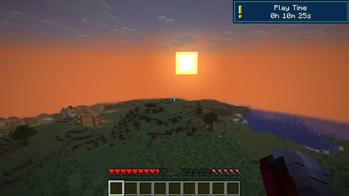
Playtime Toast is a lightweight, client-side Fabric mod designed for players who want to keep track of their in-game time without opening complex menus or sub-screens.
With a single keypress, it displays your current world playtime as a clean, native system toast notification in the top-right corner of your screen — perfectly matching Minecraft's vanilla look and feel.
✨ Key Features
- ⚡ Instant Feedback: Press a single hotkey to instantly view your total playtime for the current world.
- 🎨 Vanilla Style: Uses Minecraft's built-in toast notification system for a clean, non-intrusive UI experience.
- 💾 Persistent Counter: Accurately tracks your time across multiple sessions without resetting when you rejoin.
- 🌐 Full Internationalization: Fully localized across 20+ languages with clean configuration and keybinding integrations.
- ⚡ Ultra-Lightweight & Client-Side: Runs 100% on the client. Works flawlessly on multiplayer servers and Vanilla Realms without server-side installation!
📜 Commands & Features
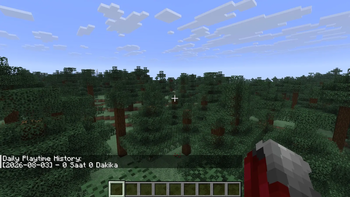
/playtime log— Shows your daily playtime history in a detailed breakdown right in chat!Example Output:
[2026-08-01] - 3 Hours 20 Mins[2026-08-02] - 1 Hour 45 Mins
🎮 Controls & Keybindings
| Action | Default Key | How to Rebind |
|---|---|---|
| Show Playtime | O |
Options ➔ Controls ➔ Key Binds ➔ Scroll to bottom |
💡 Tip: You can rebind the key to any button you prefer (e.g.,
F4or a side mouse button) directly from the in-game control settings!
🛠️ Installation & Requirements
- ⚙️ Loader: Fabric Loader
- 📌 Minecraft Version: Works across multiple 1.21.11 versions (Check the Versions tab)
- 🧩 Dependencies: Fabric API
- Download the latest
.jarfile from the Versions tab. - Place the file into your
.minecraft/modsdirectory. - Launch your game and press
Oto see your playtime!
💬 Community & Support
Have a suggestion, found a bug, or want to report an issue? Join our official community!
- 💬 Discord: Join Craftify Discord Server
🔗 Check Out My Other Lightweight Mods!
Enhance your vanilla Minecraft experience with my collection of minimalist, client-side utilities:
| Mod | Description |
|---|---|
| 🌍 Where Am I? | Color-coded biome & dimension notifications as you explore. |
| 🛡️ Clean Durability | Minimalist item durability tooltips & break warning toast alerts. |
| 📏 Height Meter | Clean HUD height meter with full altimeter scale & compact hotbar modes. |