


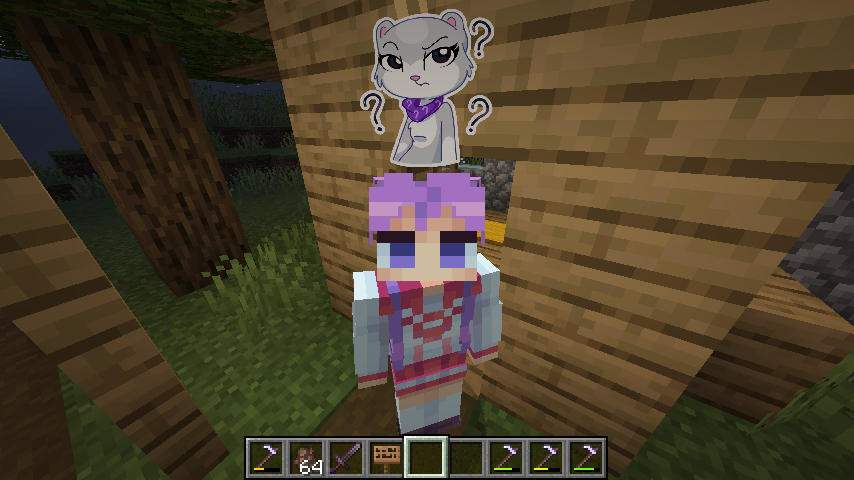
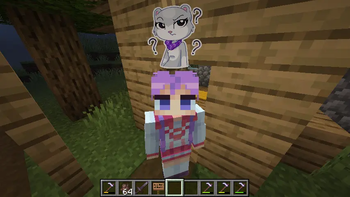
This mod allows you to customize and display pop-up emotes above your character's head
Custom emotes
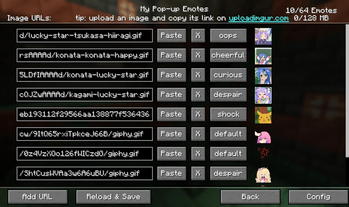
- Can be added by entering image URLs in the My Emotes screen, accessible through a button on the title screen
- Supported formats are .png, .gif and .jpeg.
- There are several selectable sounds for each emote
Usage
- Open the emote menu by holding the V key
- Move the cursor to the desired emote and release the button
- To change pages, click either the right or left side of the screen
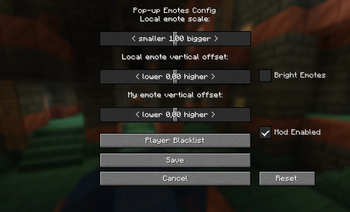
Mods > Pop-up Emotes > Config
- Configure scale and brightness of emotes
- Set personal emote height. Helps when you play with custom player model mods like Yes Steve Model
- Access player blacklist
- If you are using a texture pack to replace default emotes that has fewer emotes than the default emount, you can hide what's left by specifying resourcePackEmoteAmount in the client config file
Server
- Server-side blacklist can be managed via the /popupemotes serverblacklist add/remove/clear/show command. It requires permission level 3 (configurable) or the pop_up_emotes.moderator permission.
Also check out Pop-up Emotes Online Addon

| Version | Minecraft | Loader | Download |
|---|---|---|---|
|
Pop-up Emotes 1.5.6-1 1.5.6-1 |
26.3
|
neoforge
|
Download |
|
Pop-up Emotes 1.5.6 1.5.6 |
1.21.1
|
fabric
|
Download |
|
Pop-up Emotes 1.5.6 1.5.6 |
1.20.1
|
fabric
|
Download |
|
Pop-up Emotes 1.5.6 1.5.6 |
1.21.11
|
fabric
|
Download |
|
Pop-up Emotes 1.5.6 1.5.6 |
26.3
|
neoforge
|
Download |
|
Pop-up Emotes 1.5.6 1.5.6 |
26.3
|
fabric
|
Download |
|
Pop-up Emotes 1.5.6 1.5.6 |
26.2
|
fabric
|
Download |
|
Pop-up Emotes 1.5.6 1.5.6 |
26.1, 26.1.1, 26.1.2
|
fabric
|
Download |
|
Pop-up Emotes 1.5.6 1.5.6 |
1.21.1
|
neoforge
|
Download |
|
Pop-up Emotes 1.5.6 1.5.6 |
1.20.1
|
forge
|
Download |
|
Pop-up Emotes 1.5.5 1.5.5 |
26.3
|
neoforge
|
Download |
|
Pop-up Emotes 1.5.5 1.5.5 |
26.3
|
fabric
|
Download |
|
Pop-up Emotes 1.5.5 1.5.5 |
26.1, 26.1.1, 26.1.2
|
fabric
|
Download |
|
Pop-up Emotes 1.5.5 1.5.5 |
1.21.1
|
neoforge
|
Download |
|
Pop-up Emotes 1.5.5 1.5.5 |
1.20.1
|
forge
|
Download |
|
Pop-up Emotes 1.5.4 1.5.4 |
26.2
|
fabric
|
Download |
|
Pop-up Emotes 1.5.4 1.5.4 |
26.1, 26.1.1, 26.1.2
|
fabric
|
Download |
|
Pop-up Emotes 1.5.4 1.5.4 |
26.3
|
fabric
|
Download |
|
Pop-up Emotes 1.5.4 1.5.4 |
1.20.1
|
forge
|
Download |
|
Pop-up Emotes 1.5.4 1.5.4 |
1.21.1
|
neoforge
|
Download |
|
Pop-up Emotes 1.5.3 1.5.3 |
26.1, 26.1.1, 26.1.2
|
fabric
|
Download |
|
Pop-up Emotes 1.5.3 1.5.3 |
1.21.1
|
neoforge
|
Download |
|
Pop-up Emotes 1.5.3 1.5.3 |
1.20.1
|
forge
|
Download |
|
Pop-up Emotes 1.5.2 1.5.2 |
1.21.1
|
neoforge
|
Download |
|
Pop-up Emotes 1.5.2 1.5.2 |
1.20.1
|
forge
|
Download |
|
Pop-up Emotes 1.5.1 1.5.1 |
26.1, 26.1.1, 26.1.2
|
fabric
|
Download |
|
Pop-up Emotes 1.5.1 1.5.1 |
1.21.11
|
fabric
|
Download |
|
Pop-up Emotes 1.5.1 1.5.1 |
1.21.8
|
fabric
|
Download |
|
Pop-up Emotes 1.5.1 1.5.1 |
1.21.1
|
neoforge
|
Download |
|
Pop-up Emotes 1.5.1 1.5.1 |
1.20.1
|
forge
|
Download |
|
Pop-up Emotes 1.5.0 1.5.0 |
1.21.1
|
neoforge
|
Download |
|
Pop-up Emotes 1.5.0 1.5.0 |
1.20.1
|
forge
|
Download |
|
Pop-up Emotes 1.4.7 1.4.7 |
1.21.8
|
fabric
|
Download |
|
Pop-up Emotes 1.4.7 1.4.7 |
1.21.11
|
fabric
|
Download |
|
Pop-up Emotes 1.4.7 1.4.7 |
1.21.1
|
neoforge
|
Download |
|
Pop-up Emotes 1.4.7 1.4.7 |
1.20.1
|
forge
|
Download |
|
Pop-up Emotes 1.4.6 1.4.6 |
1.21.1
|
neoforge
|
Download |
|
Pop-up Emotes 1.4.6 1.4.6 |
1.20.1
|
forge
|
Download |
|
Pop-up Emotes 1.4.6 1.4.6 |
1.21.11
|
fabric
|
Download |
|
Pop-up Emotes 1.4.5 1.4.5 |
1.21.1
|
neoforge
|
Download |
|
Pop-up Emotes 1.4.5 1.4.5 |
1.20.1
|
forge
|
Download |
|
Pop-up Emotes 1.4.4 1.4.4 |
1.20.1
|
forge
|
Download |
|
Pop-up Emotes 1.4.3 1.4.3 |
1.21.11
|
fabric
|
Download |
|
Pop-up Emotes 1.4.2 1.4.2 |
1.21.11
|
fabric
|
Download |
|
Pop-up Emotes 1.4.3 1.4.3 |
1.21.1
|
neoforge
|
Download |
|
Pop-up Emotes 1.4.3 1.4.3 |
1.20.1
|
forge
|
Download |
|
Pop-up Emotes 1.4.2 1.4.2 |
1.21.1
|
neoforge
|
Download |
|
Pop-up Emotes 1.4.2 1.4.2 |
1.20.1
|
forge
|
Download |
|
Pop-up Emotes 1.4.1 1.4.1 |
1.20.1
|
forge
|
Download |
|
Pop-up Emotes 1.4 1.4 |
1.20.1
|
forge
|
Download |
|
Pop-up Emotes 1.3.6 1.3.6 |
1.20.1
|
forge
|
Download |
|
Pop-up Emotes 1.3.5 1.3.5 |
1.21.10
|
neoforge
|
Download |
|
Pop-up Emotes 1.3.5 1.3.5 |
1.21.1
|
neoforge
|
Download |
|
Pop-up Emotes 1.3.5 1.3.5 |
1.20.1
|
forge
|
Download |
|
Pop-up Emotes 1.3.3 1.3.3 |
1.20.1
|
forge
|
Download |
|
Pop-up Emotes 1.3.1 1.3.1 |
1.21.10
|
neoforge
|
Download |
|
Pop-up Emotes 1.3.1 1.3.1 |
1.21.1
|
neoforge
|
Download |
|
Pop-up Emotes 1.3.1 1.3.1 |
1.20.1
|
forge
|
Download |
|
Pop-up Emotes 1.3 1.3 |
1.20.1
|
forge
|
Download |
|
Pop-up Emotes 1.2.2 1.2.2 |
1.21.1
|
neoforge
|
Download |
|
Pop-up Emotes 1.2.2 1.2.2 |
1.20.1
|
forge
|
Download |
|
Pop-up Emotes 1.2.1 1.2.1 |
1.20.1
|
fabric
|
Download |
|
Pop-up Emotes 1.2.1 1.2.1 |
1.21.1
|
neoforge
|
Download |
|
Pop-up Emotes 1.2.1 1.2.1 |
1.19.2
|
forge
|
Download |
|
Pop-up Emotes 1.2.1 1.2.1 |
1.20.1
|
forge
|
Download |