

Protoncracker Engine
The PCKR Engine is the core configuration framework and management mod for all my mods. It provides a clean, unified, in-game configuration interface, automatic server-client configuration synchronization in multiplayer, and dynamic resource reloading.
Features
- Options Menu Integration: Access the config dashboard directly by clicking the PCKR Engine button inside the standard Minecraft Options menu.
- Unified Configuration Dashboard: View and change settings for all recognized mods, organized into Server and Client categories.
- Zero Hotkey Conflicts: Removes redundant keybinds so your keyboard layout stays completely clear.
- Multiplayer State Sync & Locking: Master settings are registered and managed server-side. When connecting to a multiplayer server, the server locks in configurations on client screens to prevent drift and mismatches.
- Dynamic Reloading: Reloading configurations dynamically updates block replacement lists and recipe load conditions instantly without needing to restart the game world.
In-Game Options Screen
Open the standard Minecraft Options menu and click the PCKR Engine button next to "Done" to open the dashboard. The dashboard splits mods into:
- Server Mods: Mods that govern server-side logic (e.g. worldgen replacements, mob behaviors, loot tables).
- Client Mods: Mods that govern client-side visual preferences (e.g. rendering, scaling, tooltips).
- Unrecognized Mods: Other loaded Fabric mods in the current environment (displayed in read-only form).
Within the config menu, players can:
- Toggle simple options (ON/OFF buttons).
- Click on "Expand" to open a mod's options, where they can:
- Adjust numeric values (+/- buttons).
- Choose list values (selector options).
- Run on-demand mod tasks.
- If a mod has more than 10 settings, clicking Configure... opens its own subscreen, which can be heavily customized.
Server Commands
Admin commands are available to server operators (permission level 2+):
/pckr reload: Loads all configuration files from disk, runs reload listeners for each active mod to sweep chunks/levels, and re-evaluates all dynamic recipes and conditions.
Contributing
Are you also tired of developing custom UI and hotkey placements to configure your mods? Use the Protoncracker Engine's Documentation (link to be developed) to learn how to make it a part of your project, and never worry about it again.
Thanks for downloading, and if you ever run into any issues, please contact me. I'll get it sorted right away. ~protoncracker.
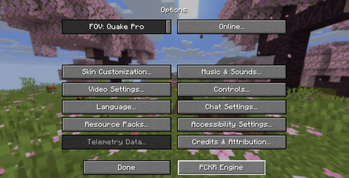
The Engine appears in the Options menu, everywhere in Minecraft where you can access it. It is Shortened to Engine or PCKR Engine for Quality Of Life reasons.
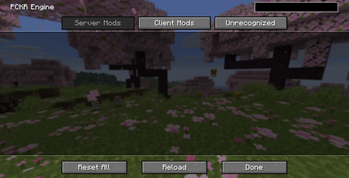
This is the base Engine when you haven't added any other Protoncracker mods or supported mods in general. We're working on automatically adapting outside mods into the Engine for optimization and configuration.
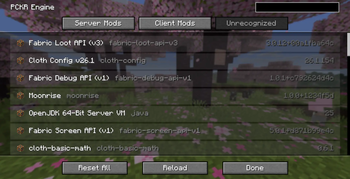
Unrecognized Mods can't be altered and they default to the Engine's Icon, but The Engine doesn't alter their functionality in any way, shape, or form. As long as They don't do it either.
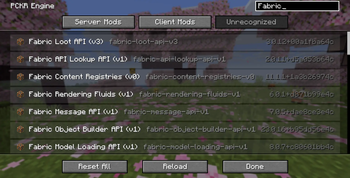
Our Search feature works in any tab, and there you can view any mods that match it, organized by a RegEX rule of Relevance.
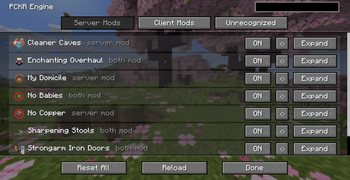
While on the Server Mods list, you can Enable/Disable, Reset, or Expand a mod. From left to right, it gives you the mod's Icon, Name, and if it is recognized as a Server, Client, or Both mod. Finally, we have the option to Reset All, Reload, and Done.
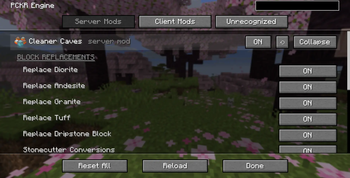
Configuring your mods is simple now, thanks to the PCKR Engine. These are only a few examples, without a mod's own subpage. Reset All resets configurations of all mods. Reload reloads all mods' features.
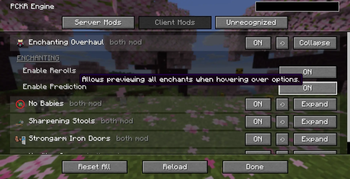
Remember to read the Tooltips for more information on the mod's workings before making changes that can alter your world, and maybe give undesirable outcomes.