

PVPHQ TierTagger
Announcement!!
I am currently updating/rebuilding the Project for the new PVPHQ ranked System. Not all old features are supported yet. Supported features for PVPHQ are:
- Display the rank of any player next to their name. (rank, rating, icon) (layout can only be changed inside the config as of right now, sry)
- Cycle which kit the rank is shown for using a hotkey.
- Cycle which kit the rank is shown for using a hotkey
Functionality:
- Display the rank of any player next to their name.
- Cycle which kit the rank is shown for using a hotkey or "Mod menu" settings.
- Automaticly pick the shown kit based on your inventorys contents.
- Show all of your own ranks using a hotkey.
- Show any Players ranks with /tiertags.
- Works on any Server.
How to use:
Keybinds
You can set all the keybinds in your controls settings just as usual.
| Keybind name | function | Category | default keybind |
|---|---|---|---|
| Cycle Kits | Switch, which kit the Elo/Sr is displayed for | Tier Tagger (Flow PVP) | none |
| Show Stats | Opens the stats screen for yourself | Tier Tagger (Flow PVP) | none |
Settings
You can acces the settings menu through Mod Menu.
| Setting | function |
|---|---|
| Kit: | Switch, which kit the Elo/Sr is displayed for |
| Auto Pick Displayed Kit: | Automaticly switches which kit the Elo/Sr is displayed for, based on your inventorys content |
Commands
| Command | function |
|---|---|
| /tiertags |
Lookup any players stats, match history and skin |
Statistics Screen:
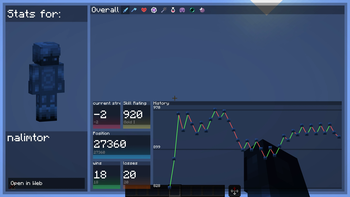
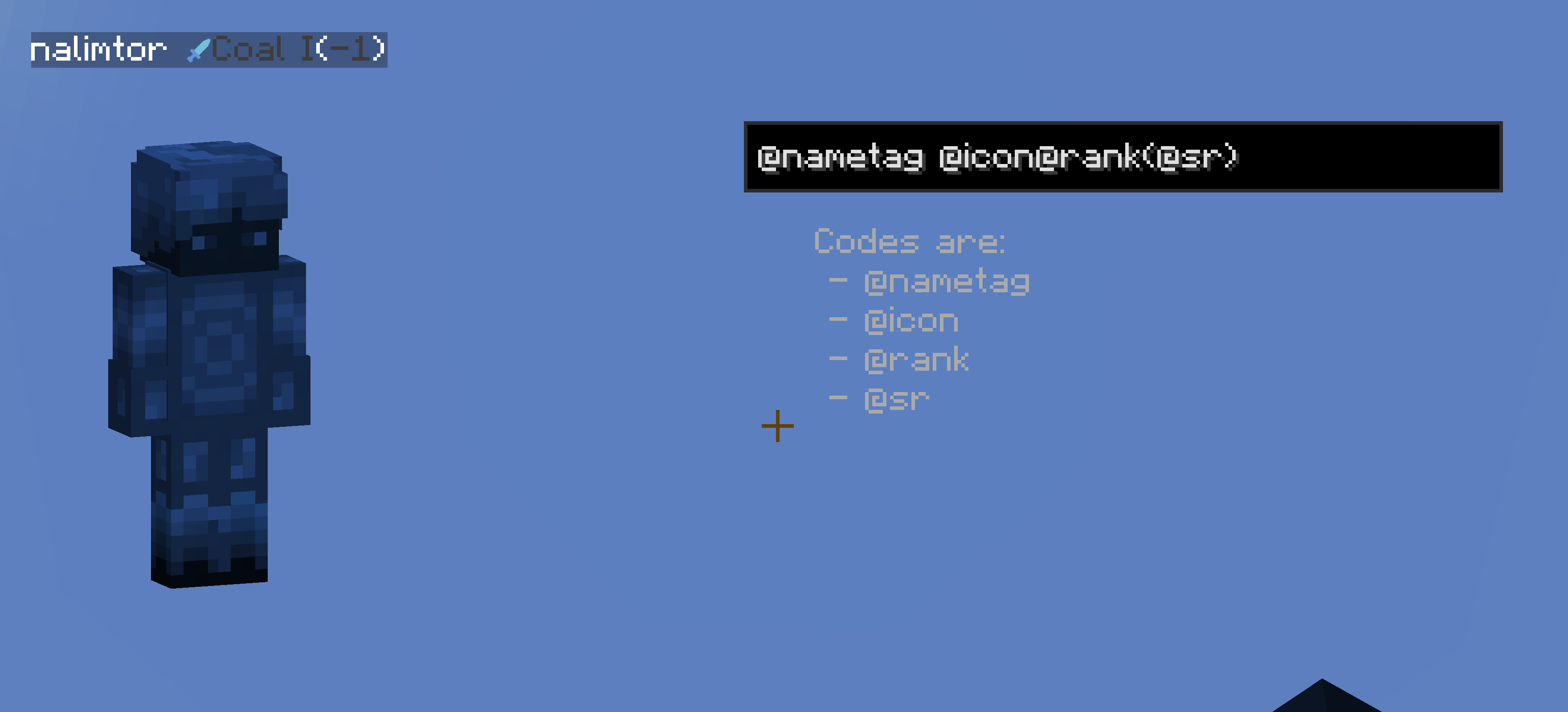
Customize Rank Diplay
You can completly customize how any players ranks get displayed.

just use the nametag customization menu in the settings.
I am also open for ideas and issue fixes, for both just create a new issue on github.
(This project is unofficial and not associated with PVPHQ)




No gallery available for this project.
| Version | Minecraft | Loader | Download |
|---|---|---|---|
|
PVPHQ TierTagger 4.1.1 4.1.1 |
1.21.11
|
fabric
|
Download |
|
PVPHQ TierTagger 4.1.1 4.1.1 |
26.1, 26.1.1, 26.1.2
|
fabric
|
Download |
|
PVPHQ TierTagger 4.1.1 4.1.1 |
26.2
|
fabric
|
Download |
|
PVPHQ TierTagger 4.1 4.1 |
26.2
|
fabric
|
Download |
|
PVPHQ TierTagger 4.1 4.1 |
1.21.11
|
fabric
|
Download |
|
PVPHQ TierTagger 4.1 4.1 |
26.1, 26.1.1, 26.1.2
|
fabric
|
Download |
|
PVPHQ TierTagger 4.0 4.0 |
1.21.11
|
fabric
|
Download |
|
PVPHQ TierTagger 4.0 4.0 |
26.1, 26.1.1, 26.1.2
|
fabric
|
Download |
|
Tier Tags for Flow PVP 3.4 3.4 |
26.1, 26.1.1, 26.1.2
|
fabric
|
Download |
|
Tier Tags for Flow PVP 3.2 3.2 |
26.1, 26.1.1, 26.1.2
|
fabric
|
Download |
|
Tier Tags for Flow PVP 3.0 3.1 |
26.1, 26.1.1, 26.1.2
|
fabric
|
Download |
|
Tier Tags for Flow PVP 3.0 3.0 |
26.1, 26.1.1, 26.1.2
|
fabric
|
Download |
|
Tier Tags for Flow PVP 2.4 2.4 |
26.1, 26.1.1, 26.1.2
|
fabric
|
Download |
|
Tier Tags for Flow PVP 2.3 2.3 |
26.1, 26.1.1, 26.1.2
|
fabric
|
Download |
|
Tier Tags for Flow PVP 2.3 2.3 |
1.21.11
|
fabric
|
Download |
|
Tier Tagger (Flow PVP) 2.2 2.2 |
26.1, 26.1.1, 26.1.2
|
fabric
|
Download |
|
Tier Tagger (Flow PVP) 2.1 2.1 |
26.1, 26.1.1, 26.1.2
|
fabric
|
Download |
|
Tier Tagger (Flow PVP) 2.0 2.0 |
26.1, 26.1.1, 26.1.2
|
fabric
|
Download |
|
Tier Tagger (Flow PVP) 1.1.1 1.1.1 |
26.1, 26.1.1, 26.1.2
|
fabric
|
Download |
|
Tier Tagger (Flow PVP) 1.1 1.1 |
26.1, 26.1.1, 26.1.2
|
fabric
|
Download |
|
Tier Tagger (Flow PVP) 1.0 1.0 |
26.1, 26.1.1, 26.1.2
|
fabric
|
Download |
|
Tier Tagger (Flow PVP) 1.0.0 1.1-Alpha |
26.1, 26.1.1, 26.1.2
|
fabric
|
Download |
|
Tier Tagger (Flow PVP) 1.0.0 1.0.0 |
26.1, 26.1.1, 26.1.2
|
fabric
|
Download |