

PvPPrac
A PvP practice plugin built for Paper servers, intended for private server use only.
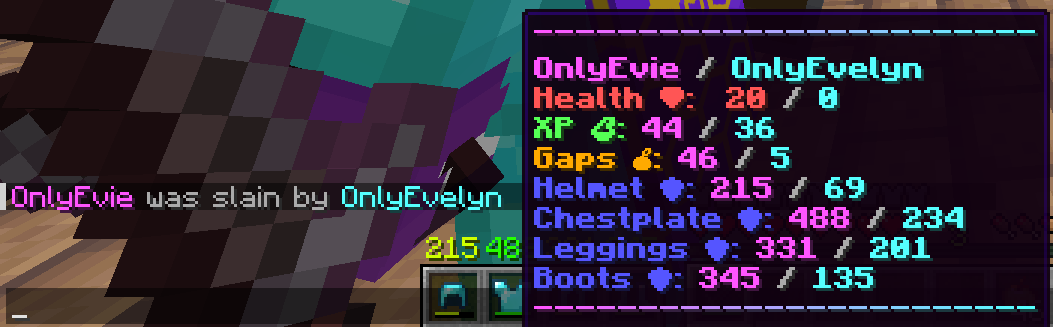
Provides a some practice oriented QOL features such as: god mode, build mode with automatic block reset, one command gear repair, teleport utilities, custom kill messages, and more.
Features
- God Mode — toggle invulnerability per player, with full damage cancellation.
- Build Mode — placed blocks and emptied buckets reset to air automatically after a configurable delay (handy for shared practice arenas).
- Custom Kill Messages — on death, a hoverable broadcast shows health, XP bottles, golden apples, and remaining armor durability for both the victim and the attacker.
- Spawn Management — set and persist a server spawn location in
config.yml, teleport yourself or others to it. - Utility Commands — fly, ping, game mode, heal, mend (repair), clear inventory, kill, and teleport-to-surface (
/top). - Multi-Target Support — most commands accept an optional player argument when you hold the corresponding
.otherspermission.
Commands
| Command | Aliases | Description |
|---|---|---|
/god [player] |
— | Toggle your (or another player's) god-mode status. |
/fly [player] |
— | Toggle your (or another player's) fly mode. |
/ping [player] |
— | Check your (or another player's) ping. |
/spawn [player] |
— | Teleport yourself or another player to the server spawn. |
/gm <gamemode> |
game-mode, gamemode |
Change your game mode. |
/heal [player] |
— | Heal yourself or another player. |
/mend [player] |
repair |
Repair the tools/armor of yourself or another player. |
/clear [player] |
empty |
Clear the inventory of yourself or another player. |
/kill [player] |
suicide |
Kill yourself or another player. |
/top |
up |
Teleport to the highest block above your position. |
/build [player] |
— | Toggle build mode (disables block reset) for yourself or another player. |
/setspawn |
set-spawn, spawnset, spawn-set |
Set the world spawn to your current position. |
Permissions
All commands require a matching pvpprac.commands.<name> permission. Targeting other players additionally requires the corresponding .others permission (default: op). You're expected to use Luckperms or an alternitive to properly set up player permissions.
| Permission | Description |
|---|---|
pvpprac.commands.god |
Use /god on yourself. |
pvpprac.commands.god.others |
Toggle god-mode for other players. |
pvpprac.commands.fly |
Use /fly on yourself. |
pvpprac.commands.fly.others |
Toggle fly-mode for other players. |
pvpprac.commands.ping |
Use /ping. |
pvpprac.commands.ping.others |
Check other players' ping. |
pvpprac.commands.spawn |
Use /spawn. |
pvpprac.commands.spawn.others |
Teleport other players to spawn. |
pvpprac.commands.gamemode |
Use /gm. |
pvpprac.commands.heal |
Use /heal. |
pvpprac.commands.heal.others |
Heal other players. |
pvpprac.commands.mend |
Use /mend. |
pvpprac.commands.mend.others |
Mend other players' items. |
pvpprac.commands.clear |
Use /clear. |
pvpprac.commands.clear.others |
Clear other players' inventories. |
pvpprac.commands.kill |
Use /kill. |
pvpprac.commands.kill.others |
Kill other players. |
pvpprac.commands.top |
Use /top. |
pvpprac.commands.build |
Use /build. |
pvpprac.commands.build.others |
Toggle build mode for other players. |
pvpprac.commands.set-spawn |
Use /setspawn. |
Configuration
Generated at plugins/PvPPrac/config.yml:
prefix: "<gold>PvP Prac <dark_gray>» <reset>"
spawn-location: null
block-reset-timer: 960
custom-kill-message: true
| Option | Default | Description |
|---|---|---|
prefix |
<gold>PvP Prac <dark_gray>» <reset> |
Plugin prefix used by the plugins messages. |
spawn-location |
null |
The server spawn location (world:x:y:z:yaw:pitch). Set it in-game with /setspawn. |
block-reset-timer |
960 |
How long blocks will stay untill they will be set to air after playing. |
custom-kill-message |
true |
Enable/disable the custom death messages. |
- No AI was used in the making of this plugin.
- You're expected to know how to set up Luckperms and have a kit plugin of your own.
| Version | Minecraft | Loader | Download |
|---|---|---|---|
|
PvPPrac 1.0.0 1.0.0 |
1.18, 1.18.1, 1.18.2, 1.19, 1.19.1, 1.19.2, 1.19.3, 1.19.4, 1.20, 1.20.1, 1.20.2, 1.20.3, 1.20.4, 1.20.5, 1.20.6, 1.21, 1.21.1, 1.21.2, 1.21.3, 1.21.4, 1.21.5, 1.21.6, 1.21.7, 1.21.8, 1.21.9, 1.21.10, 1.21.11, 26.1, 26.1.1, 26.1.2, 26.2
|
paper
|
Download |