


qStaffChat
A lightweight Paper plugin that gives your staff team a private in-game chat channel with optional two-way Discord sync — all through a single bot token.
Features
/sc <message>— private staff-only chat channel- Two-way Discord sync via a Discord bot (read and write in one setup)
- LuckPerms prefix support in message formatting
- PlaceholderAPI support for advanced placeholders
- Hex (
#RRGGBB) and legacy (&a,&c, …) color codes in all formats - Fully configurable message formats and permissions
/staffchat reload— reload config without restarting the server- Works in Minecraft-only mode if Discord is not configured
Requirements
| Dependency | Required |
|---|---|
| LuckPerms | Yes |
| PlaceholderAPI | Yes |
Commands & Permissions
| Command | Description | Permission | Default |
|---|---|---|---|
/sc <message> |
Send a message to staff chat | staffchat.use |
op |
/staffchat reload |
Reload the configuration | staffchat.reload |
op |
Configuration
# --- Discord Bot (optional) ---
# Leave both values empty to run in Minecraft-only mode.
DiscordBotToken: ""   # Bot token from Discord Developer Portal
DiscordChannelId: ""  # ID of the channel to relay messages to/from

# --- Message Formats ---
# Supports color codes:
#   Legacy: &a, &b, &c, &6, &l (bold), &o (italic), etc.
#   Hex:    #FF0000, #00FF00, #1E90FF, etc. (1.16+ only)
formatMinecraftMessage: "StaffChat » %luckperms_prefix% %playerName% » %message%"
formatDiscordMessage: "StaffChat » [Discord] %playerName% » %message%"
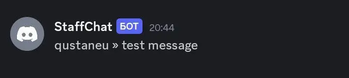
formatMinecraftToDiscord: "%playerName% » %message%"

# --- Permissions ---
usagePerm: "staffchat.use"
reloadPerm: "staffchat.reload"
Available placeholders
| Placeholder | Description |
|---|---|
%playerName% |
In-game name of the sender |
%message% |
Message content |
%luckperms_prefix% |
LuckPerms prefix of the sender |
Discord Setup (optional)
- Go to discord.com/developers/applications and create an application.
- Add a Bot and copy the token → set as
DiscordBotToken. - Under Bot → Privileged Gateway Intents, enable Server Members Intent, Message Content Intent.
- Invite the bot to your server with the
botscope and Read/Send Messages permission. - Enable Developer Mode in Discord, right-click the target channel → Copy Channel ID → set as
DiscordChannelId. - Run
/staffchat reload— the bot will connect immediately.

| Version | Minecraft | Loader | Download |
|---|---|---|---|
|
1.1 |
1.20, 1.20.1, 1.20.2, 1.20.3, 1.20.4, 1.20.5, 1.20.6, 1.21, 1.21.1, 1.21.2, 1.21.3, 1.21.4
|
paper, spigot
|
Download |