

QuantuMiz
Your yet-another optimization & improvement modpack, now powered with 100% FOSS mods!
Download · Issue Tracker · Source Code
QuantuMiz is the optimization and improvement modpack which provides the best Vanilla Minecraft experience by optimizing and improving the game, with the power of 100% FOSS mods.
Changelog
See here.
Features
- Focused on optimizing and slightly improving the base game as many as possible!
- Partial compatibility of OptiFine features such as Connected Textures and Shaders!
- 100% community-made, free and open-source! All mod's source code are available on their respective GitHub page.
List of mods
List of mods can be found here.
Derivatives/Editions
We also have various official derivative of QuantuMiz (A.K.A Editions), which is designed for specific purposes.
- QuantuMiz: Competitive Edition (QuantuMiz CE): A modpack optimized for PvP gaming for various community servers, displaying useful information and highly customizable features.
Using this modpack on your livestream/contents
You are free to use this modpack on livestream and contents as this modpack is MIT License! But I would be grateful if you leave a link to this modpack.
Thank you for supporting this modpack project!
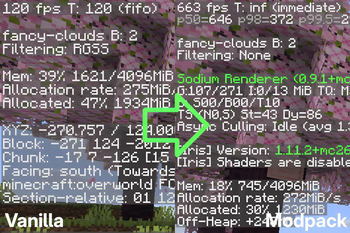
QuantuMiz provides huge optimization compared with Vanilla client, thanks to various open-source optimization mods included in modpack.
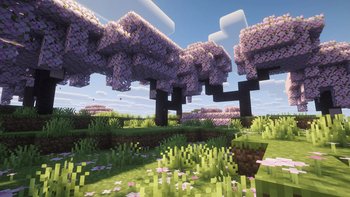
Thanks to Iris mod, you can also add your favorite shader pack into the modpack. (Note: Shader packs are not included in modpack, and must be installed manually. Shader pack used: Complementary Reimagined)
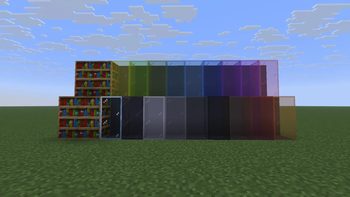
QuantuMiz supports Connected Textures out-of-the-box, which makes glass, bookshelf look better than Vanilla minecraft. Don't like Connected Textures? You can turn it off on resource pack option screen at any time.
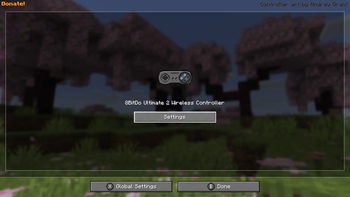
Playing on your Steam Deck? Or do you prefer controller over Keyboard & Mouse? No worries! isXander's 'Controlify' adds support for various types of controllers and handhelds to play Minecraft with your own way.
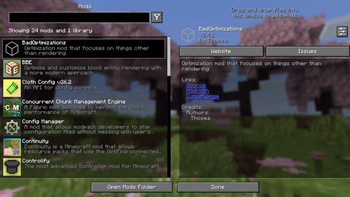
Don't like some of the features? You can open 'Mod Menu' on your Game menu to see the details about the featured mods, and also modify the configuration for specific mods as you wish.
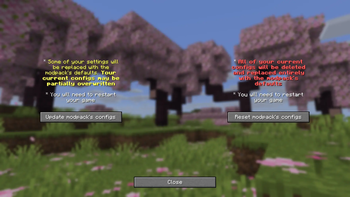
Something went wrong with your configuration? You can revert to modpack default at anytime by opening 'Config Manager' from Mod Menu at any time.