

QuickQuit
QuickQuit is a mod that lets you leave your world or server instantly with a single keypress — no more digging through the pause menu when you need to log off fast.
Found bugs or have questions? Join our Discord server!

✨ Features
- Instant Quit hotkey (default
F8) — press it while in a world/server and you're immediately back at the title screen (or the game closes entirely, depending on your settings). - Mod menu hotkey (default
P) — opens QuickQuit's own settings screen from anywhere in-game. - Optional confirmation — turn on "Confirm Before Quitting" in the settings if you'd rather press the Quit key twice (within a few seconds) instead of quitting instantly. Off by default.
- Choose what "quit" means — pick whether the Quit key sends you to the Title Screen or fully closes the game.
/quickquitcommand — a client-side command that works on any server, even without operator permissions:/quickquit <amount> seconds|minutes|hours— schedule a quit after a delay./quickquit cancel— cancel a scheduled quit./quickquit status— check whether a quit is currently scheduled.
- Fully localized — available in English and Russian, following your game's language automatically.
📖 How to use
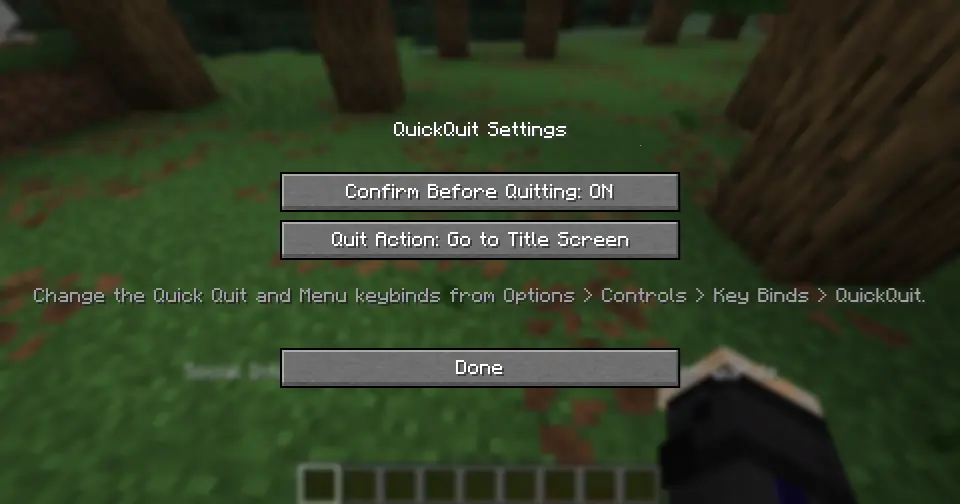
- Change the keybinds (optional). Go to
Options > Controls > Key Binds > QuickQuitto rebind the Quit key (defaultF8) and the Menu key (defaultP) to whatever you like. - Open the settings screen. Press the Menu key (
Pby default) at any time — in a world, in a menu, doesn't matter — to open QuickQuit's settings. - Configure your quit behavior.
- Toggle Confirm Before Quitting on if you want a safety check before you leave.
- Set Quit Action to either return to the Title Screen or Close the Game completely.
- Quit instantly. While in a world or on a server, press the Quit key (
F8by default). If confirmation is off, you're out immediately. If confirmation is on, you'll see a message in chat — press the key again within a few seconds to confirm. - Schedule a delayed quit. Type a command like:
/quickquit 5 minutes
/quickquit 30 seconds
/quickquit 2 hours
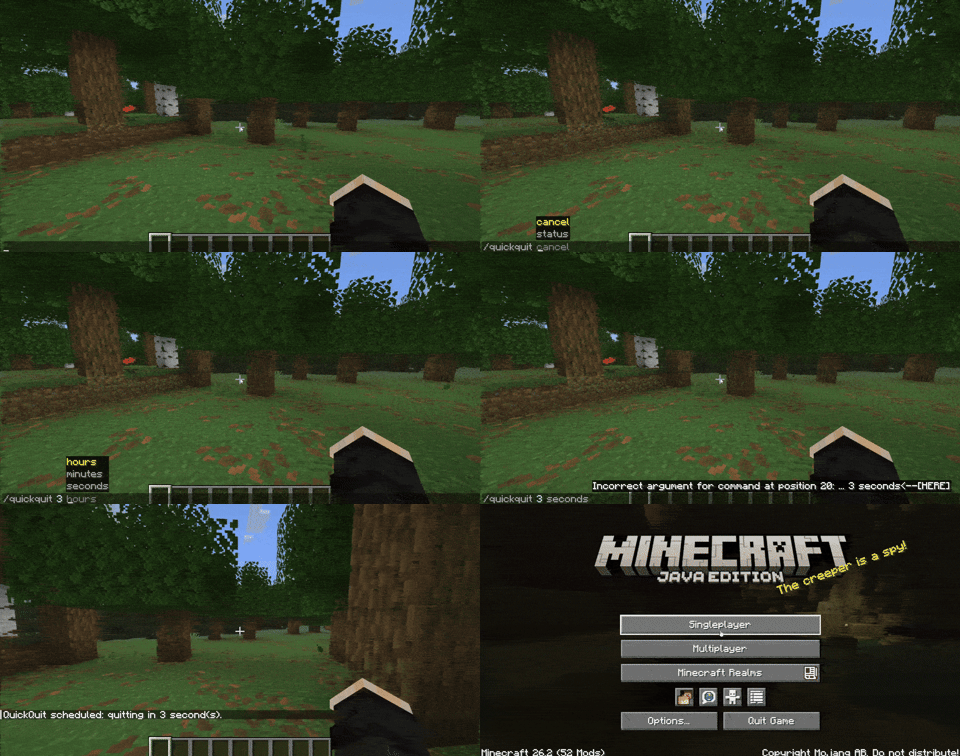
QuickQuit will automatically quit for you once the timer runs out. Use /quickquit status to check the countdown, or /quickquit cancel to call it off.
ℹ️ Notes
- No configuration file editing needed — everything is adjustable from the in-game settings screen.
| Version | Minecraft | Loader | Download |
|---|---|---|---|
|
QuickQuit 1.0.0 1.0.0 |
26.2
|
fabric
|
Download |