

RandomEffects
RU | EN
RandomEffects is a flexible Minecraft plugin that applies random potion effects to players during gameplay, creating unpredictable and exciting challenges.

Features
- Multiple effect application modes:
- Timed Mode: Apply random effects to all players at configurable intervals
- Chunk Mode: Players receive new effects when entering different chunks
- Join Mode: Players receive effects upon joining the server
- Fully customizable effect settings
- Configure available effects, durations, and amplifiers
- Control number of simultaneous effects
- Optional particle display
- Multi-language support (English and Russian)
- Simple and intuitive commands
- Compatible with multiple Minecraft versions (1.8.8+)
Requirements
- Java 8 or higher
- Spigot/Bukkit server (1.8.8 or higher)
Installation
- Download the latest
RandomEffects-1.0.0.jarfrom the releases section - Place the JAR file in your server's
pluginsfolder - Restart your server
- A default configuration file will be generated at
plugins/RandomEffects/config.yml
Configuration
The plugin creates a config.yml file in the plugins/RandomEffects directory. Key settings include:
# Language settings (en, ru)
language: en

# Effects settings
effects:
  # Timed mode - activates effects for everyone at the same time
  timed:
    enabled: true
    interval: 60 # seconds

  # Chunk mode - activates effects when a player enters a new chunk
  chunk:
    enabled: true

  # Apply effects when a player joins the server
  applyOnJoin: true

  # Duration range in seconds
  duration:
    min: 20
    max: 60

  # Amplifier range (0 = level I, 1 = level II, etc.)
  amplifier:
    min: 0
    max: 2
Usage
Basic commands:
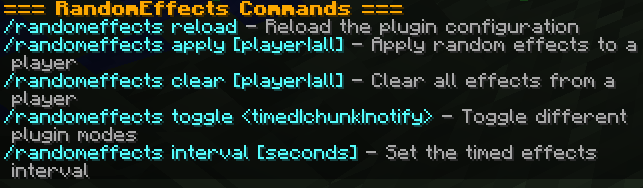
/randomeffects- Show plugin information/randomeffects help- Display help information/randomeffects reload- Reload the plugin configuration/randomeffects apply [player]- Apply random effects to yourself or specified player/randomeffects clear [player]- Clear effects from yourself or specified player/randomeffects toggle <timed|chunk>- Toggle a specific plugin mode/randomeffects interval <seconds>- Set the timed mode interval
Aliases: /reffects, /reff
Permissions
randomeffects.use- Basic command access (default: true)randomeffects.admin.reload- Reload configuration (default: op)randomeffects.admin.apply- Apply effects to players (default: op)randomeffects.admin.clear- Clear effects from players (default: op)randomeffects.admin.toggle- Toggle plugin modes (default: op)randomeffects.admin.interval- Change timed effects interval (default: op)
Building from Source
This project uses Maven as its build system. To build the plugin:
- Clone the repository
- Navigate to the project directory
- Run:
mvn -B package --file pom.xml
The compiled JAR will be in target/RandomEffects-1.0.0.jar
Dependencies
- Spigot API
| Version | Minecraft | Loader | Download |
|---|---|---|---|
|
RandomEffects 1.0.0 1.0.0 |
1.10, 1.10.1, 1.10.2, 1.11, 1.11.1, 1.11.2, 1.12, 1.12.1, 1.12.2, 1.13, 1.13.1, 1.13.2, 1.14, 1.14.1, 1.14.2, 1.14.3, 1.14.4, 1.15, 1.15.1, 1.15.2, 1.16, 1.16.1, 1.16.2, 1.16.3, 1.16.4, 1.16.5, 1.17, 1.17.1, 1.18, 1.18.1, 1.18.2, 1.19, 1.19.1, 1.19.2, 1.19.3, 1.19.4, 1.20, 1.20.1, 1.20.2, 1.20.3, 1.20.4, 1.20.5, 1.20.6, 1.21, 1.21.1, 1.21.2, 1.21.3, 1.21.4, 1.21.5, 1.8.8, 1.8.9, 1.9, 1.9.1, 1.9.2, 1.9.3, 1.9.4
|
bukkit, folia, paper, purpur, spigot
|
Download |