

RecapPvP
RecapPvP is a client-side Fabric mod for Minecraft 1.21 that tracks and displays a detailed breakdown of your PvP performance after every fight — so you can learn, improve, and review your gameplay with ease.
🗡️ What Does It Do?
Whenever you're in a PvP fight, RecapPvP silently records everything happening in the background. When the fight ends, it prints a clean PVP Recap summary showing everything that mattered.
No more guessing how many potions you burned, whether your sword accuracy was on point, or how many pearls you wasted — RecapPvP tells you exactly.
📊 Tracked Stats
RecapPvP tracks a wide range of combat statistics, all configurable:
- Kills & Deaths — K/D ratio per session
- Sword Stats — Hits and misses
- Mace Stats — Hits and misses
- Shield Breaks — Shields you disabled vs. shields the opponent disabled on you
- Potions — Health pots and buff pots used
- Consumables — Food, golden apples, XP bottles
- Utilities — Crystals placed, anchors placed, cobwebs, wind charges
- Pearls Used
- Elytra Distance — How far you flew during the fight
- Live Combo & Reach Display — See your current combo and reach in real time during combat
- Potion Alerts — Get warned when a potion is about to expire
💾 Battle History
Loved a session? Save it. RecapPvP includes a full Battle History system — name your battles and store them locally. View or replay any past session from the in-game History screen.
🎉 Auto-GG
RecapPvP can automatically send a GG message to chat at the end of a fight, chosen randomly from a set of friendly messages. Toggle it on or off whenever you like.
⚙️ Configuration
Everything is configurable through the in-game Config Screen. Enable or disable any stat category to keep your recap focused on what matters to you:
- Show/hide pearls, shield breaks, mace stats, sword stats, consumables, potions, utilities, movement, combo, reach, potion alerts, and Auto-GG
🎮 Key Bindings
| Binding | Default | Action |
|---|---|---|
| Toggle Recording | Unbound | Start/stop tracking |
| Open Recap Menu | Unbound | View current session stats |
| Open History | Unbound | Browse saved battles |
You can also use the /recapsave command to save a battle directly from chat.
📦 Requirements
- Minecraft 1.21.1
- Fabric Loader ≥ 0.19.2
- Fabric API
Client-side only — works on any server.
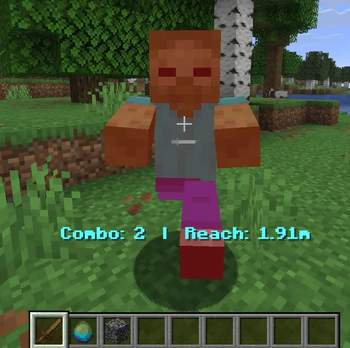
This is how it looks if enabled!
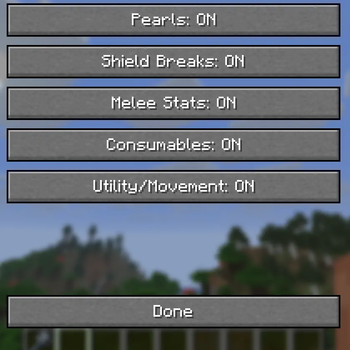
Amazing GUI to toggle what statistics are saved!
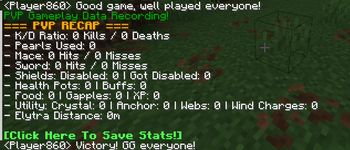
This is a preview of the chat including the Auto GG text chat feature, which is shown at the top and bottom of the image!
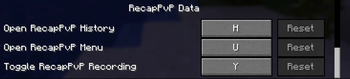
This is where you can apply different keybinds to different buttons!
This is what inspired me! I made this in canva!