

Englisch:
RestoreInv - Your inventory, safely stored.
RestoreInv is a handy Minecraft mod that allows you to restore your inventory after death or unexpected loss - simple, reliable and fully customizable. Designed with a focus on functionality, server compatibility and ease of use. If you use the command while you have something in your inventory, this inventory will be replaced with the saved one.
🔁 Never lose valuable items again. Whether due to a server crash, lava or PvP - with RestoreInv you are prepared.
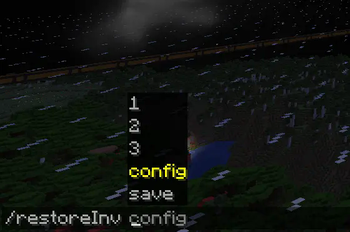
💬 Simple command: Open the chat and enter /restoreinv config and customize restore rules to your needs and restore your inventory with these commands /restoreInv 1/2/3. (1 is backed up every minute with default settings and 2 every 5 minutes. 3 is only saved if you enter /restoreInv save).

⚙️ Customizable & Intuitive: A clear GUI allows you to set after how many minutes slot 1&2 should be saved.
📦 Features:
Supports Minecraft 1.21+
GUI for configuration
Compatible with Fabric
Secure restore of inventories after death
🚀 Installation: Open Minecraft 1.21.1 Mod Ornder & drag in file Or simply via Modrinth
🛠️ Technical requirements:
Java 21 or newer
Minecraft 1.21 or newer
Compatible with other mods, e.g. Fabric API
German:
RestoreInv – Dein Inventar, sicher gespeichert.
RestoreInv ist eine praktische Minecraft-Mod, die es dir erlaubt, dein Inventar nach dem Tod oder bei unerwartetem Verlust wiederherzustellen – einfach, zuverlässig und vollständig anpassbar. Entwickelt mit Fokus auf Funktionalität, Server-Kompatibilität und Benutzerfreundlichkeit. Wenn man den Command nutzt während man etwas im Inventar hat, dann wird dieses Inventar mit dem gesicherten ersetzt.
🔁 Verliere nie wieder wertvolle Items. Ob durch einen Serverabsturz, Lava oder PvP – mit RestoreInv bist du vorbereitet.
💬 Einfacher Befehl: Öffne den Chat und gib /restoreinv config ein und passe Wiederherstellungsregeln an deine Bedürfnisse an und stelle dein Inventar mit diesen Commands wiederher /restoreInv 1/2/3. (1 wird mit standart Einstellungen jede Minute gesichert und 2 alle 5 Minuten. 3 wird nur gesichert wenn du /restoreInv save eingibst.)
⚙️ Anpassbar & Intuitiv: Ein übersichtliches GUI erlaubt dir einzustellen nach wie vielen Minuten Slot 1&2 gesichert werden sollen.
📦 Features:
Unterstützt Minecraft 1.21+
GUI zur Konfiguration
Kompatibel mit Fabric
Sicheres Wiederherstellen von Inventaren nach dem Tod
🚀 Installation: Minecraft 1.21.1 Mod Ornder öffnen & Datei rein ziehen Oder einfach über Modrinth
🛠️ Technische Voraussetzungen:
Java 21 oder neuer
Minecraft 1.21 oder neuer
Kompatibel mit anderen Mods, z.B. Fabric API


| Version | Minecraft | Loader | Download |
|---|---|---|---|
|
Restore Inventory 3.1.0 3.1.0 |
1.21.10, 1.21.11, 1.21.9
|
fabric
|
Download |
|
Restore Inventory 3.1.0 3.1.0 |
1.21, 1.21.1
|
fabric
|
Download |
|
Restore Inventory 2.4.0 2.4.0 |
1.21.9
|
fabric
|
Download |
|
Restore Inventory 2.4.0 2.4.0 |
1.21.4
|
fabric
|
Download |
|
Restore Inventory 2.4.0 2.4.0 |
1.21.3
|
fabric
|
Download |
|
Restore Inventory 2.4.0 2.4.0 |
1.21.2
|
fabric
|
Download |
|
Restore Inventory 2.4.0 2.4.0 |
1.21.11
|
fabric
|
Download |
|
Restore Inventory 2.4.0 2.4.0 |
1.21.10
|
fabric
|
Download |
|
Restore Inventory 2.4.0 2.4.0 |
1.21
|
fabric
|
Download |
|
Restore Inventory 2.4.0 2.4.0 |
1.21.1
|
fabric
|
Download |
|
Restore Inventory 2.3.0 2.3.0 |
1.21.1
|
fabric
|
Download |
|
Restore Inventory 2.0.4 2.0.4 |
1.21.1
|
fabric
|
Download |
|
Restore Inventory 1.0.3 1.0.3 |
1.21.1
|
fabric
|
Download |