Survival Assistant PLUS
A client-side survival utility mod for Fabric 26.1.2. Provides various quality-of-life features with a configurable GUI and hotkeys via malilib.
Features
| Feature | Description |
|---|---|
| Auto Tool | Automatically switches to the fastest tool in your hotbar when mining |
| Auto Eat | Automatically eats food when hunger or health is low |
| Auto Totem | Automatically equips totems to offhand; supports shulker restocking |
| Freecam | Detach camera from player for free movement; full key control |
| HaoQiChongTian | Freeze mid-air with third-person camera rotation and sound effect |
| No Slow | Disables slime block movement slowdown |
| Silent Pearl / Firework | Switch and use ender pearls / fireworks directly from inventory |
| Pearl Trajectory | Renders predicted ender pearl trajectory |
| Firework Warning | On-screen warning when fireworks are below threshold |
| Totem Warning | On-screen warning when totems are below threshold |
| Better Chat | Chat regex filtering and folding |
| Command Completion Filter | Block specified commands from tab completion |
| Hide Entity Health | Blocks FZ datapack health display under entity nametags |
| Shulker Restock | Auto-restock pearls/fireworks from shulkers (requires Quick Shulker) |
Dependencies
- Fabric Loader >= 0.19.1
- Fabric API (latest 0.153.0+ recommended)
- malilib (required — provides config UI)
- Mod Menu (recommended for easy config management)
- Quick Shulker (optional — needed for shulker restock)
Installation
- Install Fabric Loader
- Place the mod jar in
.minecraft/mods - Download malilib and place it in the mods folder
- (Optional) Install Mod Menu and/or Quick Shulker
- Launch the game and press
Z + Lto open the config menu
Configuration
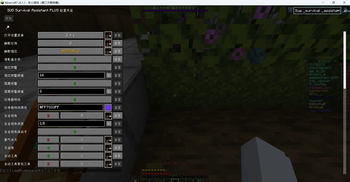
All features are managed through the malilib config screen:
- Toggle switches and hotkey bindings
- Numeric sliders
- Color pickers
- String lists
Press Z + L (configurable) to open the settings.
Notes
- Client-side only — no server installation required
- Shulker Restock requires the Quick Shulker mod to be installed