

ScoreboardPlus
A lightweight, fully configurable sidebar scoreboard plugin for Spigot/Paper servers — one command, one config file, and a bunch of handy subcommands to manage everything without ever touching the file system.
✨ Features
- 🪶 Lightweight — no external dependencies, pure Bukkit API
- ⚙️ Single
config.yml— title, lines, update interval, and messages all in one place - 🧩 Live editing in-game — change the title or lines with commands, no restarts needed
- 🔄 Auto-updating — refreshes on a configurable tick interval
- 🎨 Full color code support (
&-codes) - 🧠 Built-in placeholders —
%player%,%online%,%maxplayers%,%world%,%date%,%time% - 🔌 PlaceholderAPI support (soft-dependency, auto-detected)
- 👤 Per-player toggle — players can turn their own scoreboard on/off
📜 Commands
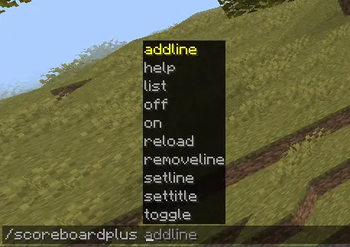
Everything lives under a single command: /scoreboardplus (aliases: /sb, /sbp, /scoreboard).
| Command | Permission | Description |
|---|---|---|
/sb help |
— | Show the help menu |
/sb on |
scoreboardplus.use |
Enable your own scoreboard |
/sb off |
scoreboardplus.use |
Disable your own scoreboard |
/sb toggle |
scoreboardplus.use |
Toggle your own scoreboard |
/sb reload |
scoreboardplus.admin |
Reload config.yml |
/sb settitle <text> |
scoreboardplus.admin |
Set and save the scoreboard title |
/sb addline <text> |
scoreboardplus.admin |
Append a new line |
/sb removeline <index> |
scoreboardplus.admin |
Remove a line by index |
/sb setline <index> <text> |
scoreboardplus.admin |
Overwrite an existing line |
/sb list |
scoreboardplus.admin |
List all lines with their index |
Every editing command saves straight to
config.ymland instantly refreshes the scoreboard for all online players — no/reloadrequired.
🔑 Permissions
| Node | Default | Description |
|---|---|---|
scoreboardplus.use |
true |
Toggle your own scoreboard on/off |
scoreboardplus.admin |
op |
Edit the title, lines, and reload the config |
🧠 Placeholders
Use these directly inside title and lines in config.yml:
%player%       -> player's name
%online%       -> online player count
%maxplayers%   -> max player count
%world%        -> the player's current world
%date%         -> current date
%time%         -> current time
If PlaceholderAPI is installed, its placeholders (%plugin_something%) work automatically — no extra setup needed.
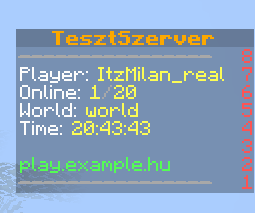
⚙️ Example configuration
settings:
  enabled-by-default: true
  update-interval: 20

scoreboard:
  title: "&6&lMyServer"
  lines:
    - "&7&m----------------"
    - "&fPlayer: &e%player%"
    - "&fOnline: &e%online%&7/&e%maxplayers%"
    - "&fWorld: &e%world%"
    - "&fTime: &e%time%"
    - " "
    - "&aplay.example.com"
    - "&7&m----------------"
📥 Installation
- Drop the
.jarfile into your server'splugins/folder. - Restart (or start) the server — this generates the default
config.yml. - Edit
config.ymlor use the in-game commands to customize the scoreboard. - Run
/sb reloadto apply changes without restarting.
🖥️ Compatibility
- Platform: Spigot / Paper
- Minecraft version: 1.20+ (built and tested against 1.20.x-1.21)
- Dependencies: none required
- Soft-dependencies: PlaceholderAPI (optional)
| Version | Minecraft | Loader | Download |
|---|---|---|---|
|
Scoreboard+ 1.0 1.0 |
1.21.11
|
bukkit, paper
|
Download |