

Introduction
This plugin is based on org.spigotmc:spigot-api:1.20.1-R0.1-SNAPSHOT, branching out from my previous project zhisuan11core.
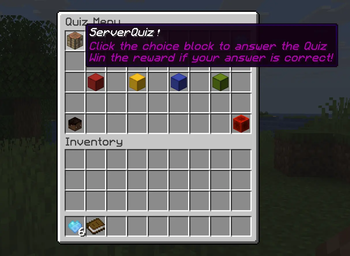
Generally, you can regard it as a simple Database Management System, which manage a Q&A system in a Minecraft server.
It also helps me prepare in advance for my database system course assignments.
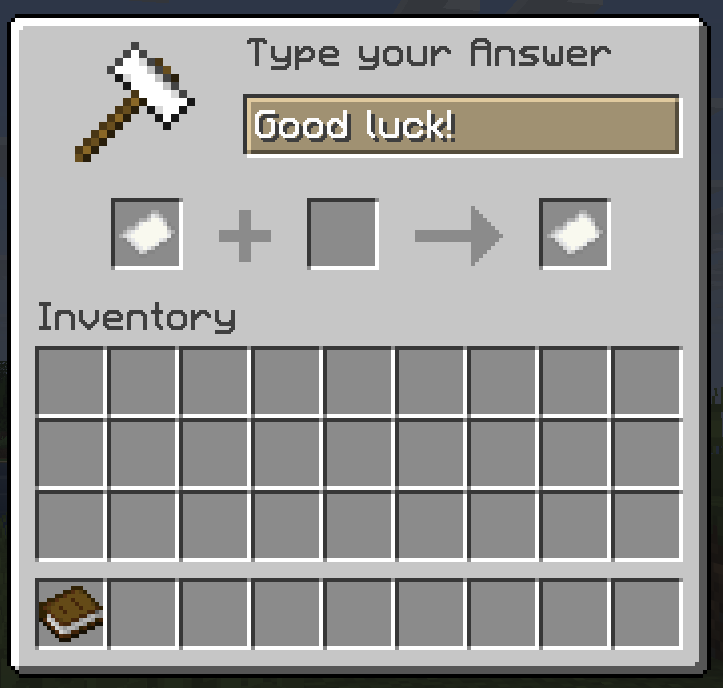
Now, it uses AnvilGUI to provide blank quiz system.
Configuration
The Q&A system has two ways to storage data: YAML, MYSQL.
Since plugin version 1.1.0, fill-in-the-blanks quiz has been supported!
If you choose YAML type, please set your quiz at Quiz.yml in the format below:
Choice:
  - Question: "Which of the following is not a valid IP address?"
    Options:
      A: "172.28.45.56"
      B: "192.168.0.1"
      C: "240e:360:6f43:500:d14d:dbd0:97:b3b3"
      D: "127.256.3.34"
    Answer: D
    Reward: DIAMOND
  - Question: "Which of the following file formats are not considered compressed files"
    Options:
      A: "zip"
      B: "rar"
      C: "7z"
      D: "png"
    Answer: D
    Reward: DIAMOND

Blank:
  - Question: "1+1=?"
    Answer: "2"
    Reward: DIAMOND
Since version 1.1.2, you can set
Rewarda number if you have Vault based plugins.However, they must be written in a String format, which means wrapping them with double quotation marks.
Or if you prefer MYSQL, please create a new database named serverquiz and set your basic config in advance:
config:
  storage: MYSQL
  host: { your host }
  port: { your port }
  name: { your name }
  password: { your password }
  database: serverquiz
The configuration file has been updated! You can easily set some configurations now. Other config options is shown below:
###########################################
##             Update checker            ##
###########################################

updateChecker:
  # Option: modrinth/github
  source: modrinth
  enable: true

##############################################
##            Broadcast messages            ##
##############################################

broadcast:
  # The text must be written in a single line
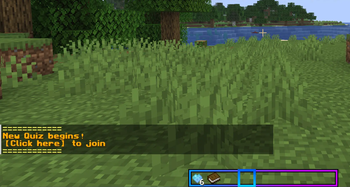
  text: "§e============\n§6§lNew Quiz begins! \n【Click here】 to join§r§e\n============"
  hover: "§7Click to join Server Quiz!"
  # The time between each quiz, the unit is seconds
  interval: 900

##############################################
##             Answer messages              ##
##############################################

messages:
  # A player has already given the correct answer
  hasWinner: "The quiz has already been solved!"
  # You have answered the quiz
  hasAnswered: "You have already answered this quiz!"
  # Your answer is right
  correct: "You have solved the quiz!"
  # Your answer is wrong
  wrong: "Your answer is wrong!"
  # Send Reward
  sendReward: "Reward has been sent to you: "
  # Update player's score
  score: "Your score board has been updated!"

##############################################
##              The GUI text                ##
##############################################

gui:
  title: "Quiz Menu"
  question: "Question"
  reward: "Reward"
  # Available for choice quiz
  choice:
    option: "Option "
    # Whether to arrange options randomly
    random: true
  # Available for blank quiz
  blank:
    answerSheet: "Answer sheet"
    answerTitle: "Type your Answer"
  # Scoreboard settings
  scoreBoard:
    title: "§rYour quiz score board"
    # ServerQuiz has some built-in variables, which can be used here:
    # - %serverquiz_name% : the player's name
    # - %serverquiz_correct% : the number of questions correctly answered by the player
    # - %serverquiz_total% : the total number of questions answered by the player
    # - %serverquiz_accuracy% : the accuracy of the player answering questions
    lore:
      - ""
      - "§ePlayer: §f %serverquiz_name%"
      - "§eCorrect: §f %serverquiz_correct%"
      - "§eTotal: §f %serverquiz_total%"
      - "§eAccuracy: §f %serverquiz_accuracy%"
Command
| Command | Function | Permission |
|---|---|---|
/quiz open |
open the answer menu | serverquiz.open |
/quiz send <num> |
send a quiz | serverquiz.edit |
/quiz show |
show the config details | serverquiz.show |
/quiz edit |
edit the config | serverquiz.edit |
/quiz reload |
reload the config | serverquiz.edit |
Since version 1.1.1, you can change quiz in the game using command
/quiz edit choiceor/quiz edit blank.However, this function is still in development. You'd better do it through Database Manager.
| Version | Minecraft | Loader | Download |
|---|---|---|---|
|
Server Quiz 1.1.3 1.1.3 |
1.20.1, 1.21.11
|
paper, spigot
|
Download |
|
Server Quiz 1.1.2 1.1.2 |
1.20.1, 1.21.11
|
paper, spigot
|
Download |
|
Server Quiz 1.1.1 1.1.1 |
1.20.1, 1.21.11
|
paper, spigot
|
Download |
|
Server Quiz 1.1.0 1.1.0 |
1.20.1, 1.21.11
|
paper, spigot
|
Download |
|
ServerQuiz 1.0.0 1.0.0 |
1.20.1, 1.21.11
|
paper, spigot
|
Download |