

Shine Client Shine in battle, even on weak hardware.
Shine Client is a minimalist and lightweight Fabric client mod for Minecraft 1.16.4, created for those who want to enjoy PvP comfortably but can't afford a powerful computer. I've always wanted to play with popular Minecraft clients, but my PC can't run versions higher than 1.16.4. That's why I made Shine Client — my own set of utilities for players like me. All the features are already under the hood, the interface is polished to perfection, and system load is minimal.
🎛️ Control — a matter of seconds Press Right Shift to open a modern feature toggle menu. Everything is intuitive, fast, and clutter-free.
✨ Features that make the game brighter
📊 Smart HUD Displays FPS, CPS (clicks per second), coordinates, armor status, and active potion effects. Compact, stylish, and free of visual clutter.
🧩 Compatibility & Installation
✅ Version: Minecraft 1.16.4 (soon 1.16.5 and 1.21.11)
✅ Loader: Fabric
✅ Type: Client-side only (does not affect the server)
✅ Friendliness: Works alongside other HUD and utility mods.
Installation in 1 minute: Download Shine Client, place it in the mods folder, launch the game, and press Right Shift — let's get configuring!
💬 Author & Community Made with heart — seekis. Join me, share your impressions, report bugs, and suggest new features:https://discord.gg/YnXg2frwed<iframe width="560" height="315" src="https://www.youtube-nocookie.com/embed/9_GqbWK_LOM" title="YouTube video player" frameborder="0" allow="accelerometer; autoplay; clipboard-write; encrypted-media; gyroscope; picture-in-picture; web-share" allowfullscreen></iframe> I've always wanted to play with popular Minecraft clients. My computer can't run versions higher than 1.16.4, so I decided to make my own client for PvP for people like me with weak devices.
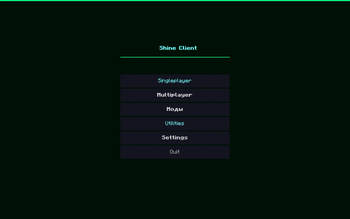
The screenshot shows that the main menu has a completely different interface, and the "Utilities" button has been added, which opens the client's functions menu
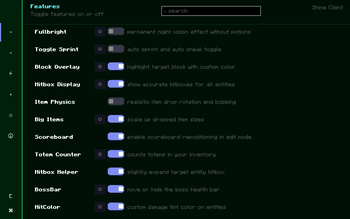
The client menu includes the following tabs: "Features," "HUD Elements," "Optimization,"Themes," "Configurations," "About," and "HUD Edit Mode." Search bar.
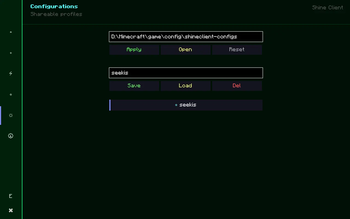
Here you can create your own configurations, save them, and share them with friends.
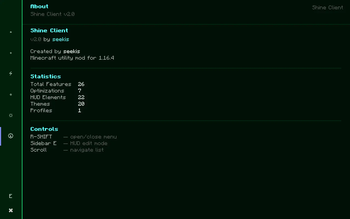
All the information about the client is written here.