

Features
- 9 different minigames, all of them can be turned on or off individually
- Fully customizable, every word list, question, message and reward is in the config
- Rounds start on their own on a random interval, or on command
- Reward groups with chances, so a win can pay a base reward plus a rare bonus
- Win stats, personal bests and leaderboards, stored in SQLite, H2, MySQL or MariaDB
- Players who don't want the games can mute them with a single command
- Won't cause lag, everything is cached in memory and saved off the main thread
- MiniMessage support (legacy
&codes work too)
The Minigames
Unscramble  - A scrambled word appears, type it unscrambled
Reverse     - A word printed backwards, type it the right way round
Math        - Solve a generated math problem, first correct answer wins
Fast Type   - Retype a sentence exactly, fastest typist wins
Trivia      - 55 Minecraft questions included, each with multiple accepted answers
Reaction    - A random token appears, pure reflex
Hot & Cold  - Guess the secret number, everyone gets private hot/cold feedback
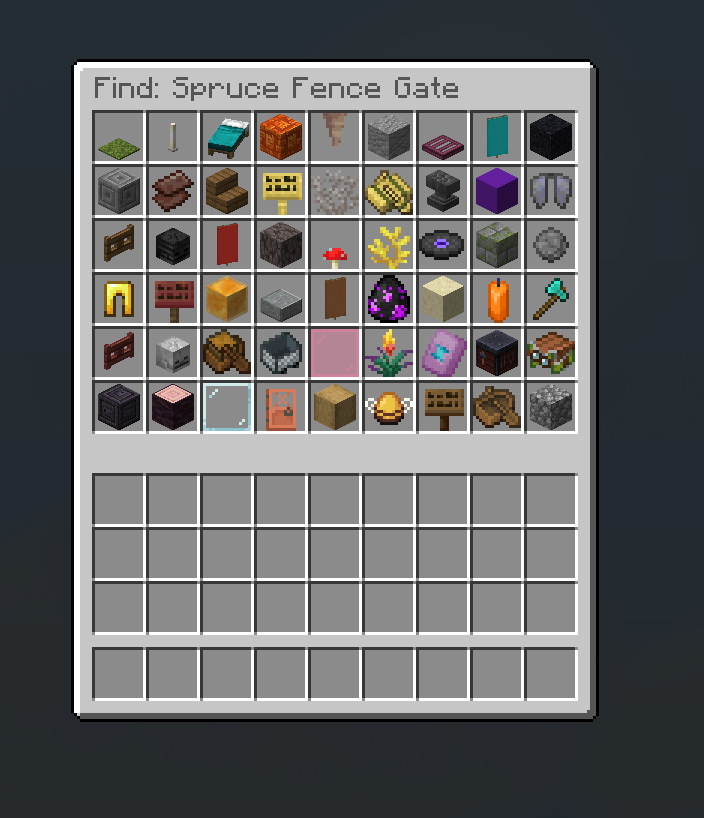
Item Pick   - Click the chat button, find the named item in a full double chest
Lucky Loot  - A shared board of chests, one holds the prize, empty ones vanish for everyone
Item Pick sometimes hides the same item 2-3 times and you have to click every copy. Lucky Loot updates live for every player looking at the board.
Commands & Permissions
Commands
/chatgames (/cg, /minigames) - Open the help menu
/chatgames play - Join the current click-to-play game
/chatgames info - Show the running game or when the next one starts
/chatgames stats [player] - View win statistics
/chatgames top [game] - View the leaderboard
/chatgames toggle - Mute or unmute the minigames
/chatgames start [game] - Start a round now
/chatgames stop - Cancel the running round
/chatgames list - List every minigame and its status
/chatgames storage - Test the statistics database connection
/chatgames reload - Reload all configuration
/chatgames resetstats - Wipe all statistics
Permissions
chatgames.play - Allows answering minigames
chatgames.receive - Allows seeing minigame broadcasts
chatgames.stats - Allows viewing stats and leaderboards
chatgames.toggle - Allows muting the minigames
chatgames.admin - Start, stop, reload, storage test and reset
Preview


Configuration
Every minigame has its own file in plugins/ChatGames/games/, so you can edit one game
without touching the rest. New options added by updates are merged into your files
automatically, your edits are never overwritten.
Rewards
Rewards are a list of groups. Every group rolls its own chance, so a win can hand out nothing, one group or several:
rewards:
  commands:
    - chance: 1.0
      commands:
        - "give %player% diamond 1"
    - chance: 0.05
      commands:
        - "give %player% netherite_scrap 1"
        - "broadcast &6%player% &7hit the jackpot!"
Divider lines
Headings and divider bars use %fill% and %divider% instead of hand counted spaces.
They are measured in font pixels, so every game's header and footer line ends at exactly
the same spot no matter how long the title is:
announce:
  - "<gold><bold>UNSCRAMBLE!</bold> %fill%"
  - "<gray>Unscramble this word:"
  - "<yellow><bold>%scrambled%</bold>"
  - "%divider%"
Storage
Statistics and mute toggles are stored in a database, not in flat files. The JDBC drivers are downloaded by Paper on first start, so there is nothing to install:
storage:
  type: sqlite # sqlite, h2, mysql, mariadb or yaml
  table-prefix: chatgames_
Tables are created automatically. If you switch to MySQL or MariaDB, run
/chatgames storage to test the connection - it reports connect time, server version and
a real write/read round-trip.
Extra Info
Dependencies
- PlaceholderAPI (Optional)
Compatibility
- Paper 1.21 - 1.21.8 (and Paper forks like Purpur)
- Java 21 or newer
- Does not work on Spigot or CraftBukkit
- Folia is not supported yet
Install
- Download the plugin
- Place the downloaded .jar file into your plugins folder
- Restart your server (Do not use /reload or any plugin manager like PlugMan, etc.)
- Enjoy!
Default config.yml
# Start rounds automatically. Set to false to only run games via /chatgames start.
auto-start: true

# Random delay between rounds.
interval:
  min-seconds: 300
  max-seconds: 600

# Players needed online before a round starts automatically.
min-online-players: 1

# Worlds where games are never broadcast and never accept answers.
disabled-worlds: []

# When true, only players with chatgames.play may answer.
require-play-permission: false

# When true, only players with chatgames.receive see the broadcasts.
require-receive-permission: false

# Allow /chatgames toggle so players can mute the games.
allow-toggle: true

# Mirror broadcasts into the server console.
log-to-console: false

chat:
  # Hide the winning message from public chat.
  cancel-winning-message: true
  # Hide wrong guesses from public chat. Useful for hotcold, noisy for the rest.
  cancel-wrong-answers: false

# Fallback rewards, used when a game has no rewards of its own.
default-rewards:
  commands:
    - chance: 1.0
      commands:
        - "give %player% diamond 1"
    - chance: 0.1
      commands:
        - "give %player% diamond_block 1"

sounds:
  start:
    enabled: true
    sound: "minecraft:block.note_block.pling"
    volume: 1.0
    pitch: 1.2
  win:
    enabled: true
    sound: "minecraft:entity.player.levelup"
    volume: 1.0
    pitch: 1.0
  timeout:
    enabled: true
    sound: "minecraft:block.note_block.bass"
    volume: 1.0
    pitch: 0.8
  wrong:
    enabled: true
    sound: "minecraft:block.note_block.didgeridoo"
    volume: 1.0
    pitch: 0.6

stats:
  enabled: true
  leaderboard-size: 10
  save-interval-minutes: 5

storage:
  type: sqlite
  file: stats.db
  table-prefix: chatgames_
  connect-timeout-seconds: 5

  mysql:
    host: localhost
    port: 3306
    database: minecraft
    username: root
    password: ""
    properties: "?useSSL=false&allowPublicKeyRetrieval=true&characterEncoding=utf8&useUnicode=true"

  mariadb:
    host: localhost
    port: 3306
    database: minecraft
    username: root
    password: ""
    properties: "?useSSL=false&characterEncoding=utf8&useUnicode=true"
Example game config (games/unscramble.yml)
enabled: true
display-name: "Unscramble"
weight: 1.0
timeout-seconds: 45
max-attempts: 0          # 0 = unlimited guesses per player

answer:
  ignore-case: true
  ignore-spaces: false

show-hint: true
hint-letters: 1

words:
  - diamond
  - creeper
  - enderman
  - redstone
  # ...120 words included by default

announce:
  - "<gold><bold>UNSCRAMBLE!</bold> %fill%"
  - "<gray>Unscramble this word:"
  - "<yellow><bold>%scrambled%</bold> <dark_gray>(<gray>%length% letters<dark_gray>)"
  - "<gray>Type your answer in chat within <white>%timeout%s<gray>!"
  - "%divider%"

win-message:
  - "<green><bold>%player%</bold> <gray>unscrambled <white>%word% <gray>in <yellow>%time%s<gray>!"

timeout-message:
  - "<red>Nobody solved it. The word was <white>%word%<red>."

rewards:
  commands:
    - chance: 1.0
      commands:
        - "give %player% diamond 1"




| Version | Minecraft | Loader | Download |
|---|---|---|---|
|
Simple ChatGames 1.0.0 1.0.0 |
1.21, 1.21.1, 1.21.10, 1.21.11, 1.21.2, 1.21.3, 1.21.4, 1.21.5, 1.21.6, 1.21.7, 1.21.8, 1.21.9
|
paper, purpur
|
Download |