

Simple Tickets
Plugin
A support ticket system with a built-in Discord bot. Players can create tickets both in-game and directly on Discord, both sides are fully connected.
Please message me if you encounter any Bugs! Discord: Muhammed.n.14 (for Bug-Reports, other Issues and Feedback) Available for Paper 1.20+
Features:
- Create tickets in-game (/ticket
) - Fully customizable categories (Bug, Report Player, Other, freely extendable), identical on both sides
- Automatically creates a private Discord channel per ticket, only visible to the creator, support roles and the bot
- Claim & Close via button on Discord
- Per-player ticket numbering (e.g. ticket-name-3), resettable
- Closed tickets get moved into an archive category and locked for everyone except the bot, instead of being deleted (optional, otherwise automatic deletion after a configurable time)
- Reopen via button, automatically moves the ticket back into the active category
- Optional transcript posted to a log channel when a ticket is closed
- Multiple support roles supported at once
- In-game notification for missed replies, plus /ticket history to read the full conversation
- Reply directly from in-game (/ticket reply)
- Multi-language (German/English), each player can choose their own
- Discord account linking (/linkdiscord): linked players are automatically added to their ticket's Discord channel, even while banned from Minecraft or not currently playing
- Linking sends an in-game chat confirmation showing the linked Discord account's name; one Discord account can be linked to multiple Minecraft accounts, but each Minecraft account can only be linked to one Discord account at a time (use /unlinkdiscord to switch)
How to use (in-game):
- /ticket
- /ticket close Closes your currently open ticket
- /ticket reply
Replies directly in-game inside your open ticket - /ticket history Shows the previous message history of your ticket
- /ticket language <de, en> Chooses your preferred language
- /linkdiscord Generates a code to link your Discord account
- /unlinkdiscord Removes the link between your Minecraft and Discord account
Admin Commands (Permission: ticket.admin):
- /ticket setup
- /ticket config ticketcategory
Category for new tickets - /ticket config archivecategory
Category for closed tickets (optional) - /ticket config logchannel
Channel for transcripts (optional) - /ticket config addsupportrole
/ removesupportrole Manage support roles - /ticket config supportroles Shows configured support roles
- /ticket config resetnumbering Resets ticket numbering to #1
- /ticket panel
Posts the "Create Ticket" panel - /ticket reload Reloads config.yml
Discord Commands:
- /ticketpanel Posts the "Create Ticket" panel (requires "Manage Server")
- /link [code] Links your Discord account with your Minecraft account
- /reopen Reopens the current closed ticket (also available as a button) Permissions:
- ticket.use You need this Permission to create and reply to your own tickets. (Default: true)
- ticket.admin You need this Permission to manage the ticket system, Discord setup and configuration. (Default: op)

default config.yml:
discord:
  enabled: false
  token: ""
  guild-id: ""
  ticket-category-id: ""
  archive-category-id: ""
  support-role-ids: []
  log-channel-id: ""

categories:
  bug:
    label: "Report Bug"
    emoji: "🐛"
  report:
    label: "Report Player"
    emoji: "🚨"
  other:
    label: "Other"
    emoji: "❓"

settings:
  delete-channel-after-close-seconds: 15
  transcript-enabled: true
  default-language: "en"
  numbering-since: 0

Simple Tickets
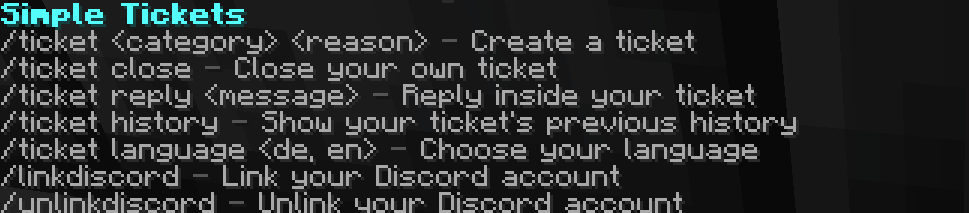
This is /ticket help when you dont have the permission.
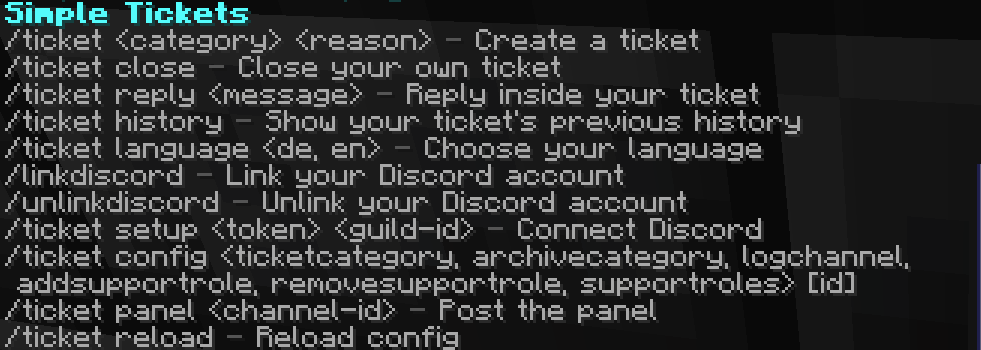
This is the /ticket help command when you have op.
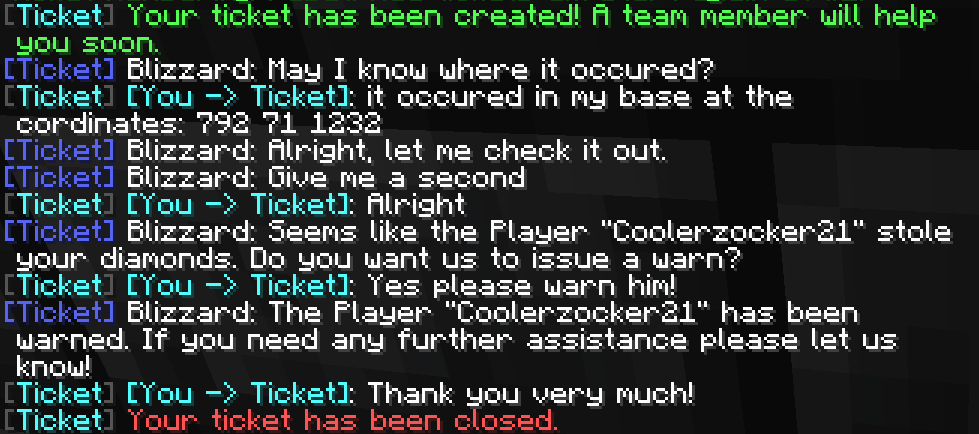
This Image shows how the Player ingame in Minecraft which communicates with someone in the discord.
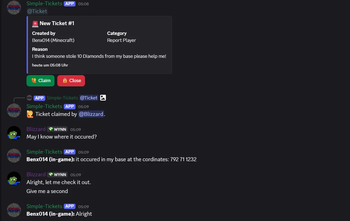
This first Pitcute shows the discord side of the communication with the player Ingame
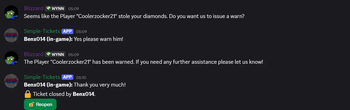
This second Picture shows the second part of the communication with the Player ingame.
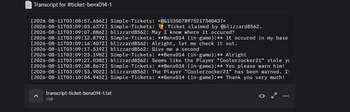
This is the Ticket-log feature where all your transcripts of the tickets are.
| Version | Minecraft | Loader | Download |
|---|---|---|---|
|
Simple Tickets 1.0.0 1.0.0 |
1.20, 1.20.1, 1.20.2, 1.20.3, 1.20.4, 1.20.5, 1.20.6, 1.21, 1.21.1, 1.21.2, 1.21.3, 1.21.4, 1.21.5, 1.21.6, 1.21.7, 1.21.8, 1.21.9, 1.21.10, 1.21.11, 26.1, 26.1.1, 26.1.2, 26.2
|
bukkit, paper, purpur, spigot
|
Download |