

SimpleCometElevator
A simple elevator plugin for Minecraft Paper.
シンプルなMinecraft Paper用エレベータープラグイン。
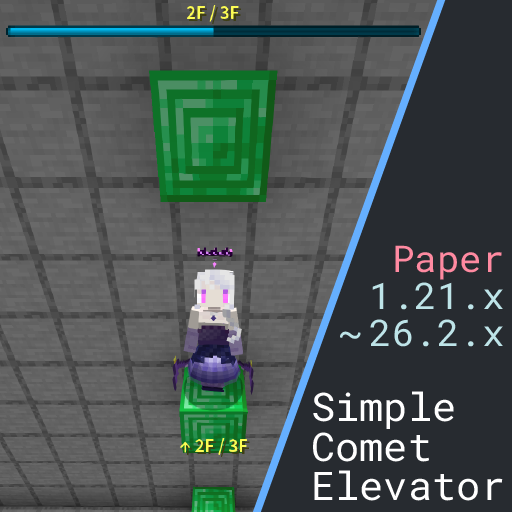
⭐ Features / 特徴
- Simple by design — Installation only requires placing two blocks.
- Easy to Use - Move by jumping and sneaking.
- Built-in extras — BossBar display, movement sounds, and cooldown are available.
- Highly configurable — Customize block types, display format, sounds, and more.
⏳ Quick Start / クイックスタート
How to Build an Elevator / エレベーターのつくりかた


-
Stack floor blocks vertically with at least 2 empty/passable blocks above each one — that's one floor.
- Each elevator shaft should use the same block type.
- Default floor blocks: most metal blocks (except copper), and wool blocks.
-
Jump on a floor block → move up ⬆
-
Sneak on a floor block → move down ⬇
-
You can also use a command to move to a specific floor
/sce move <number>
Minimum Requirements / 最低限の構成
- The floor block must be listed in
base-blocks. - Each floor must have at least
required-airempty blocks above it (default:2). - Those empty blocks must be listed in
passable-blocks.
You can view and edit all settings in
config.ymlinside the plugin folder.
⚡ Built-in Features / 機能
BossBar Floor Display / ボスバーによるフロア表示
- Shows current floor and total floors on screen.
- Customize color, style, and format.


Title and ActionBar option / タイトル、アクションバー表示オプション
- You can also set up UP and DOWN messages for the title and action bar.
- This feature is disabled by default.
Sound Effects / 効果音
- Different sounds for going up and going down.
- Adjust volume and pitch individually, or disable entirely.
- You can also play back multiple sounds with different delay settings.
Cooldown / クールダウン
- Optional cooldown to prevent spam teleporting.
- Configurable duration and message format.
⚙️ Configuration / 設定
All settings are in plugins/SimpleCometElevator/user-settings/config.yml.
Massages Language / 言語
messages:
  language: ja
choose between en and ja
日本語と英語が選べるよ
Floor Blocks / 床ブロック
elevator:
  floor:
    base-blocks:
      - IRON_BLOCK
      - GOLD_BLOCK
      - DIAMOND_BLOCK
      - EMERALD_BLOCK
      - NETHERITE_BLOCK
      - REDSTONE_BLOCK
      - LAPIS_BLOCK
      - $WOOLS        # Tag-based bulk selection is supported
    passable-blocks:
      - $AIR
      - $CARPETS
      # Blocks treated as empty space above floors
    required-air: 2          # Minimum empty blocks above each floor
    tolerance-height: 0.3   # How far off a floor block a player can be (in blocks)
    allow-mixed-blocks: false  # Allow different block types in one shaft
Command / コマンド
elevator:
  command:
    move:
      enabled: true # Can also disable the move command
Cooldown / クールダウン
elevator:
  cooldown:
    enabled: false
    seconds: 1.0
    format: "§cCooldown: {time}s"
Sounds / 効果音
elevator:
  sound:
    up:
      enabled: true
      broadcast: false # Determines whether the sound can be heard by others
      entries:
        - type: minecraft:entity.experience_orb.pickup
          volume: 1.0
          pitch: 0.69
          delay: 0 # Delay after movement (ms)

    down:
      enabled: true
      broadcast: false
      entries:
        - type: minecraft:entity.experience_orb.pickup
          volume: 1.0
          pitch: 0.56
          delay: 0

    command: # You can also customize the sound effects for moving between floors using commands.
      up:
        enabled: true
        broadcast: false
        entries: # Can play the sound multiple times
          - type: minecraft:entity.experience_orb.pickup
            volume: 1.0
            pitch: 0.56
            delay: 0
          - type: minecraft:entity.experience_orb.pickup
            volume: 1.0
            pitch: 0.69
            delay: 350

      down:
        enabled: true
        broadcast: false
        entries:
          - type: minecraft:entity.experience_orb.pickup
            volume: 1.0
            pitch: 0.69
            delay: 0
          - type: minecraft:entity.experience_orb.pickup
            volume: 1.0
            pitch: 0.56
            delay: 350
BossBar / ボスバー
elevator:
  floorbar:
    enabled: true
    color: BLUE          # BLUE, GREEN, PINK, PURPLE, RED, WHITE, YELLOW
    style: SOLID         # SOLID, SEGMENTED_6, SEGMENTED_10, SEGMENTED_12, SEGMENTED_20
    format: "§e{current}F / {total}F"
    use-y-progress: false  # Use Y-coordinate range for progress bar instead of floor count
Title / タイトル
elevator:
  title:
    up:
      enabled: false
      title: "§e↑UP↑"
      subtitle: "§7{current}F / {total}F"
      fade-in: 10
      stay: 40
      fade-out: 10
    down:
      enabled: false
      title: "§e↓DOWN↓"
      subtitle: "§7{current}F / {total}F"
      fade-in: 10
      stay: 40
      fade-out: 10
    command:
      up:
        enabled: false
        title: "§b↑{current}F↑"
        subtitle: "§7/ {total}F"
        fade-in: 10
        stay: 40
        fade-out: 10
      down:
        enabled: false
        title: "§b↓{current}F↓"
        subtitle: "§7/ {total}F"
        fade-in: 10
        stay: 40
        fade-out: 10
ActionBar / アクションバー
elevator:
  actionbar:
    up:
      enabled: false
      format: "§e↑ {current}F / {total}F"
    down:
      enabled: false
      format: "§e↓ {current}F / {total}F"
    command:
      up:
        enabled: false
        format: "§b↑ {current}F / {total}F"
      down:
        enabled: false
        format: "§b↓ {current}F / {total}F"
📋 Commands / コマンド
For Player / プレイヤー向け
Permission: simplecometelevator.move
| Command | Description |
|---|---|
/sce move <floor> |
Move to the specified floor |
For Admin / 管理者向け
Permission: simplecometelevator.admin
| Command | Description |
|---|---|
/sce help |
Show command help |
/sce info |
Show plugin info |
/sce check |
Check update |
/sce reload |
Reload config.yml |
/sce get <path> |
Display a config value |
/sce set <path> <value> |
Update and apply a config value |
/sce reset <path> [confirm] |
Delete value and restore default config value |
Examples:
/sce set elevator.cooldown.enabled true
/sce set elevator.cooldown.seconds 1.5
/sce reload
🎯 Compatibility / 対応バージョン
- Minecraft: 1.21.x ~ 26.1.x
- Server software: Paper
🛠️ Advanced Settings / 高度な設定
Tag Notation ($) / タグの利用
Use Minecraft block tags for bulk selection:
base-blocks:
  - $WOOLS       # All wool blocks
  - $BUTTONS     # All button types
  - IRON_BLOCK   # Individual block still works
Available tags: Spigot Javadocs
Exclusion Notation (!) / 除外設定
Exclude specific blocks or tags:
passable-blocks:
  - $TRAPDOORS
  - !IRON_TRAPDOOR  # Exclude iron trapdoors specifically
💡 Tips
- Some configurations cannot be reloaded using the reload command. After editing
config.yml, we recommend reloading the plugin itself. - Keep
tolerance-heightbelow0.5to avoid false detections. - Use different sounds for up and down for better feedback.
🐛 Troubleshooting / トラブルシューティング
Elevator not working? Check the following:
- Is the floor block listed in
base-blocks? - Are there at least
required-airempty blocks above the floor? (default:2) - Are the blocks in that space listed in
passable-blocks? - Did you run reloading the plugin after changing
config.yml?
📖 Full Documentation / 詳細ドキュメント
- English full guide: README.en.md
- 日本語ガイドもあるわよ!: README.ja.md
Author: Hisui.A
Source: https://github.com/stabery/SimpleCometElevator
Bug reports and feature requests → GitHub Issues
Pull requests are welcome!

A bossbar for the floor progress will appear, and the cooldown time will be displayed on the action bar.

If `use-y-progress` is set to `true`, the progress of the boss bar is calculated as the ratio of the current floor's y-coordinate to the y-distance between the highest and lowest floors. If it is set to `false`, the progress of the boss bar is calculated
| Version | Minecraft | Loader | Download |
|---|---|---|---|
|
SimpleCometElevator 1.1.0 1.1.0 |
1.21, 1.21.1, 1.21.10, 1.21.11, 1.21.2, 1.21.3, 1.21.4, 1.21.5, 1.21.6, 1.21.7, 1.21.8, 1.21.9, 26.1, 26.1.1, 26.1.2, 26.2
|
paper
|
Download |
|
SimpleCometElevator 1.0.0-1.21.x 1.0.0 |
1.21, 1.21.1, 1.21.10, 1.21.11, 1.21.2, 1.21.3, 1.21.4, 1.21.5, 1.21.6, 1.21.7, 1.21.8, 1.21.9
|
paper
|
Download |