

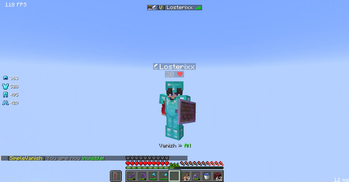
This plugin allows you to make yourself invisible to other players.
Features
- Make youreself completly inviseble to others.
- Players with 'simplevanish.see' can see vanished players.
- Reload the plugin in-game.
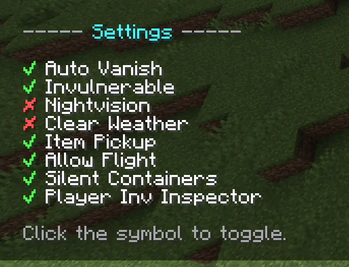
- Configurable settings for vanished players (e.g., fly, item pickup ...). (+ Personal settings)
- PlaceholderAPI Support
- Customizable messages in english.yml & german.yml. (You can also create own lang-files)
Commands
/vanish– Toggle vanish mode for yourself/vanish <player>– Toggle vanish mode for another player/vanish settings– Open your vanish settings menu/vanish toggle <setting>– Toggle a specific setting directly/simplevanish reload– Reload the plugin configuration/simplevanish about– Show plugin information
Permissions
simplevanish.use.self– Use/vanishfor yourselfsimplevanish.use.other– Use/vanish <player>simplevanish.see– See vanished playerssimplevanish.reload– Use/simplevanish reloadsimplevanish.admin– Access reload and about commandssimplevanish.admin.update– Receive update notificationssimplevanish.settings– Access settings menusimplevanish.setting.auto-vanish– Enable auto-vanish on joinsimplevanish.setting.invulnerable– Become invulnerable while vanishedsimplevanish.setting.nightvision-effect– Get night vision while vanishedsimplevanish.setting.clear-weather– Force clear weather while vanishedsimplevanish.setting.item-pickup– Pick up items while vanishedsimplevanish.setting.allow-flight– Fly while vanishedsimplevanish.setting.silent-containers– Open containers silently while vanished
Placeholders
- %simplevanish_vanished%: Is the player Vanished?
- %simplevanish_vanished_players%: Returns the number of all vanished players
- %simplevanish_fake_playercount%: Return the playercount but without vanished players
Configs
View config.yml
# This plugin utilizes MiniMessage for messages.
# For more information, visit https://docs.adventure.kyori.net/minimessage.html

file-version: 1

# The prefix before every message
prefix: "<#84F3D4><b>SimpleVanish</b> <dark_gray>⚡ <gray>"

# The messages file to use
langFile: 'english'

# Settings for the update checker
updateChecker:
  # Send a message to the console when a new version is available
  consoleMessage: true
  # Send a message to the player when a new version is available
  # This requires the permission 'simplevanish.admin.update' or to be an OP
  playerMessage: true

# Settings for the action bar
actionbar:
  # Should the action bar be enabled?
  enabled: true
  # Message when the player is vanished
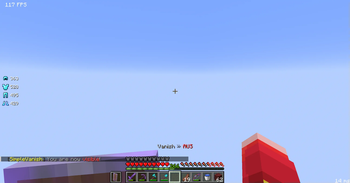
  on: "<gray>Vanish <dark_gray>- <green>ON"
  # Message when the player is visible
  off: "<gray>Vanish <dark_gray>- <red>OFF"

# Should players be able to define their own vanish settings?
personalSettings: true

# Default settings for players who do not have personal settings enabled
defaultSettings:
  # Should the player automatically vanish when they join the server?
  auto-vanish: true
  # Should the player be invulnerable while vanished?
  invulnerable: true
  # Should the player get the night vision effect while vanished?
  nightvision-effect: false
  # Should the weather be cleared when the player enters vanish?
  # This affects only the weather for the vanished player
  clear-weather: false
  # Should vanished players be able to pick up items?
  item-pickup: true
  # Should vanished players be allowed to fly?
  allow-flight: true
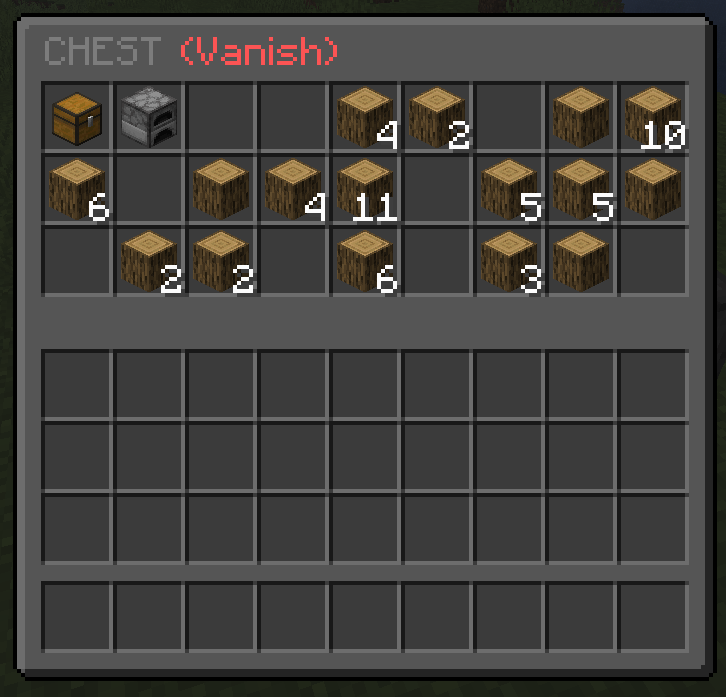
  # Should the player be able to see a preview of containers while vanished without opening them?
  silent-containers: true
  # Should the player be able to see a preview of inventories from other players while vanished?
  player-inv-inspector: true

# Extra hiding settings (Where should vanished players be hidden?)
extraHidingSettings:
  # Should vanished players be hidden from the player-count on the server list?
  serverList: true
  # Should vanished players be ignored for sleeping checks?
  sleeping: true
  # Should the joinMessages for vanished players be hidden?
  joinMessage: true
  # Should the quitMessages for vanished players be hidden?
  quitMessage: true
  # Should the deathMessages for vanished players be hidden?
  deathMessage: true
  # Should the advancement messages for vanished players be hidden?
  advancementMessage: true
  # Filter tab-completions for vanished players?
  tabCompletions: true

# Placeholder settings
placeholders:
  # Placeholder for the vanished state of the player
  vanished:
    # The placeholder to use when the player is vanished
    true: "<gray>[<yellow>V<gray>]"
    # The placeholder to use when the player is visible
    false: ""
  # Placeholder to show the vanished player count
  vanished_players:
    # The placeholder to use when there are no vanished players
    none: "<red>None"
    # The placeholder to use when there are vanished players
    count: "<yellow>%count%"
  # Placeholder to show all non-vanished players
  fake_playercount:
    # The placeholder to use when there are no non-vanished players
    none: "<red>None"
    # The placeholder to use when there are non-vanished players
    count: "<yellow>%count%"
View english.yml
# This plugin utilizes MiniMessage for messages.
# For more information, visit https://docs.adventure.kyori.net/minimessage.html

file-version: 1

# General messages
general:
  noPlayer: "<gray>You <red>must be a player<gray> to execute this command!"
  noPerms: "<gray>You <red>do not have permission<gray> to execute this command!"

# Other messages
other:
  updateChecker: "<gray>An <yellow>update <gray>is available! You are using version <red>v%current-version%<gray>, the latest version is <green>v%latest-version%<gray>!"
  symbol:
    true: "<green>✔"
    false: "<red>✘"
    hoverMessage: "<gray>Click to toggle"
  setting-names:
    auto-vanish: "Auto Vanish"
    invulnerable: "Invulnerable"
    nightvision-effect: "Nightvision"
    clear-weather: "Clear Weather"
    item-pickup: "Item Pickup"
    allow-flight: "Allow Flight"
    silent-containers: "Silent Containers"
    player-inv-inspector: "Player Inv Inspector"
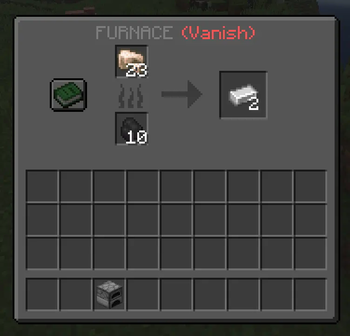
  silent-containers-title: "%container% <red>(Vanish)"
  player-inv-inspector-title: "%player%'s Inventory <red>(Vanish)"

# Command messages
commands:
  # Messages for the /simplevanish command (main plugin command)
  simplevanish:
    usage: "<gray>Please use <red>/simplevanish <about/reload><gray>!"
    about: "<gray>SimpleVanish v%version% <dark_gray>- <gray>%author%"
    reload:
      reloading: "<yellow>Reloading <gray>SimpleVanish..."
      reloaded: "<green>Successfully reloaded <gray>SimpleVanish! <dark_gray>(%time%ms)"
      error: "<gray>An <red>error occurred <gray>while reloading SimpleVanish! Check the console for details."
  vanish:
    usage: "<gray>Please use <red>/vanish <?player/settings/toggle> <?setting><gray>!"
    settings:
      noPerms: "<gray>You <red>do not have permission<gray> to change this setting! <dark_gray>(%setting%)"
      prefix:
        - " "
        - " "
        - " "
        - " "
        - " "
        - " "
        - " "
        - " "
        - " "
        - " "
        - "<gray>----- <aqua>Settings <gray>-----"
        - " "
      entries:
        - "<gray>%symbol% <white>%setting%"
      suffix:
        - " "
        - "<gray>Click the symbol to toggle."
        - " "
    enabled: "<white>%player% <gray>is now <green>vanished<gray>!"
    disabled: "<white>%player% <gray>is now <red>visible<gray>!"
    playerNotFound: "<gray>The given player <red>could not be found<gray>!"
View german.yml
# Dieses Plugin verwendet MiniMessage für Nachrichten.
# Weitere Informationen findest du unter https://docs.adventure.kyori.net/minimessage.html

file-version: 1

# Generelle Nachrichten
general:
  noPlayer: "<gray>Dies können <red>nur Spieler<gray> ausführen!"
  noPerms: "<gray>Du hast <red>keine Berechtigung<gray> für diesen Befehl!"

# Andere Nachrichten
other:
  updateChecker: "<gray>Es ist ein <yellow>Update verfügbar<gray>! Die momentane Version ist die <red>v%current-version%<gray>, die neuste Version ist die <green>v%latest-version%<gray>!"
  symbol:
    true: "<green>✔"
    false: "<red>✘"
    hoverMessage: "<gray>Klicke, um umzuschalten"
  setting-names:
    auto-vanish: "Auto-Vanish"
    invulnerable: "Unverwundbar"
    nightvision-effect: "Nachtsicht"
    clear-weather: "Klares Wetter"
    item-pickup: "Items aufsammeln"
    allow-flight: "Fliegen erlaubt"
    silent-containers: "Silent Containers"
    player-inv-inspector: "Spieler Inv-Inspektor"
  silent-containers-title: "%container% <red>(Vanish)"
  player-inv-inspector-title: "%player%'s Inventar <red>(Vanish)"

# Befehlsnachrichten
commands:
  # Nachrichten für den /simplevanish Befehl (Hauptbefehl des Plugins)
  simplevanish:
    usage: "<gray>Bitte nutze <red>/simplevanish <about/reload><gray>!"
    about: "<gray>SimpleVanish v%version% <dark_gray>- <gray>%author%"
    reload:
      reloading: "<yellow>SimpleVanish <gray>wird neugeladen<gray>..."
      reloaded: "<green>SimpleVanish wurde <gray>erfolgreich neugeladen! <dark_gray>(%time%ms)"
      error: "<gray>Ein <red>Fehler ist aufgetreten<gray> beim Neuladen von SimpleVanish! Überprüfe die Konsole für Details."
  vanish:
    usage: "<gray>Bitte nutze <red>/vanish <?Spieler/settings/toggle> <?Einstellung><gray>!"
    settings:
      noPerms: "<gray>Du hast <red>keine Berechtigung<gray> diese Einstellung zu ändern! <dark_gray>(%setting%)"
      prefix:
        - " "
        - " "
        - " "
        - " "
        - " "
        - " "
        - " "
        - " "
        - " "
        - " "
        - "<gray>----- <aqua>Einstellungen <gray>-----"
        - " "
      entries:
        - "<gray>%symbol% <white>%setting%"
      suffix:
        - " "
        - "<gray>Klicke auf das Symbol, um umzuschalten."
        - " "
    enabled: "<white>%player% <gray>ist nun <green>unsichtbar<gray>!"
    disabled: "<white>%player% <gray>ist nun <red>sichtbar<gray>!"
    playerNotFound: "<gray>Der angegebene Spieler <red>konnte nicht gefunden werden<gray>!"
For developers:
When a player is vanished, a simple metadata entry "vanished" is added to the player.
You can check if a player is vanished like this:
if (player.hasMetadata("vanished")) {
    // player is vanished
}
This lets you easily integrate vanish state into your own plugins or features.
Contact
If you encounter any issues or bugs, or have a request for a new feature, please contact me via Discord or join my Discord-Server.
My discord-name is Losterixx.
My Discord-Server: Link
| Version | Minecraft | Loader | Download |
|---|---|---|---|
|
SimpleVanish 2.2 2.2 |
1.21, 1.21.1, 1.21.2, 1.21.3, 1.21.4, 1.21.5, 1.21.6, 1.21.7, 1.21.8, 1.21.9, 1.21.10, 1.21.11, 26.1, 26.1.1, 26.1.2, 26.2, 26.3
|
paper, purpur
|
Download |
|
SimpleVanish 2.2 2.2 |
1.21, 1.21.1, 1.21.2, 1.21.3, 1.21.4, 1.21.5, 1.21.6, 1.21.7, 1.21.8, 1.21.9, 1.21.10, 1.21.11
|
paper, purpur
|
Download |
|
SimpleVanish 2.1 2.1 |
1.21, 1.21.1, 1.21.2, 1.21.3, 1.21.4, 1.21.5, 1.21.6, 1.21.7, 1.21.8
|
paper, purpur
|
Download |
|
SimpleVanish 2.0 2.0 |
1.21, 1.21.1, 1.21.2, 1.21.3, 1.21.4, 1.21.5, 1.21.6, 1.21.7, 1.21.8
|
paper, purpur
|
Download |
|
SimpleVanish 1.1.1 1.1.1 |
1.21, 1.21.1, 1.21.2, 1.21.3, 1.21.4, 1.21.5, 1.21.6, 1.21.7, 1.21.8
|
bukkit, paper, purpur, spigot
|
Download |
|
SimpleVanish 1.1.1 1.1.1 |
1.21, 1.21.1
|
bukkit, paper, purpur, spigot
|
Download |
|
SimpleVanish 1.1.0 1.1.0 |
1.21, 1.21.1
|
bukkit, paper, purpur, spigot
|
Download |
|
SimpleVanish 1.0.1 1.0.1 |
1.21, 1.21.1
|
bukkit, paper, purpur, spigot
|
Download |
|
SimpleVanish 1.0.0 1.0.0 |
1.21, 1.21.1
|
bukkit, paper, purpur, spigot
|
Download |
|
SimpleVanish 1.0.0 1.0.0 |
1.21
|
bukkit, paper, purpur, spigot
|
Download |
|
SimpleVanish 1.0.0 1.0.0 |
1.21
|
bukkit, paper, purpur, spigot
|
Download |
|
SimpleVanish 1.0.0 1.0.0 |
1.21
|
bukkit, paper, purpur, spigot
|
Download |