Sliding Platforms
Real sliding platforms built from any blocks — doors, elevator cabins, even whole rail-free transit lines. They actually move, you actually ride them.
A standalone from-scratch take on the idea of Moving Elevators, for Minecraft 1.20.1 (Fabric). Point a controller at a wall of blocks, right-click — the wall becomes a living platform, glides at your speed along any axis, and settles back as ordinary blocks. While it moves, it's real: block-by-block collision, you can stand on it, it pushes players and mobs.
What you get
🚪 Sliding doors from any blocks
- Doors up to 12×12×3 out of the box (limits fully configurable, live).
- Pick the slide axis (X / Y / Z), travel distance (or auto = full size) and speed with sliders.
- Auto-scan or manual block picking — build any shape, not just rectangles.
- Smooth trapezoid motion: acceleration, cruise, braking, clean docking.
- Cascade mode: rows travel one after another like a curtain, with per-row delay and root-first inversion — theatrical openings included free.
🛗 Elevator rides
- Elevator screens plan real multi-floor trips: passenger menu, floor names and numbers, instant departures.
- Chain screens together to call the cabin from any floor — peer-to-peer, no master block.
- FIFO queueing, final parking flush at the destination's face, full ride persistence across server restarts, rollback if something blocks the way.
💡 Platform glow
- Redstone lamps near the door light up automatically (radius 6) while the panel is around: the tunnel lights up ahead of a riding cabin like a metro, doorways shine at the doorstep.
- Vanilla redstone is never touched; per-door toggle, server-wide default in the config.
🔊 Shared custom sounds
- Start / loop / stop / arrive-chime per door — and everyone on the server hears them.
- The server auto-builds a standard server resource pack and serves it the vanilla way;
players upload
.oggright from the sound menu — no manual copying. - Built-in mini-HTTP delivery (port 24466) with a chunked in-game fallback if the port is firewalled. Pack, port, host and fallback are all toggles in the config.
🔒 QoL toys
- Remote switch block: bind once, toggle a door from anywhere; redstone input supported.
- Sensor (players/mobs, name whitelist), per-controller lock by owner name, auto-close timer.
- Named controllers and screens, in the placing player's language (EN / RU included).
⚙️ Server config menu — /slidingplatformscfg
- Ops-only GUI (level 2+, or the singleplayer host) — everything the
config/slidingplatforms.jsoncan do, without editing files: door size limits, travel, speed, ride length, new-door defaults, sound pack and port (re-binds live, no restart), debug logs. - Two tabs: Limits (curated presets) and No restrictions (free numbers — yes, even 900 blocks/sec, at your own risk; the menu warns you in red).
- Edits apply instantly, save to the same JSON file and sync to everyone online. Players who never open it see absolutely zero change.
Blocks & recipes
| Block | Recipe (3×3) |
|---|---|
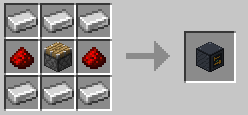
| Platform Controller | Iron ×6 around a piston, redstone at the sides |
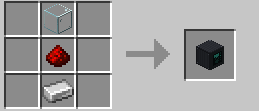
| Elevator Screen | Glass over redstone over iron (vertical) |
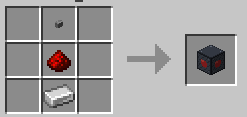
| Remote Switch | Stone button over redstone over iron (vertical) |
Controls
| Gesture | Action |
|---|---|
| Right-click controller | open / close |
| Shift + right-click (empty hand) | settings menu |
| Right-click screen | passenger floor menu |
| Shift + right-click on switch | switch menu |
| Redstone pulse | same as right-click |
Requirements
Minecraft 1.20.1 · Fabric Loader 0.15+ · Fabric API · Java 17+ Install on server and clients (vanilla clients still receive the sound pack via the standard server resource pack, but the mod's menus need the client mod too).
Safety first
Every moving block comes back — even if the server restarts mid-flight, the cabin lands its blocks on world load. Extreme config values can lag or crash the game: the in-game menu says so in red, and defaults always match classic behavior.
License: MIT