

SMPWhitelist
by Arcana Studios
What is SMPWhitelist?
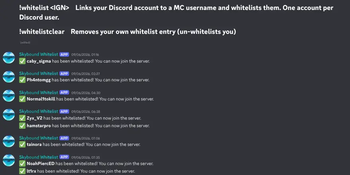
SMPWhitelist bridges your Discord server and Minecraft whitelist — letting players register themselves directly from a Discord channel without any admin involvement. No commands, no tickets, no back-and-forth.
Features
Self-service whitelisting — Players run !whitelist <IGN> in your designated Discord channel and get added instantly Self-service removal — Players can unlink their account anytime with !whitelistclear One account per user — Each Discord account can only link one Minecraft username Admin controls — Admins can look up, remove, or manage any entry via Discord or in-game commands Offline mode support — Works on both online-mode and offline-mode servers Clean channels — Command messages are automatically deleted after processing
Discord Commands
CommandWhoDescription!whitelist <IGN>EveryoneLink your Minecraft account!whitelistclearEveryoneRemove your own whitelist entry!whitelistclear <@user>AdminsRemove another user's entry!whitelistcheck <@user/IGN>AdminsLook up a whitelist entry
In-Game Commands
All require the discordwhitelist.admin permission (op by default). CommandDescription/dwl statusView bot status and config info/dwl listList all Discord → Minecraft entries/dwl remove <IGN/DiscordID>Remove a whitelist entry/dwl reloadReload config and restart the bot
Setup
Create a bot at discord.com/developers Drop the plugin .jar into your /plugins folder Add your bot token and channel ID to config.yml Optionally set an admin-role-id to restrict admin commands Restart your server — the bot will announce itself in your channel
| Version | Minecraft | Loader | Download |
|---|---|---|---|
|
smpwhitelister 1.1.0 1.1.0 |
1.21, 1.21.1, 1.21.2, 1.21.3, 1.21.4, 1.21.5, 1.21.6, 1.21.7, 1.21.8, 1.21.9, 1.21.10, 1.21.11
|
paper
|
Download |