Spawn Rules
A server-side Fabric mod that lets you block specific mobs and animals from spawning. It cancels spawns early in the tick loop to save server performance.
Key features:
- Blocks spawns before the mob entity is created, which reduces server CPU load.
- Prevents "Can't spawn entity of type" warning spam in the console logs.
- Player-spawned entities (spawn eggs, summon commands, breeding, buckets, and portal travel) are always allowed.
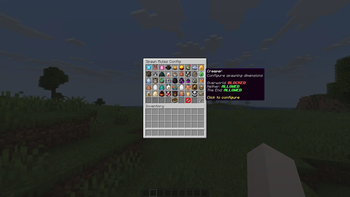
- Includes an in-game GUI to change settings without editing files.
How to use the In-Game GUI (Click to expand)
Run the command /spawnrules config in-game (requires operator level 2).
- A menu will open showing all survival mobs in the game (including modded ones).
- Hovering over a mob shows if it is allowed or blocked in the Overworld, Nether, and End.
- Click any mob to toggle its spawn status for those dimensions.
- Changes save to disk and update in memory immediately.
Configuration File Example (Click to expand)
You can also edit the config file directly at config/spawnrules.json. Here is an example config that blocks zombies in the overworld:
{
  "dimensions": {
    "minecraft:overworld": {
      "blocked_types": [
        "minecraft:zombie"
      ],
      "blocked_categories": []
    }
  }
}
- blocked_types: A list of entity IDs (like minecraft:zombie) to block in that dimension.
- blocked_categories: A list of categories to block. The categories are:
- monster (zombies, creepers, skeletons, etc.)
- creature (cows, pigs, sheep, etc.)
- ambient (bats)
- water_creature (squids, dolphins)
- water_ambient (tropical fish)
- axolotls
- underground_water_creature (glow squids)
Commands (Click to expand)
- /spawnrules config - Opens the visual settings GUI (Requires OP level 2).
- /spawnrules reload - Reloads the settings from the configuration file (Requires OP level 2).