

🛒 SpygChestShop
Create powerful and lag-free chest shops with ease!
SpygChestShop is a lightweight and efficient plugin that makes shop creation simple and intuitive, perfect for any Minecraft economy server!
✨ Features
🪶 Lightweight and Efficient
Built for speed, zero lag, even on larger servers.
🛠️ Easy Shop Creation
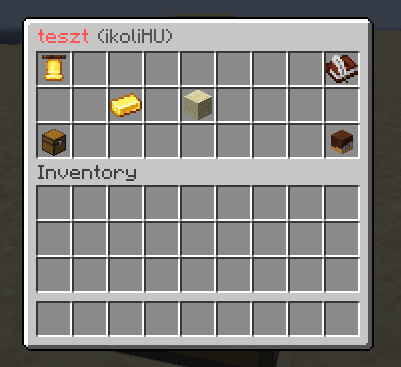
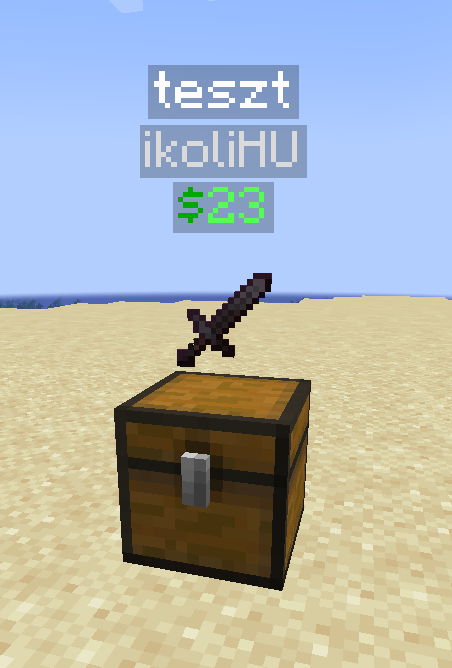
Just look at a chest and run a simple command to create your shop.
🔔 Notifications
Get notified whenever someone buys from your shop.
⚔️ Admin Commands
Easily manage shops and players using powerful admin tools.
⚙️ Highly Customizable
🛠️ Tweak Everything to Your Liking
The plugin comes with a detailed and flexible config (config.yml) where you can customize nearly every aspect of the shop behavior from display messages to protection settings.
Perfect for servers that want full control and a personalized experience!
🧾 Usage
- 🛒 Create a shop:
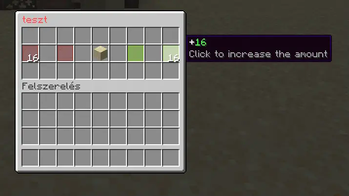
/scs create <shop-name> - 🧍 Players buy by right-clicking the chest and choosing the amount
- ➕ Add members:
/scs add <shop> <player>to allow stock refills - ❌ Break the chest to remove a shop
- 🛡️ Admin permissions:
- Break any shop with
shift + right-left click→spygchestshop.admin.break - Edit any shop with
shift + right-click→spygchestshop.admin.edit
- Break any shop with
- 🔄 Reload config on the fly:
/scs reload
🛠️ Installation Guide
- 📥 Download
SpygChestShop.jar - 📦 Use Paper 1.20.6+ (or fork)
- 📁 Put the
.jarfile in yourplugins/folder - 💵 Install Vault and an economy plugin (like Essentials)
- 🔁 Restart your server
📋 Requirements
- ☕ Java 21 or higher
- 🧻 Paper 1.20.6+
- 💸 Vault + any economy plugin
📜 Commands & Permissions
-
🛒 /spygchestshop create
<shop-name>
Create a shop while looking at a chest
🔑 Permission:spygchestshop.use -
➕ /spygchestshop add
<shop><player>
Add a player to your shop
🔑 Permission:spygchestshop.use -
➖ /spygchestshop remove
<shop><player>
Remove a player from your shop
🔑 Permission:spygchestshop.use -
🏷️ /spygchestshop rename
<shop><new-name>
Rename an existing shop
🔑 Permission:spygchestshop.use -
📄 /spygchestshop list
[page]
List your shops
🔑 Permission:spygchestshop.use -
📋 /spygchestshop adminlist
<player>[page]
List all shops of a player
🔑 Permission:spygchestshop.admin.list -
🔄 /spygchestshop reload
Reload the plugin configuration
🔑 Permission:spygchestshop.admin.reload -
🧪 /spygchestshop admin customer
Toggle customer mode (for debugging)
🔑 Permission:spygchestshop.admin.customermode
Permissions
- spygchestshop.max.
<group>- You can define max shop groups ing the config.yml - spygchestshop.admin.break or spygchestshop.admin - Allows breaking of other player's shops (shift + left-click on shop)
- spygchestshop.admin.edit or spygchestshop.admin - Allows editing of other player's shops (shift + right-click on shop)
Videos
<iframe width="560" height="315" src="https://www.youtube-nocookie.com/embed/pCuC8QiDVS8" title="YouTube video player" frameborder="0" allow="accelerometer; autoplay; clipboard-write; encrypted-media; gyroscope; picture-in-picture; web-share" allowfullscreen></iframe>💬 Need Help or Have a Suggestion?
If you need help or have a feature request, feel free to reach out to us on Discord:
🌐 dc.spygstudios.com
| Version | Minecraft | Loader | Download |
|---|---|---|---|
|
Spyg-ChestShop 1.9.2 1.9.2 |
1.20.6, 1.21, 1.21.1, 1.21.2, 1.21.3, 1.21.4, 1.21.5, 1.21.6, 1.21.7, 1.21.8, 1.21.9, 1.21.10, 1.21.11
|
paper, purpur
|
Download |
|
Spyg-ChestShop 1.9.0 1.9.1 |
1.20.6, 1.21, 1.21.1, 1.21.2, 1.21.3, 1.21.4, 1.21.5, 1.21.6, 1.21.7, 1.21.8, 1.21.9, 1.21.10, 1.21.11
|
paper, purpur
|
Download |
|
Spyg-ChestShop 1.9.0 1.9.0 |
1.20.6, 1.21, 1.21.1, 1.21.2, 1.21.3, 1.21.4, 1.21.5, 1.21.6, 1.21.7, 1.21.8, 1.21.9, 1.21.10, 1.21.11
|
paper, purpur
|
Download |
|
Spyg-ChestShop 1.8.1 1.8.1 |
1.20.6, 1.21, 1.21.1, 1.21.2, 1.21.3, 1.21.4, 1.21.5, 1.21.6, 1.21.7, 1.21.8
|
paper, purpur
|
Download |
|
Spyg-ChestShop 1.8.0 1.8.0 |
1.20.6, 1.21, 1.21.1, 1.21.2, 1.21.3, 1.21.4, 1.21.5, 1.21.6, 1.21.7, 1.21.8
|
paper, purpur
|
Download |
|
Spyg-ChestShop 1.7.1 1.7.1 |
1.20.6, 1.21, 1.21.1, 1.21.2, 1.21.3, 1.21.4, 1.21.5, 1.21.6, 1.21.7, 1.21.8
|
paper, purpur
|
Download |
|
Spyg-ChestShop 1.6.2 1.6.2 |
1.20.6, 1.21, 1.21.1, 1.21.2, 1.21.3, 1.21.4, 1.21.5, 1.21.6, 1.21.7, 1.21.8
|
paper, purpur
|
Download |
|
Spyg-ChestShop 1.6.1 1.6.1 |
1.20.6, 1.21, 1.21.1, 1.21.2, 1.21.3, 1.21.4, 1.21.5, 1.21.6, 1.21.7
|
paper, purpur
|
Download |
|
Spyg-ChestShop 1.5.4 1.5.4 |
1.20.6, 1.21, 1.21.1, 1.21.2, 1.21.3, 1.21.4, 1.21.5
|
paper, purpur
|
Download |
|
Spyg-ChestShop 1.5.2 1.5.2 |
1.20.6, 1.21, 1.21.1, 1.21.2, 1.21.3, 1.21.4, 1.21.5
|
paper, purpur
|
Download |
|
Spyg-ChestShop 1.5.1 1.5.1 |
1.20.6, 1.21, 1.21.1, 1.21.2, 1.21.3, 1.21.4, 1.21.5
|
paper, purpur
|
Download |
|
Spyg-ChestShop 1.4.1 1.4.1 |
1.20.6, 1.21, 1.21.1, 1.21.2, 1.21.3, 1.21.4
|
paper, purpur
|
Download |
|
Spyg-ChestShop 1.3.1 1.3.1 |
1.20.6, 1.21, 1.21.1, 1.21.2, 1.21.3, 1.21.4
|
paper, purpur
|
Download |
|
Spyg-ChestShop 1.3.0 1.3.0 |
1.20.6, 1.21, 1.21.1, 1.21.2, 1.21.3, 1.21.4
|
paper, purpur
|
Download |
|
Spyg-ChestShop 1.2.0 1.2.0 |
1.20.6, 1.21, 1.21.1, 1.21.2, 1.21.3, 1.21.4
|
paper, purpur
|
Download |
|
Spyg-ChestShop 1.1.1 1.1.1 |
1.20.6, 1.21, 1.21.1, 1.21.2, 1.21.3, 1.21.4
|
paper, purpur
|
Download |
|
Spyg-ChestShop 1.1.0 1.1.0 |
1.20.6, 1.21, 1.21.1, 1.21.2, 1.21.3, 1.21.4
|
paper, purpur
|
Download |
|
Spyg-ChestShop 1.0.0 1.0.0 |
1.20.6, 1.21, 1.21.1, 1.21.2, 1.21.3, 1.21.4
|
paper, purpur
|
Download |