

sSumoPvP
sSumoPvP is a Minecraft plugin that adds a simple and professional SumoPvP arena system for servers.
The plugin is made for manual events, quick tournaments, and staff-controlled 1v1 SumoPvP fights. It does not include ranked matches, ELO, or automatic matchmaking. Instead, it focuses on clean and controlled SumoPvP fights using configurable arenas.
Features
- Arena creation using a selection wand
- Configurable SumoPvP arenas
- 1v1 fights controlled by staff
- Optional arena selection when starting a fight
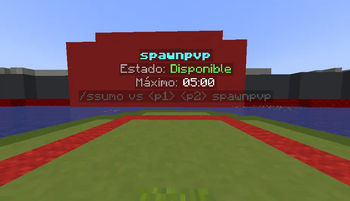
- Dynamic holograms for arena information
- BossBar support during fights
- Automatic inventory, armor, and gamemode restoration
- Fight protection system
- PlaceholderAPI support
- Commands to create, edit, enable, disable, start, stop, and reload arenas
Fight Protection
During a SumoPvP fight, the plugin helps keep the match clean by blocking things such as:
- Outside player interference
- Unwanted damage
- Fall damage
- Hunger loss
- Building
- Item drops
- Command usage during fights
This makes the plugin useful for organized events where staff members need full control over the match.
Main Commands
| Command | Description |
|---|---|
/ssumo wand |
Gives the arena selection wand. |
/ssumo create <arena> |
Creates a new arena. |
/ssumo redefine <arena> |
Updates an arena selection. |
/ssumo setspawn <arena> <1|2> |
Sets the player spawn points. |
/ssumo setholo <arena> |
Places the arena hologram. |
/ssumo settime <arena> <5m|300s> |
Sets the maximum fight time. |
/ssumo enable <arena> <true|false> |
Enables or disables an arena. |
/ssumo vs <player1> <player2> [arena] |
Starts a SumoPvP fight. |
/wsumo select <player1> <player2> [arena] |
Quick alias to start a fight. |
/ssumo stop <arena|player|all> |
Stops an active fight. |
/ssumo leave |
Allows a player to surrender. |
/ssumo reload |
Reloads the plugin configuration. |
How to Set Up an Arena
-
Place the plugin
.jarfile inside your server’s/pluginsfolder. -
Restart the server.
-
Use
/ssumo wand. -
Select the arena area.
-
Create the arena with
/ssumo create <name>. -
Set both spawns:
/ssumo setspawn <arena> 1/ssumo setspawn <arena> 2
-
Place the hologram with
/ssumo setholo <arena>. -
Enable the arena.
-
Start a fight with
/ssumo vs <player1> <player2> [arena].
Best Used For
- Survival events
- Practice servers
- Community tournaments
- BoxPvP servers
- HCF / Factions events
- Minigame servers
- Competitive Minecraft servers
Support
If you find a bug or have a suggestion, you can report it through the official support Discord.
This plugin is focused on manual SumoPvP events and staff-controlled fights. https://discord.gg/bHYytmGgkK

| Version | Minecraft | Loader | Download |
|---|---|---|---|
|
sSumoPvP 1.0.0 1.0.0 |
1.16, 1.16.1, 1.16.2, 1.16.3, 1.16.4, 1.16.5, 1.17, 1.17.1, 1.18, 1.18.1, 1.18.2, 1.19, 1.19.1, 1.19.2, 1.19.3, 1.19.4, 1.20, 1.20.1, 1.20.2, 1.20.3, 1.20.4, 1.20.5, 1.20.6, 1.21, 1.21.1, 1.21.2, 1.21.3, 1.21.4, 1.21.5, 1.21.6, 1.21.7, 1.21.8, 1.21.9, 1.21.10, 1.21.11, 26.1, 26.1.1, 26.1.2
|
bukkit, paper, purpur, spigot
|
Download |