

Stealthy Chest Locks
Stealthy Chest Locks adds physical key-based locking for Minecraft servers.
Players can lock chests and doors, then use an actual in-game key item to unlock them. This makes storage and base protection feel more immersive than simple command-only protection.
Features
- Lock chests and doors
- Physical key items for players
- Different lock types
- Player-owned locks
- Admin management tools
- Lockpicking minigame
- Useful for survival, factions, roleplay, and event servers
- Simple setup for staff and server owners
Useful Commands
/lock- Lock the chest or door you are looking at/unlock- Unlock the chest or door you own/key- Create or manage a key for your lock/lockpick- Start lockpicking a locked chest or door/locks- View your current locked blocks/lockadmin- Staff/admin management command/lockreload- Reload the plugin configuration
How to set up in-game
- Craft or receive a lock item.
- Hold the lock in your hand.
- Right-click a chest, barrel, or door to lock it.
- The player gets a physical key for that lock.
- To open the locked block, hold the correct key and right-click it.
- To remove your lock, look at it and run
/lock remove.
Crafting
Locks are crafted using the matching ingot type:
- Copper Lock: copper ingots
- Iron Lock: iron ingots
- Gold Lock: gold ingots
- Lockpick: stick + iron nugget
Player Commands
/lock info- Check the lock you are looking at/lock remove- Remove your own lock/lock give-key <player>- Give another player a copy of your key/lock list- View your active locks
Admin Commands
/lockadmin give <player> <copper|iron|gold>- Give a lock item/lockadmin givelockpick <player> [amount]- Give lockpicks/lockadmin inspect- Inspect the lock you are looking at/lockadmin remove- Remove the lock you are looking at/lockadmin removeall <player>- Remove all locks owned by a player/lockadmin bypass- Toggle admin bypass mode/lockadmin stats- Show total active locks
Crafting Recipes
Copper Lock
Used for basic locking on chests, barrels, and doors.
┌──────┬──────┬──────┐
│  🟧  │  🟧  │  🟧  │
├──────┼──────┼──────┤
│  🟧  │      │  🟧  │
├──────┼──────┼──────┤
│      │  🟧  │      │
└──────┴──────┴──────┘
🟧 = Copper Ingot

┌──────┬──────┬──────┐
│  ⬜  │  ⬜  │  ⬜  │
├──────┼──────┼──────┤
│  ⬜  │      │  ⬜  │
├──────┼──────┼──────┤
│      │  ⬜  │      │
└──────┴──────┴──────┘
⬜ = Iron Ingot


┌──────┬──────┬──────┐
│  🟨  │  🟨  │  🟨  │
├──────┼──────┼──────┤
│  🟨  │      │  🟨  │
├──────┼──────┼──────┤
│      │  🟨  │      │
└──────┴──────┴──────┘
🟨 = Gold Ingot

┌──────┬──────┬─────────────┐
│      │      │ Iron Nugget │
├──────┼──────┼─────────────┤
│      │Stick │             │
├──────┼──────┼─────────────┤
│      │      │             │
└──────┴──────┴─────────────┘

**Keys are not crafted.
****A key is created when a player locks a chest, barrel, or door.**
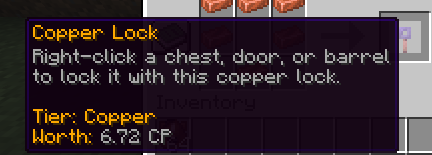
The copper lock displays its tier, helping players identify the lock type before placing it.
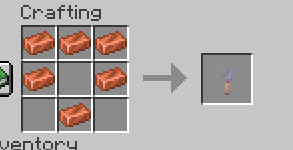
A copper lock item used to lock chests, barrels, and doors. The tooltip shows its tier and value.
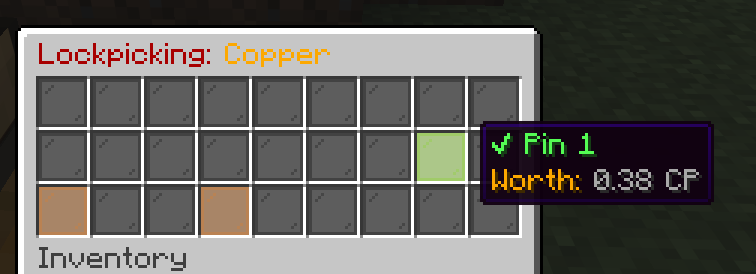
The lockpicking interface challenges players to find the correct pin positions. Failed attempts may break the lockpick.
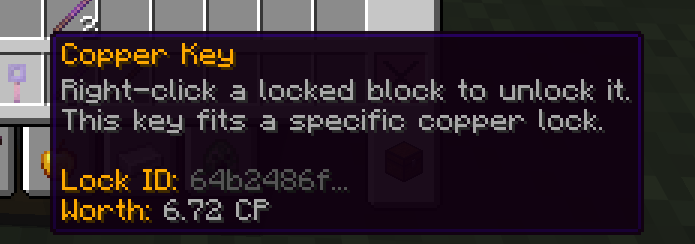
A physical key item linked to a specific copper lock. Players must hold the correct key to unlock the block.
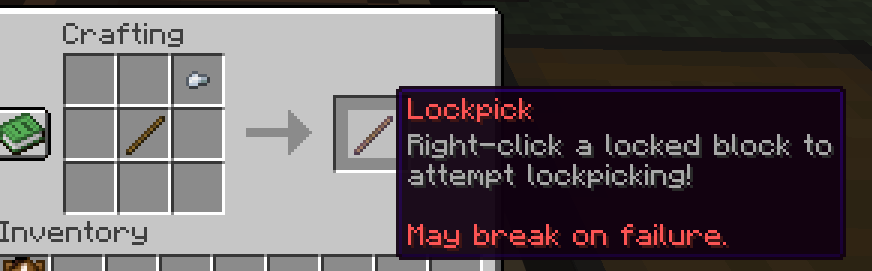
A lockpick can be crafted using a stick and an iron nugget. Players use it to attempt lockpicking.
| Version | Minecraft | Loader | Download |
|---|---|---|---|
|
Stealthy-Chest-Locks 1.0.9-server-ready 1.0.9-server-ready |
1.20, 1.20.1, 1.20.2, 1.20.3, 1.20.4, 1.20.5, 1.20.6, 1.21, 1.21.1, 1.21.2, 1.21.3, 1.21.4, 1.21.5, 1.21.6, 1.21.7, 1.21.8, 1.21.9, 1.21.10, 1.21.11
|
paper, spigot
|
Download |