

Structure Bounds
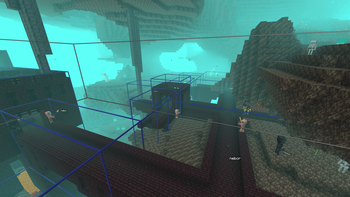
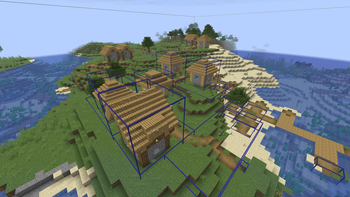
One command outlines every generated structure around you, and every piece inside it, so you can see where a village ends, where a mineshaft runs, and exactly which pieces the world generator placed.
IMPORTANT: Only chunks that are already loaded are scanned, and the outlines are rebuilt when you cross a chunk boundary. A structure nobody has loaded is not drawn, and one that loads while you stand still appears once you move.
Features
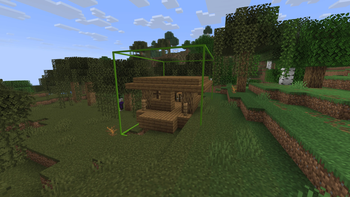
- See the shape of a structure: a white box around the structure itself, a green one around its start piece and a blue one around every other piece, the colours vanilla's own debug view uses
- Named pieces: each drawn piece carries its name above it, readable through terrain so a buried piece still reads
- Isolate one structure: keep the structure you are standing in, drop every other, and give the one you kept a glow so it stays visible from outside
- Nobody else sees them: the boxes are packets rather than blocks or entities, so nothing is spawned, nothing persists a restart and no other player is sent them
- Tunable detail: each player picks how many pieces a structure may draw, or lifts the limit entirely, and what a limit drops is always the furthest away
- Configurable limits: operators set the scan radius and a cap on how many boxes a single player can be sent
- Settings persist: every toggle is stored on the player, so it survives a relog
Requirements
The plugin needs Paper, or a fork of it, and reaches into the server's own internals. Each JAR is built against one Minecraft version and named for it, so give the server the JAR that matches. Anything outside this table is best-effort and logged on startup.
| JAR | Minecraft | Java |
|---|---|---|
structure-bounds-1.21.11-<version>.jar |
1.21.11 | 21 or newer |
structure-bounds-26.1.2-<version>.jar |
26.1.2 | 25 or newer |
structure-bounds-26.2-<version>.jar |
26.2 | 25 or newer |
Installation
Drop the JAR for your server's Minecraft version, from the table above, into the server's plugins/ directory and
restart.
Commands
| Command | Description | Permission |
|---|---|---|
/bounds |
Draws the outlines around you, or hides them again | structure-bounds.use |
/bounds all-pieces |
Draws every piece whatever the max-pieces limit, or applies it again |
structure-bounds.use |
/bounds isolate |
Keeps only the structure you are standing in, or clears the hold | structure-bounds.use |
/bounds max-pieces <count> |
Sets how many pieces one structure may draw, up to maxBoxesPerPlayer |
structure-bounds.use |
/bounds show-labels |
Draws the label above each piece, or hides them | structure-bounds.use |
/bounds show-labels names |
Adds the friendly name under each piece's ID, or removes it | structure-bounds.use |
A command that redraws is limited to one every two seconds, and refuses with a message until the wait is out. Hiding the outlines is never refused.
Configuration
plugins/structure-bounds/config.yml. The plugin writes it on first start and rewrites it on every start after that,
with a comment above each key: keys it no longer reads are removed, new ones appear with their defaults, and comments
you add yourself are not kept.
| Key | Description | Default | Minimum | Maximum |
|---|---|---|---|---|
debug |
Enables debug functionality. See Debug Mode | false |
||
scanRadiusChunks |
How far around a player to look for structures, in chunks | 6 |
1 |
16 |
maxBoxesPerPlayer |
How many boxes one player may be sent at once | 256 |
1 |
1024 |
pieceNames |
Friendly names shown under piece IDs, see below |
Out-of-range values are clamped back to their default, with a warning in the console. A value of the wrong type, such as text where a number belongs, stops the plugin from starting and names the file in the console.
A player who is sent the cap keeps the boxes nearest them, loses the rest, and is told once that the view was cut short.
Leave version alone: it records the shape of the file so the plugin can upgrade it.
Piece names
pieceNames maps a piece's ID to the friendly name shown under it. An entry can use the full ID or just its last path
segment, so corner_01 names every village street corner built from that template. The plugin ships names for the older
structures whose IDs are abbreviations, such as shcc for a stronghold chest corridor.
pieceNames:
  shcc: Stronghold Chest Corridor
  corner_01: Street Corner
  btp: ''
Once pieceNames is in the file it replaces the shipped names entirely, so a name you delete is no longer shown. Set a
name to '' to hide it explicitly. Remove the whole section to get the shipped names back.
Upgrading from 0.2.0
The first start converts the old file on its own: scan-radius-chunks and max-boxes-per-player keep their values
under their new names, the contents of piece-names.yml move into pieceNames, and piece-names.yml is deleted. The
old config.yml is kept beside the new one as config.yml.v1.bak.
Permissions
| Node | Grants | Default |
|---|---|---|
structure-bounds.use |
/bounds and its subcommands |
Everyone |
Debug Mode
Everything here is gated behind the debug configuration flag, which is off by default.
Every scan, redraw, dropped session and refused command is logged to the console, naming the player and the counts involved. Nothing a player sees changes.
| Version | Minecraft | Loader | Download |
|---|---|---|---|
|
Structure Bounds 0.3.0 0.3.0 |
26.2
|
paper, purpur
|
Download |
|
Structure Bounds 0.3.0 0.3.0 |
26.1.2
|
paper, purpur
|
Download |
|
Structure Bounds 0.3.0 0.3.0 |
1.21.11
|
paper, purpur
|
Download |
|
Structure Bounds 0.2.0 - 26.2 0.2.0 |
26.2
|
paper, purpur
|
Download |
|
Structure Bounds 0.2.0 - 26.1.2 0.2.0 |
26.1.2
|
paper, purpur
|
Download |
|
Structure Bounds 0.2.0 - 1.21.11 0.2.0 |
1.21.11
|
paper, purpur
|
Download |
|
Structure Bounds 0.1.0 0.1.0 |
1.21.11
|
paper, purpur
|
Download |