


TitaniumPlayerInfo is a Minecraft server administration and player-information plugin. It provides player information through graphical inventory GUIs and supports both online players and known offline players.
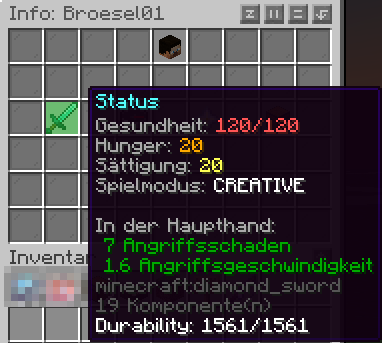
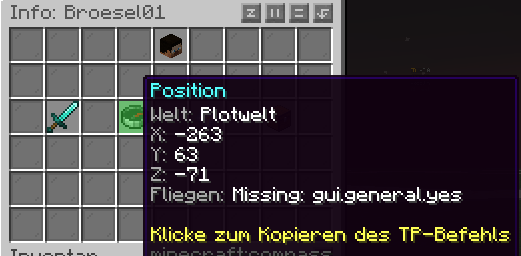
The main purpose is to provide a central player profile containing status information, location, LuckPerms data, inventory, armor, offhand and Ender Chest access. User-visible text is managed through language files.
Supported server platforms:
- Paper
- Spigot
- Purpur
- Folia
Requirements:
- Minecraft/server API 1.21 or newer
- Java 21 or newer according to the server environment
- LuckPerms
- The fernsehheft EnderChest plugin when the external EnderChest mode is enabled
2. Installation
- Install and enable LuckPerms.
- Start the server.
- Select the desired language in
config.yml. - Run
/playerinfo reloadafter changing the configuration.
If the fernsehheft EnderChest integration is required, install and enable the fernsehheft EnderChest plugin as well.
3. Commands
| Command | Function |
|---|---|
/playerinfo <player> |
Open the selected player's profile |
/pi <player> |
Short form of /playerinfo <player> |
/playerinfo reload |
Reload configuration and language files |
/pi reload |
Short form of /playerinfo reload |
The commands require the corresponding TitaniumPlayerInfo permission.
4. Permissions
| Permission | Meaning |
|---|---|
playerinfo.use |
Use /playerinfo and /pi |
playerinfo.reload |
Reload configuration and language files |
playerinfo.view.ip |
View IP addresses |
playerinfo.view.inventory |
View inventories and equipment |
playerinfo.view.enderchest |
View/open Ender Chests |
playerinfo.view.permissions |
View LuckPerms and permission information |
The default permission level for these nodes is op. Permissions can be assigned individually through LuckPerms.
5. Player profiles
A player profile can contain:
- player name
- UUID
- first login
- last login
- online/offline status
- level
- health
- hunger and saturation
- game mode
- current world
- X/Y/Z coordinates
- IP address when permitted
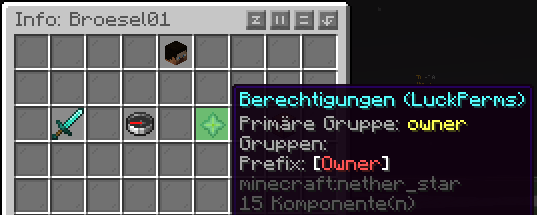
- LuckPerms primary group
- inherited groups
- prefix
- OP status
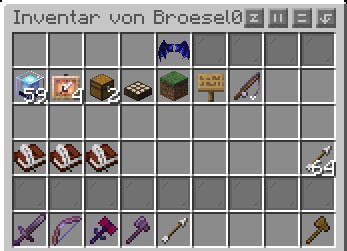
- inventory
- hotbar
- armor
- offhand
- Ender Chest
For offline players, only information that is actually available persistently is displayed. Live inventory and live Ender Chest contents are not reconstructed from nonexistent data.
6. Inventory view
The inventory view uses a fixed mapping:
- Minecraft inventory 9–35 → GUI 9–35
- Hotbar 0–8 → GUI 36–44
- Armor → GUI 0–3
- Offhand → GUI 4
- Back → GUI 49
This keeps the back button separate from the player's hotbar slots.
7. Ender Chest modes
The Ender Chest mode is controlled through config.yml:
enderchest:
  use-vanilla: true
There are two modes.
use-vanilla: true
TitaniumPlayerInfo uses the normal Minecraft Ender Chest.
use-vanilla: false
TitaniumPlayerInfo uses the fernsehheft EnderChest integration.
The fernsehheft plugin remains responsible for the actual storage and EnderChest management. TitaniumPlayerInfo does not copy its contents into its own database or replace the fernsehheft storage system.
8. Fernsehheft EnderChest and page selection
The fernsehheft EnderChest supports multiple pages. Which pages a player may use is controlled through LuckPerms and the permissions used by fernsehheft, for example:
enderchest.ec.pages.1
enderchest.ec.pages.2
enderchest.ec.pages.3
The exact permission naming must match the installed fernsehheft version. TitaniumPlayerInfo uses the ec.pages.N permissions provided by fernsehheft for its page selection logic.
When use-vanilla: false is enabled, clicking the Ender Chest button first opens a page-selection GUI.
The selector provides:
- direct selection of available pages
- ◀ previous-page arrow
- ▶ next-page arrow
- a clear indication of the current selection
- no selection for pages not granted to the inspected player
- a way back to the player profile
The number of pages is not hardcoded to five or ten. It is based on the ec.pages.N permissions available to the inspected player and fernsehheft's configured maximum.
Example
If a player has only:
ec.pages.1
ec.pages.2
ec.pages.3
only pages 1, 2 and 3 are offered.
Another player may have:
 ec.pages.1
 ec.pages.2
 ec.pages.3
 ec.pages.4
 ec.pages.5
and will therefore be offered five pages.
This allows different LuckPerms groups to have different numbers of EnderChest pages.
9. Opening a fernsehheft page
After a page is selected, TitaniumPlayerInfo uses the page-opening command provided by fernsehheft:
/ecsee <player> <page>
Example:
/ecsee Andreas 3
This opens the actual fernsehheft EnderChest page. TitaniumPlayerInfo does not take over item storage.
Page access remains controlled by the fernsehheft/LuckPerms permission system. TitaniumPlayerInfo's page selector must not be used to bypass the target player's permissions.
After closing the external EnderChest, the user is returned to the corresponding TitaniumPlayerInfo context.
10. LuckPerms integration
TitaniumPlayerInfo uses the LuckPerms API for group and permission information.
The integration can use:
- primary group
- inherited groups
- prefix
- effective permissions
- OP status
- fernsehheft EnderChest page permissions
If a LuckPerms user is not already available in the local cache, TitaniumPlayerInfo can load the user through the LuckPerms API and update the GUI afterwards.
For EnderChest page selection, the important point is that permissions are evaluated for the player whose profile is being viewed, not simply for the administrator operating the GUI.
11. Languages
Six languages are currently included:
| Language | Code |
|---|---|
| German | de |
| English | en |
| French | fr |
| Italian | it |
| Polish | pl |
| Russian | ru |
Select the language in config.yml:
language: en
Then run:
/playerinfo reload
All user-visible text should be loaded from the language files rather than unnecessarily hardcoded in Java.
12. Configuration
The main configuration file is:
Important settings include:
language: en

enderchest:
  use-vanilla: true
language selects the language file.
enderchest.use-vanilla selects the normal Minecraft Ender Chest or the fernsehheft integration:
true= Vanilla Ender Chestfalse= fernsehheft EnderChest
Run /playerinfo reload after configuration changes.
18. Current GUI state
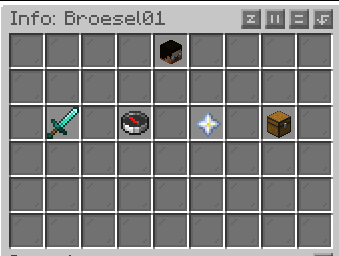
The current player-profile GUI includes, among other things:
- player information
- LuckPerms information
- inventory view
- armor and offhand
- EnderChest access
- fernsehheft page selection
- previous/next page arrows
- direct page selection The EnderChest icon is currently in GUI slot 37, exactly one complete GUI row below its previous position.

| Version | Minecraft | Loader | Download |
|---|---|---|---|
|
Titanium PlayerInfo 1.0.4 1.0.4 |
1.21, 1.21.1, 1.21.2, 1.21.3, 1.21.4, 1.21.5, 1.21.6, 1.21.7, 1.21.8, 1.21.9, 1.21.10, 1.21.11, 26.1, 26.1.1, 26.1.2, 26.2
|
bukkit, folia, paper, purpur, spigot
|
Download |
|
Titanium PlayerInfo 1.0.3 1.0.3 |
1.21, 1.21.1, 1.21.2, 1.21.3, 1.21.4, 1.21.5, 1.21.6, 1.21.7, 1.21.8, 1.21.9, 1.21.10, 1.21.11, 26.1, 26.1.1, 26.1.2, 26.2
|
folia, paper, purpur, spigot
|
Download |
|
Titanium PlayerInfo 1.0.2 1.0.2 |
1.21, 1.21.1, 1.21.2, 1.21.3, 1.21.4, 1.21.5, 1.21.6, 1.21.7, 1.21.8, 1.21.9, 1.21.10, 1.21.11, 26.1, 26.1.1, 26.1.2, 26.2
|
folia, paper, purpur, spigot
|
Download |
|
MC-PlayerInfo 1.0.1 1.0.1 |
1.21, 1.21.1, 1.21.2, 1.21.3, 1.21.4, 1.21.5, 1.21.6, 1.21.7, 1.21.8, 1.21.9, 1.21.10, 1.21.11, 26.1, 26.1.1, 26.1.2, 26.2
|
bukkit, paper, spigot
|
Download |
|
MC-PlayerInfo 1.0 1.0 |
1.21, 1.21.1, 1.21.2, 1.21.3, 1.21.4, 1.21.5, 1.21.6, 1.21.7, 1.21.8, 1.21.9, 1.21.10, 1.21.11, 26.1, 26.1.1, 26.1.2, 26.2
|
bukkit, paper, spigot
|
Download |