

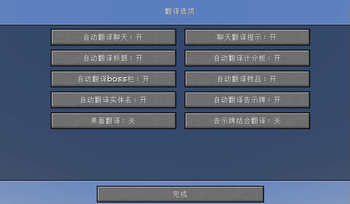
This mod serves as a translation tool within the game, designed to translate text found in various in-game elements without altering world data. It supports translating text in the chat window, scoreboard, bossbar, title, tooltip, sign, book content, entity names, and more.
Key Features
- Non-Intrusive Translation: Ensures that all functionalities do not modify the game world data.
- Multiple Translation Modes: Supports automatic translation, click-to-translate, hotkey translation, and more.
- Screen OCR Recognition: Can recognize text on screen and translate it.
- Hotkeys:
- Press U to open translation options.
- Press O to initiate screen recognition (OCR).
In-Game Commands
/transconfig config: Open the translator configuration screen to set up translation services, API keys, and other options. Can also be accessed via the Mod Menu./transconfig language <from> <to>: Set the source and target languages for translation./transconfig chatformat <format>: Set the chat translation display format./transconfig clearcache: Clear the translation cache./translate <text>: Command to translate provided text./translate-re <text>: Reverse translation command, translating from the target language back to the source language.
Supported Translation Services
The mod comes equipped with integration for the following translation services:
- OpenAI (with custom prompt support)
- Baidu Translate
- Youdao Translate
Users must obtain their own API keys from the respective platforms, then configure the translators via the Mod Menu or the /transconfig config command.
Custom OpenAI Prompt
If you use the OpenAI translator, you can edit the .minecraft/config/translator/prompt.md file to customize the translation prompt, allowing you to adjust translation style, terminology preferences, and more. Run /transconfig reload after making changes to apply them.
Note: The above instructions apply to version 3.0.0 and above. For versions below 3.0.0, please refer to the legacy project repository for documentation.
| Version | Minecraft | Loader | Download |
|---|---|---|---|
|
v3.0.0 for 1.18.2 3.0.0 |
1.18.2
|
fabric
|
Download |
|
v3.0.0 for 1.19.4 3.0.0 |
1.19.4
|
fabric
|
Download |
|
v3.0.0 for 1.20.1 3.0.0 |
1.20.1
|
fabric
|
Download |
|
v3.0.0 for 1.21.3 3.0.0 |
1.21.3
|
fabric
|
Download |
|
v3.0.0 for Minecraft 1.21.4 3.0.0 |
1.21.4
|
fabric
|
Download |
|
Translator 1.21.3+2.4.0 1.21.3-2.4.0 |
1.21.3
|
fabric
|
Download |
|
Translator 1.21+2.4.0 1.21-2.4.0 |
1.21
|
fabric
|
Download |
|
Translator 1.21+2.2.2 1.21-2.2.2 |
1.21
|
fabric
|
Download |
|
Translator 1.21.3+2.3.2 1.21.3-2.3.2 |
1.21.3
|
fabric
|
Download |
|
Translator 1.20.4+2.1.4 1.20.4-2.1.4 |
1.20.4
|
fabric
|
Download |
|
Translator 1.20.1+2.1.4 1.20.1-2.1.4 |
1.20.1
|
fabric
|
Download |
|
Translator 1.21.3+2.3.1 1.21.3-2.3.1 |
1.21.3
|
fabric
|
Download |
|
Translator 1.21+2.2.1 1.21-2.2.1 |
1.21
|
fabric
|
Download |
|
Translator 1.21.3+2.2.1 1.21.3-2.2.1 |
1.21.3
|
fabric
|
Download |
|
Translator 1.20.4+2.1.3 1.20.4-2.1.3 |
1.20.4
|
fabric
|
Download |
|
Translator 1.20.1+2.1.3 1.20.1-2.1.3 |
1.20.1
|
fabric
|
Download |
|
Translator 2.2.0+1.21 1.21-2.2.0 |
1.21
|
fabric
|
Download |
|
Translator 2.1.2+1.20.4 1.20.4-2.1.2 |
1.20.4
|
fabric
|
Download |
|
Translator 2.1.2+1.20.1 1.20.1-2.1.2 |
1.20.1
|
fabric
|
Download |
|
Translator 2.1.1+1.20.1 1.20.1-2.1.1 |
1.20.1
|
fabric
|
Download |
|
Translator 2.1.1+1.20.4 1.20.4-2.1.1 |
1.20.4
|
fabric
|
Download |
|
Translator 2.1.1+1.21 1.21-2.1.1 |
1.21
|
fabric
|
Download |