

Ultimine Rewind
Add undo/rewind functionality to FTB Ultimine. Made a mistake while vein mining? Press Ctrl+Z to restore your blocks!
Features
- 🔄 Undo Mining - Press Ctrl+Z to open the restoration interface
- 📦 Material System - Provide blocks to restore what you mined
- ✨ Creative Mode - No materials needed in creative mode
- 🔁 Partial Restore - Restore as many blocks as your materials allow, continue with Ctrl+Z
- 🌍 Multiplayer Safe - Works on servers with anti-dupe protection
- 🎨 Vanilla Style UI - Uses native chest interface
How to Use
- Mine blocks with FTB Ultimine
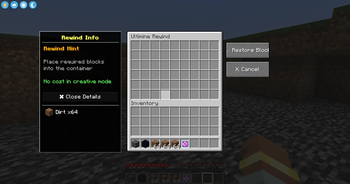
- Press Ctrl+Z to open the restoration menu
- Place materials into the container (same blocks you mined)
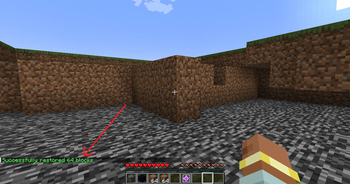
- Click "Restore Blocks" to undo your mining
Partial Restoration
Not enough materials? No problem!
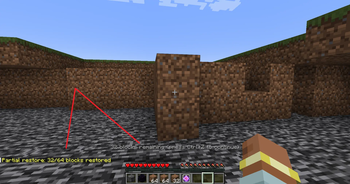
- The mod will restore as many blocks as possible
- Remaining blocks stay in the record
- Press Ctrl+Z again with more materials to continue
Requirements
- Minecraft 1.20.1
- Forge 47.0+
- FTB Ultimine (Required)
Notes
- Block entities (chests, furnaces) are restored empty to prevent item duplication
- Records expire after 10 minutes
- Only the last mining operation can be undone
- Works in both singleplayer and multiplayer
License
GNU LGPL 3.0
| Version | Minecraft | Loader | Download |
|---|---|---|---|
|
Ultimine Rewind 2.0.0 [Forge 1.20.1] 2.0.0 |
1.20.1
|
forge
|
Download |
|
Ultimine Rewind 2.1.0 [NeoForge 1.21.1] 2.1.0 |
1.21.1
|
neoforge
|
Download |
|
Ultimine Rewind 2.0.0 [NeoForge 26.1.2] 2.0.0 |
26.1.2
|
neoforge
|
Download |
|
Ultimine Rewind 1.21.1-2.0.0 1.21.1-2.0.0 |
1.21.1
|
neoforge
|
Download |
|
Ultimine Rewind 1.0.1 1.0.1 |
1.20.1
|
forge
|
Download |
|
Ultimine Rewind 1.0.0 1.0.0 |
1.20.1
|
forge
|
Download |