
Useful Saved Hotbars
a fabric mod that makes saved-hotbars a lot simpler to use
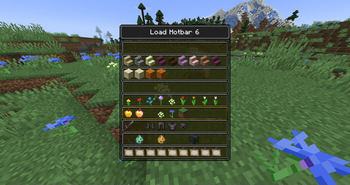
Now you don't have to remember which saved-hotbar has which number you can simply select it in a gui.
usage
Simply Press f6 (load) or f7 (save) and the appropriate menu will open. There simply click on the row you want to load/save and the action will be done.
F3 - mode
Alternatively you can also use a GameModeSelectionScreen (f3+f4) like menu.
for this you first need to bind 2 new keys in the settings.
Pressing f3 + <key> will open the menu. Letting go of f3 will load/save the currently selected hotbar.
features
- quickly load saved-hotbars
- quickly save saved-hotbars
- change hotkeys
Maintains Status
This Project is no longer maintained and will not receiver further updates. If somebody is interested in taking over this Project - please contact me via GitHub.
| Version | Minecraft | Loader | Download |
|---|---|---|---|
|
0.2.0+mc1.21.9 |
1.21.10, 1.21.9
|
fabric
|
Download |
|
0.2.0+mc1.21.6 |
1.21.6, 1.21.7, 1.21.8
|
fabric
|
Download |
|
0.2.0+mc1.21.5 |
1.21.5
|
fabric
|
Download |
|
0.2.0+mc1.21.2 |
1.21.2, 1.21.3, 1.21.4
|
fabric
|
Download |
|
0.2.0+mc1.21.0 |
1.21, 1.21.1
|
fabric
|
Download |
|
0.1.0+mc1.21.0 |
1.21
|
fabric
|
Download |
|
0.1.0+mc1.20.6 |
1.20.5, 1.20.6
|
fabric
|
Download |
|
0.1.0+mc1.20.4 |
1.20.1, 1.20.2, 1.20.3, 1.20.4
|
fabric
|
Download |