

Vein miner & Preview
Just crouch, look at one single ore from vein - you'll see the preview. Mine one - and all at once!
Warning
Custom tools, shovel and hoe avaiable only from usual versions, not "legacy".
Legacy-preview is completly broken at 1.19+. Turn it off via /scoreboard players set preview_enabled uvm.config 0
Categories
There is 4 configurable categories:
- pickaxe - diamonds, nether_quartz and emeralds
- axe - tree, wood and log
- shovel - gravel? clay?
- hoe.
Quality of Life things
If ore and his neighbor is around air when they're both will be mined. Preview (on crouch) also will show it
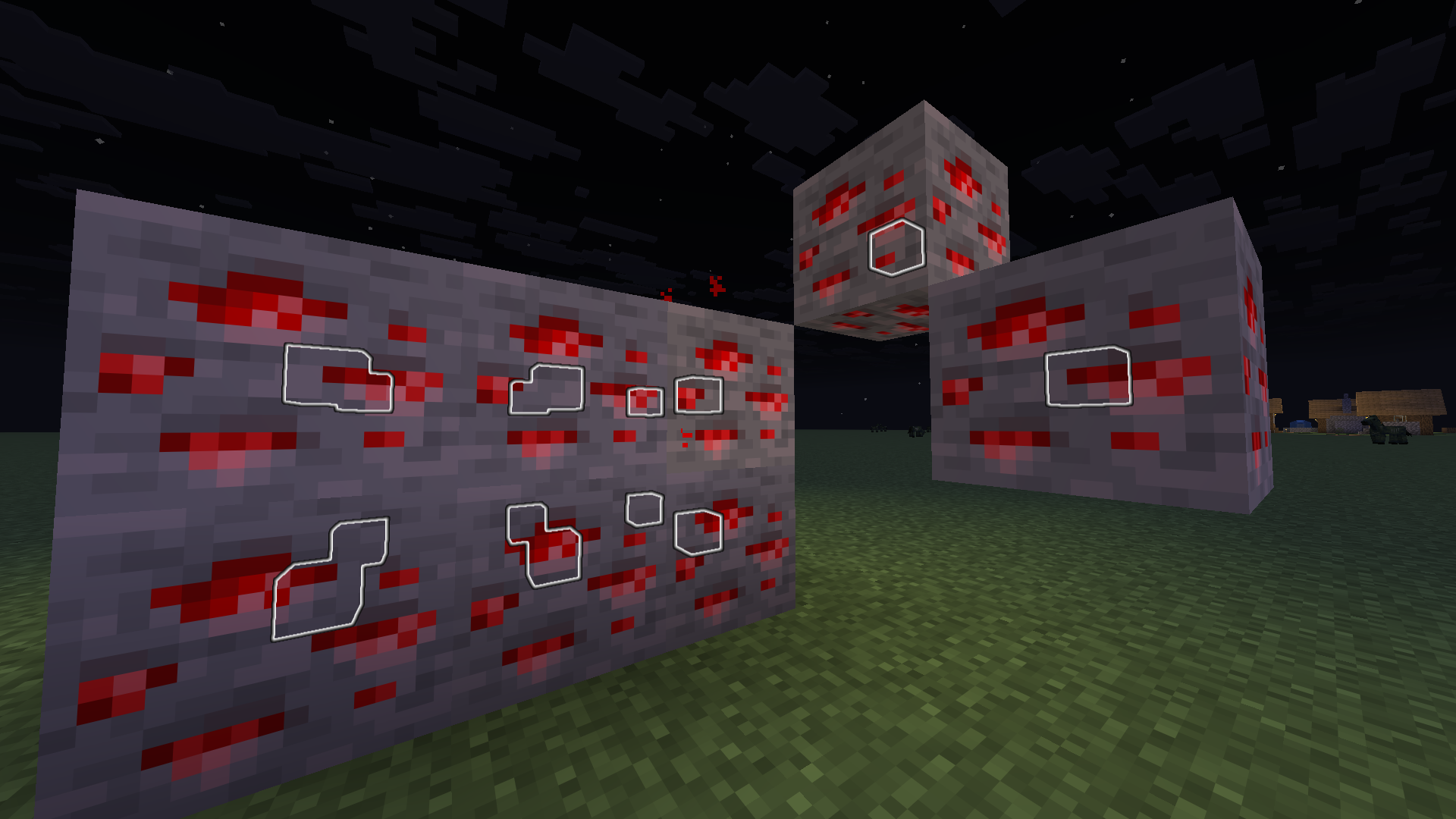
Custom things
Configuration? /add_* /function uvm:add_* commands for every tool. Syntax a little bit complicated
Add tools
/function uvm:add_tool {namespace: "minecraft", id: "wooden_hoe", category: "hoe"}
Add blocks
Pickaxe. Like "add ore from block cobblestone"
/function uvm:add_ore {b:'cobblestone'}
Axe. Im not sure with this, just not tested xd
/function uvm:add_log {b:'bamboo_block'}
Shovel
/function uvm:add_dig {b:'gravel'}
Hoe. is there a good verb for that thing? Also whole vein of sculk will not mined bc skulk not drops any items on destroy
/function uvm:add_harvest {b:'sculk'}
You also can add new block with /function uvm:add_mod
Short variant - literally "zinc ore from create can be mined with pickaxe"
/function uvm:add_mod {m:"create", b:"zinc_ore", c:"pickaxe"}`
Long variant - its same "block with id zincore from namespace create can be mined with tool from category pickaxe"
/function uvm:add_custom_block {namespace:"create", id:"zinc_ore", category:"pickaxe"}
List blocks
Did you know what you can see your custom blocks? /function uvm:list_custom_blocks will prints categories with list of added blocks

Remove things
With /function uvm:add_* commands there is /function uvm:remove_* ones:
/function uvm:remove_ore
/function uvm:remove_log
/function uvm:remove_dig
/function uvm:remove_harvest
/function uvm:remove_mod
/function uvm:remove_custom_block
I'll write examples... someday... and insert images and gif... i swear
It's literally a fork of quillphen's "Vein Miner & Preview"

Outline is actually glowing block_display with white_stained_glass model sized to 0.25x and positioned at center of block

Outline can be seen inside veins

Outline is actually glowing block_display with white_stained_glass... Only logs will be outlined, but leaves also be chopped

I said leaves also be chopped :shrug: But it's loud and scared my friends xd

Gravel added as custom blocks with shovel via `/function uvm:add_dig {b:"gravel"}`

leaves aren't drop anything?

yep, "mined" - it should be work as ore in this case...

I thinks with same reason as leaves

in chat i add sculk to category shovel and gave copper shovel. Not working :(
| Version | Minecraft | Loader | Download |
|---|---|---|---|
|
Vein Miner with Preview 1.4.0 1.4.0+mod |
26.2
|
fabric, forge, neoforge, quilt
|
Download |
|
Vein Miner with Preview 1.4.0 1.4.0 |
26.2
|
datapack
|
Download |
|
Vein Miner with Preview 1.3.4 1.3.4+mod |
26.1, 26.1.1, 26.1.2, 26.2
|
fabric, forge, neoforge, quilt
|
Download |
|
Vein Miner with Preview 1.3.4 1.3.4+mod |
1.20.5, 1.20.6
|
fabric, forge, neoforge, quilt
|
Download |
|
Vein Miner with Preview 1.5.5 1.5.5-legacy+mod |
1.13, 1.13.1, 1.13.2, 1.14, 1.14.1, 1.14.2, 1.14.3, 1.14.4, 1.15, 1.15.1, 1.15.2, 1.16, 1.16.1, 1.16.2, 1.16.3, 1.16.4, 1.16.5, 1.17, 1.17.1, 1.18, 1.18.1, 1.18.2, 1.19, 1.19.1, 1.19.2, 1.19.3, 1.19.4
|
fabric, forge, neoforge, quilt
|
Download |
|
Vein Miner with Preview 1.5.5 1.5.5-legacy |
1.13, 1.13.1, 1.13.2, 1.14, 1.14.1, 1.14.2, 1.14.3, 1.14.4, 1.15, 1.15.1, 1.15.2, 1.16, 1.16.1, 1.16.2, 1.16.3, 1.16.4, 1.16.5, 1.17, 1.17.1, 1.18, 1.18.1, 1.18.2, 1.19, 1.19.1, 1.19.2, 1.19.3, 1.19.4
|
datapack
|
Download |
|
Vein Miner with Preview 1.5.2 1.5.2-legacy |
1.13, 1.13.1, 1.13.2, 1.14, 1.14.1, 1.14.2, 1.14.3, 1.14.4
|
datapack
|
Download |
|
Vein Miner with Preview 1.3.4 1.3.4 |
26.1, 26.1.1, 26.1.2, 26.2
|
datapack
|
Download |
|
Vein Miner with Preview 1.3.4 1.3.4 |
1.20.5, 1.20.6
|
datapack
|
Download |
|
Vein Miner with Preview 1.3.4 1.3.4-legacy |
1.13, 1.13.1, 1.13.2, 1.14, 1.14.1, 1.14.2, 1.14.3, 1.14.4, 1.15, 1.15.1, 1.15.2, 1.16, 1.16.1, 1.16.2, 1.16.3, 1.16.4, 1.16.5, 1.17, 1.17.1, 1.18, 1.18.1, 1.18.2, 1.19, 1.19.1, 1.19.2, 1.19.3, 1.19.4
|
datapack
|
Download |
|
Vein Miner with Preview 1.0.1 1.0.1-1.14.2 |
1.13, 1.13.1, 1.13.2, 1.14, 1.14.1, 1.14.2, 1.14.3, 1.14.4
|
datapack
|
Download |
|
Vein Miner with Preview 1.1.0 1.1.0-1.20.5 |
1.20.5, 1.20.6
|
datapack
|
Download |
|
Vein Miner with Preview 1.14 1.0.0-1.14.2 |
1.13, 1.13.1, 1.13.2, 1.14, 1.14.1, 1.14.2, 1.14.3, 1.14.4
|
datapack
|
Download |
|
v1.0.6 1.0.6-1.20.5 |
1.20.5, 1.20.6, 1.21, 1.21-pre1, 1.21-pre2, 1.21-pre3, 1.21-pre4, 1.21-rc1, 1.21.1, 1.21.2, 1.21.2-pre1, 1.21.2-pre2, 1.21.3, 1.21.4, 1.21.5, 24w18a, 24w19a, 24w19b, 24w20a, 24w21a, 24w21b, 24w33a, 24w34a, 24w35a, 24w36a, 24w37a, 24w38a, 24w39a, 24w40a, 24w44a, 24w45a, 24w46a
|
datapack
|
Download |