

VelocityTP
跨服传送插件 — 为 Velocity 代理而生
一款轻量级的 Velocity 代理端插件,支持跨服搜索玩家并一键传送,深度适配 LuckPerms 权限系统,无需在子服务端安装任何内容。
语言 / Language
简体中文
简介
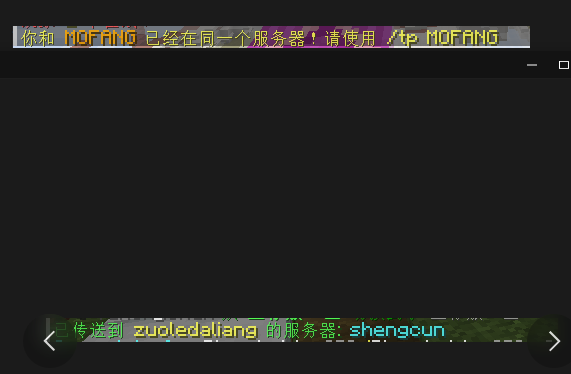
VelocityTP 是一款运行在 Velocity 代理端 的插件,提供 /vctp 命令让有权限的玩家可以跨服传送到任意在线玩家所在的子服务器。
核心理念: 仅代理端安装,子服务端零侵入。
功能特性
| 特性 | 说明 |
|---|---|
| 跨服传送 | /vctp <玩家ID> — 查找全服目标玩家,将你传送到其所在服务器 |
| 零侵入 | 只需安装在 Velocity 代理端,子服务端无需安装任何额外插件 |
| 权限控制 | 深度集成 LuckPerms,同时支持 Velocity 原生权限系统 |
| 中英双语 | 内置简体中文和英文语言包,通过 config.yml 一键切换 |
| 服务器别名 | 自定义子服务器显示名称,支持 & 颜色代码 |
| Tab 补全 | 输入 /vctp 后按 Tab 自动补全在线玩家名 |
| 别名命令 | /velocitytp 同样可用 |
命令
| 命令 | 说明 |
|---|---|
/vctp <玩家ID> |
传送到目标玩家所在的服务器 |
/velocitytp <玩家ID> |
/vctp 的别名 |
权限
| 权限节点 | 说明 |
|---|---|
velocitytp.use |
允许使用 /vctp 命令(基础权限) |
velocitytp.admin |
管理员权限 |
velocitytp.* |
通配权限 |
LuckPerms 授权示例:
/lp group default permission set velocitytp.use true
/lp user Steve permission set velocitytp.use true
配置
config.yml
# 语言设置
language: zh_CN    # zh_CN = 简体中文, en_US = English

# 服务器别名(支持 & 颜色代码)
server-aliases:
  lobby: "&a登录服"
  survival: "&b生存服"
  creative: "&6创造服"
  minigame: "&d小游戏"
语言文件
插件启动后会在 plugins/velocitytp/lang/ 目录下生成 zh_CN.yml 和 en_US.yml,你可以直接编辑这些文件修改任意提示文本,支持 & 颜色代码。
编辑后重启 Velocity 代理即可生效。
构建
前置要求: Java 11+、Maven
git clone <你的仓库地址>
cd VelocityTP
mvn clean package
生成的 JAR 文件位于 target/VelocityTP-1.1.0.jar。
安装
- 将 JAR 文件放入 Velocity 代理端的
plugins/目录 - 重启 Velocity 代理
- 确认控制台输出包含 "VelocityTP v1.1.0" 的启动横幅
- 使用 LuckPerms 或权限管理工具授权玩家
velocitytp.use权限 - 在游戏中输入
/vctp <玩家ID>体验跨服传送
兼容性
| 项目 | 要求 |
|---|---|
| Velocity | 3.0.x ~ 3.3.x |
| Java | 11+ |
| LuckPerms | 可选(5.4+) |
| 子服务端 | 任何版本 / 任何核心,无需安装任何插件 |
依赖关系
- Velocity API — 必须(代理端自带)
- LuckPerms — 可选(如有则自动启用权限检查)
工作原理
  ┌─────────────────────────────────┐
  │        Velocity 代理             │
  │  ┌───────────────────────────┐  │
  │  │      VelocityTP 插件       │  │
  │  │  ┌─────┐  ┌────────────┐  │  │
  │  │  │/vctp│→│TeleportMgr │  │  │
  │  │  └─────┘  │ 查找玩家    │  │  │
  │  │           │ 切换服务器  │  │  │
  │  │           └─────┬──────┘  │  │
  │  └─────────────────┼─────────┘  │
  │                    │            │
  └────────────────────┼────────────┘
                       │
          ┌────────────┼────────────┐
          ▼            ▼            ▼
      ┌──────┐    ┌──────┐    ┌──────┐
      │生存服│    │创造服│    │登录服│ ← 子服务端不需要任何插件
      └──────┘    └──────┘    └──────┘
English
Introduction
VelocityTP is a lightweight plugin for the Velocity proxy that enables cross-server teleportation. With the /vctp command, authorized players can teleport to any online player's server — no backend server modifications required.
Core philosophy: Proxy-only installation, zero intrusion on backend servers.
Features
| Feature | Description |
|---|---|
| Cross-server teleport | /vctp <player> — find target player across all servers and connect you to their server |
| Zero intrusion | Install only on the Velocity proxy; no plugins needed on backend servers |
| Permission control | Deep LuckPerms integration with Velocity native permission fallback |
| Dual language | Built-in Chinese (Simplified) and English, switchable via config.yml |
| Server aliases | Custom display names for backend servers with & color code support |
| Tab completion | Press Tab after /vctp to auto-complete online player names |
| Alias command | /velocitytp works as an alternative |
Commands
| Command | Description |
|---|---|
/vctp <player> |
Teleport to the target player's server |
/velocitytp <player> |
Alias for /vctp |
Permissions
| Node | Description |
|---|---|
velocitytp.use |
Allows using /vctp (basic permission) |
velocitytp.admin |
Admin permission |
velocitytp.* |
Wildcard (all permissions) |
LuckPerms examples:
/lp group default permission set velocitytp.use true
/lp user Steve permission set velocitytp.use true
Configuration
config.yml
# Language setting
language: en_US    # zh_CN = 简体中文, en_US = English

# Server aliases (supports & color codes)
server-aliases:
  lobby: "&aLogin"
  survival: "&bSurvival"
  creative: "&6Creative"
  minigame: "&dMinigame"
Language files
On first startup, the plugin copies zh_CN.yml and en_US.yml to plugins/velocitytp/lang/. You can edit these files directly to customize any message text — & color codes are fully supported.
Restart the Velocity proxy to apply changes.
Installation
- Place the JAR file in your Velocity proxy's
plugins/directory - Restart the Velocity proxy
- Verify the console shows the "VelocityTP v1.1.0" startup banner
- Grant players the
velocitytp.usepermission via LuckPerms or your permission manager - Use
/vctp <player>in-game to teleport across servers
Compatibility
| Component | Requirement |
|---|---|
| Velocity | 3.0.x ~ 3.3.x |
| Java | 11+ |
| LuckPerms | Optional (5.4+) |
| Backend servers | Any version / any core, no plugin required |
Dependencies
- Velocity API — Required (provided by the proxy)
- LuckPerms — Optional (auto-detected for permission checks)
How It Works
  ┌─────────────────────────────────┐
  │        Velocity Proxy            │
  │  ┌───────────────────────────┐  │
  │  │      VelocityTP Plugin     │  │
  │  │  ┌─────┐  ┌────────────┐  │  │
  │  │  │/vctp│→│TeleportMgr │  │  │
  │  │  └─────┘  │ Find Player│  │  │
  │  │           │ Switch Srv │  │  │
  │  │           └─────┬──────┘  │  │
  │  └─────────────────┼─────────┘  │
  │                    │            │
  └────────────────────┼────────────┘
                       │
          ┌────────────┼────────────┐
          ▼            ▼            ▼
      ┌──────┐    ┌──────┐    ┌──────┐
      │Surv. │    │Creat.│    │Login │ ← No plugin needed on backend
      └──────┘    └──────┘    └──────┘
License
MIT License © 2024 YuHongChen(LiquidTeam)
| Version | Minecraft | Loader | Download |
|---|---|---|---|
|
VelocityTP 1.2.0 1.2.0 |
1.10, 1.10.1, 1.10.2, 1.11, 1.11.1, 1.11.2, 1.12, 1.12.1, 1.12.2, 1.13, 1.13.1, 1.13.2, 1.14, 1.14.1, 1.14.2, 1.14.3, 1.14.4, 1.15, 1.15.1, 1.15.2, 1.16, 1.16.1, 1.16.2, 1.16.3, 1.16.4, 1.16.5, 1.17, 1.17.1, 1.18, 1.18.1, 1.18.2, 1.19, 1.19.1, 1.19.2, 1.19.3, 1.19.4, 1.20, 1.20.1, 1.20.2, 1.20.3, 1.20.4, 1.20.5, 1.20.6, 1.21, 1.21.1, 1.21.10, 1.21.11, 1.21.2, 1.21.3, 1.21.4, 1.21.5, 1.21.6, 1.21.7, 1.21.8, 1.21.9, 1.7.10, 1.7.2, 1.7.3, 1.7.4, 1.7.5, 1.7.6, 1.7.7, 1.7.8, 1.7.9, 1.8, 1.8.1, 1.8.2, 1.8.3, 1.8.4, 1.8.5, 1.8.6, 1.8.7, 1.8.8, 1.8.9, 1.9, 1.9.1, 1.9.2, 1.9.3, 1.9.4, 26.1, 26.1.1, 26.1.2, 26.2
|
velocity
|
Download |
|
VelocityTP 1.1.0 1.1.0 |
1.10, 1.10.1, 1.10.2, 1.11, 1.11.1, 1.11.2, 1.12, 1.12.1, 1.12.2, 1.13, 1.13.1, 1.13.2, 1.14, 1.14.1, 1.14.2, 1.14.3, 1.14.4, 1.15, 1.15.1, 1.15.2, 1.16, 1.16.1, 1.16.2, 1.16.3, 1.16.4, 1.16.5, 1.17, 1.17.1, 1.18, 1.18.1, 1.18.2, 1.19, 1.19.1, 1.19.2, 1.19.3, 1.19.4, 1.20, 1.20.1, 1.20.2, 1.20.3, 1.20.4, 1.20.5, 1.20.6, 1.21, 1.21.1, 1.21.10, 1.21.11, 1.21.2, 1.21.3, 1.21.4, 1.21.5, 1.21.6, 1.21.7, 1.21.8, 1.21.9, 1.7.10, 1.7.2, 1.7.3, 1.7.4, 1.7.5, 1.7.6, 1.7.7, 1.7.8, 1.7.9, 1.8, 1.8.1, 1.8.2, 1.8.3, 1.8.4, 1.8.5, 1.8.6, 1.8.7, 1.8.8, 1.8.9, 1.9, 1.9.1, 1.9.2, 1.9.3, 1.9.4, 26.1, 26.1.1, 26.1.2, 26.2
|
velocity
|
Download |
|
VelocityTP 1.0.0 1.0.0 |
1.10, 1.10.1, 1.10.2, 1.11, 1.11.1, 1.11.2, 1.12, 1.12.1, 1.12.2, 1.13, 1.13.1, 1.13.2, 1.14, 1.14.1, 1.14.2, 1.14.3, 1.14.4, 1.15, 1.15.1, 1.15.2, 1.16, 1.16.1, 1.16.2, 1.16.3, 1.16.4, 1.16.5, 1.17, 1.17.1, 1.18, 1.18.1, 1.18.2, 1.19, 1.19.1, 1.19.2, 1.19.3, 1.19.4, 1.20, 1.20.1, 1.20.2, 1.20.3, 1.20.4, 1.20.5, 1.20.6, 1.21, 1.21.1, 1.21.10, 1.21.11, 1.21.2, 1.21.3, 1.21.4, 1.21.5, 1.21.6, 1.21.7, 1.21.8, 1.21.9, 1.7.10, 1.7.2, 1.7.3, 1.7.4, 1.7.5, 1.7.6, 1.7.7, 1.7.8, 1.7.9, 1.8, 1.8.1, 1.8.2, 1.8.3, 1.8.4, 1.8.5, 1.8.6, 1.8.7, 1.8.8, 1.8.9, 1.9, 1.9.1, 1.9.2, 1.9.3, 1.9.4, 26.1, 26.1.1, 26.1.2, 26.2
|
velocity
|
Download |