

Features
How to interact
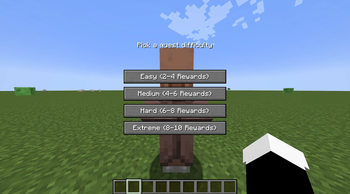
Simply Shift + Right-Click (Sneak-interact) any Villager in the world to open the Quest Selection menu instead of their standard trading interface!
Choose Your Difficulty
Villagers will offer you a choice of 4 difficulties, which completely dynamically scales both the challenge and the rewards!
- Easy: 5 - 15 objectives
- Medium: 16 - 32 objectives
- Hard: 32 - 64 objectives
- Extreme: 64 - 128 objectives
4 Dynamic Quest Types
- Gather Quests (30%): Collect specific items in your inventory.
- Kill Quests (30%): Hunt down specific hostile or passive mobs.
- Mine Quests (30%): Break specific blocks in the world.
- Delivery Quests (10%): Deliver a package to a randomly chosen target villager in the world. The target villager will literally glow through walls and have a special nametag so you can track them down!
Massively Profitable Loot System
Doing quests is highly rewarding! The reward amount you receive will always be 150% (1.5x) of the quest's required amount. If you are asked to gather 64 Wheat, you will be paid with 96 items! The reward table rolls on creation:
- 40% Early-Game Items: Get large stacks of Iron Ingots, Gold, Redstone, Coal, Bread, Copper, etc.
- 25% Emeralds: Pure, unadulterated Emerald stacks to fuel your normal trading.
- 20% High-Tier Loot: Extremely valuable drops like Diamonds, Golden Apples, XP Bottles, Lapis, Quartz, and Ender Pearls. (Note: Pure Diamond and Golden Apple drops are slightly re-balanced so they don't break your economy!)
- 10% Enchanted Books: Drops 1 to 4 Enchanted Books (scaling with difficulty) with completely random enchantments and levels pulled straight from the game's registry!
- 5% Pure Chaos: Rolls a completely random stackable item from the entire game! You might get 120 dirt, or you might get 120 Obsidian!
📖 Custom Quest Log & UI
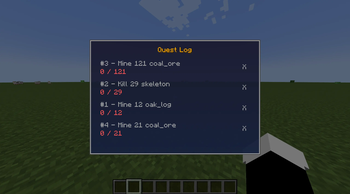
- Press J (configurable in controls) at any time to open your gorgeous Quest Log.
- Easily cancel any quest you don't want to do by clicking the red 'X' button in your log.
Villager Cooldowns
When you successfully complete a quest or cancel one, that specific villager will need to rest and is placed on a 5-Minute Cooldown. You won't have to guess who is on cooldown—exhausted villagers will visibly have a red [✘ Cooldown] tag hovering over their heads!
⚙️ Installation
Requires Fabric API and Fabric Loader (1.21). Just drop the .jar into your mods/ folder and you are ready to go! Both Client and Server are required for multiplayer.
| Version | Minecraft | Loader | Download |
|---|---|---|---|
|
Village Quests 1.1.0 1.1.0 |
1.21, 1.21.1, 1.21.10, 1.21.11, 1.21.2, 1.21.3, 1.21.4, 1.21.5, 1.21.6, 1.21.7, 1.21.8, 1.21.9
|
fabric
|
Download |