

🎵 VinylCraft 1.0.0 — Initial Release
✨ Features
- 🎧 Play MP3, OGG and WAV files directly in Minecraft
- 📂 Create and manage playlists in-game
- 🔀 Shuffle and 🔁 Repeat modes
- 🔊 Smooth volume slider
- 🖼️ Album art display in HUD and GUI
📁 How to use
- Place your music files in
.minecraft/music/ - Press P to open VinylCraft
- Enjoy your music!
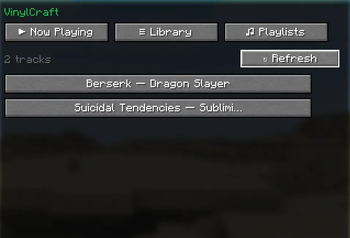
Browse all your MP3, OGG and WAV files from the .minecraft/music/ folder. Click any track to play it instantly.
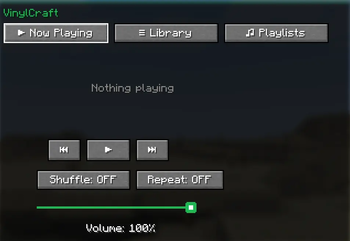
Full playback controls with previous, play/pause and next buttons. Toggle Shuffle and Repeat modes, and adjust volume with a smooth slider.
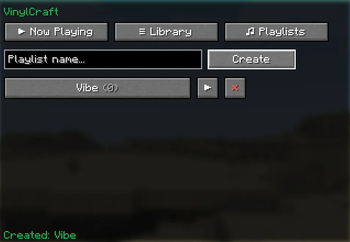
Create and manage your own playlists in-game. Type a name, hit Create, and start adding tracks. Play or delete playlists with a single click.
| Version | Minecraft | Loader | Download |
|---|---|---|---|
|
VinylCraft 1.2.0 1.2.0 |
26.2
|
fabric
|
Download |
|
VinylCraft 1.1-Release 1.1 |
1.21.11
|
fabric
|
Download |
|
VinylCraft 1.1-Release 1.1 |
1.21.10
|
fabric
|
Download |
|
VinylCraft 1.1-Release 1.1 |
1.21.9
|
fabric
|
Download |
|
VinylCraft 1.1-Release 1.1 |
1.21.8
|
fabric
|
Download |
|
VinylCraft 1.1-Release 1.1 |
1.21.7
|
fabric
|
Download |
|
VinylCraft 1.1-Release 1.1 |
1.21.6
|
fabric
|
Download |
|
VinylCraft 1.1-Release 1.1 |
1.21.1
|
fabric
|
Download |
|
VinylCraft 1.1-Release 1.1 |
1.21.3
|
fabric
|
Download |
|
VinylCraft 1.1-Release 1.1 |
1.21.4
|
fabric
|
Download |
|
VinylCraft 1.1-Release 1.1 |
1.21.5
|
fabric
|
Download |
|
VinylCraft 1.0-Release 1.0 |
1.21.5
|
fabric
|
Download |