

VIP Auctions
AuctionHouse 26.10 by VIP Plugins
Buy now, bid, and show listings in the world.





About
Players list the item in their hand as Buy Now or a bid auction. Shoppers browse a GUI, search, click world booths, and collect expired or cancelled items.
Works on Paper, Folia, and ShreddedPaper. Vault is optional.
Buy Now and bidding, with anti-snipe Search, listings GUI, and collect Frame, glass, and armor-stand booths Optional holograms and glowing signs Vault, internal, or item economy Listing limits, blacklist, and fees
World booths
Staff pair displays in the world. Listings rotate onto them automatically. Click a booth to buy or bid.
| Kind | What players see |
|---|---|
| Item frame | The listed item in a frame |
| Glass case | A floating item that spins |
| Armor stand | Worn armor, or the item in hand |
| Hologram | Name, price, and click hint over any booth |
| Sign | Optional paired sign with glow |
/auction connect <buy|bid> [frame|glass|stand] [sign|holo|both]
Each listing shows on at most one booth at a time. Turn that off with displays.unique-listings: false.
Setup
- Drop
AH-26.10.jarintoplugins/ - Start the server once
- Edit
plugins/AuctionHouse/config.ymlandlang/en.yml - Run /auction reload
- Pair booths with /auction connect
Missing config keys from later updates are filled in without wiping your comments.
Economy
| Mode | How it pays |
|---|---|
vault |
Vault if installed, otherwise internal balances |
internal |
Plugin balances via /auction eco |
item |
A configured material (default gold ingots) |
Commands
| Command | What it does |
|---|---|
| /auction | Open the auction house |
| /auction sell <price> | List the item in your hand as Buy Now |
| /auction bid <starting> | List the item in your hand for bidding |
| /auction search <query> | Search listings |
| /auction listings | View and cancel your listings |
| /auction collect | Collect expired, cancelled, or won items |
| /auction eco balance | View your balance |
| /auction connect ... | Pair a frame, glass case, or armor stand |
| /auction disconnect | Unpair a booth |
| /auction reload | Reload config and language |
| /auction eco give|take|set | Manage internal balances |
Aliases: /ah · /ahouse
Permissions
| Permission | Default | What it allows |
|---|---|---|
auctionhouse.use |
true | Open the GUI |
auctionhouse.sell |
true | List items |
auctionhouse.buy |
true | Buy listings |
auctionhouse.bid |
true | Place bids |
auctionhouse.collect |
true | Collect items |
auctionhouse.connect |
op | Pair booths |
auctionhouse.disconnect |
op | Unpair booths |
auctionhouse.reload |
op | Reload config |
auctionhouse.eco |
op | Manage internal balances |
auctionhouse.admin |
op | All staff permissions |
Experimental rent
Off by default. Edit plugins/AuctionHouse/experimental.json:
{
  "rentable-booths": false,
  "stand-full-armor": false
}
| Flag | What it does |
|---|---|
rentable-booths |
Players rent a booth so only their listings show there |
stand-full-armor |
Rented stands can show a full armor set |
Leave both false unless you want to try it. This may change in later monthly builds.
What's new in 26.10
- Glass cases and armor-stand booths
- Holograms on frames, glass, and stands
- Configurable spin speed and hologram height
- Unique listing rotation
- Safer listing fees, prices, GUI rows, reload, and Folia collections
- Update checker: Modrinth first, then Spigot
After updating, run /auction reload or restart once.
If you still have hologram-offset: 1.9, use the new per-type offsets:
displays:
  frame:
    hologram-offset: 0.85
  glass:
    hologram-offset: 0.85
  stand:
    hologram-offset: 2.55
Set the Modrinth version number to 26.10 so the update checker matches the jar.
Requirements
- Paper, Folia, or ShreddedPaper 1.21.x
- Java 21
- Vault optional
Monthly Updates
- This plugin is updated monthly and labeled as such. (Esample - 26.10 | 26 is the year and 10 is the month.)
Anonymous bStats can be turned off with metrics: false. The update checker can be turned off in config.
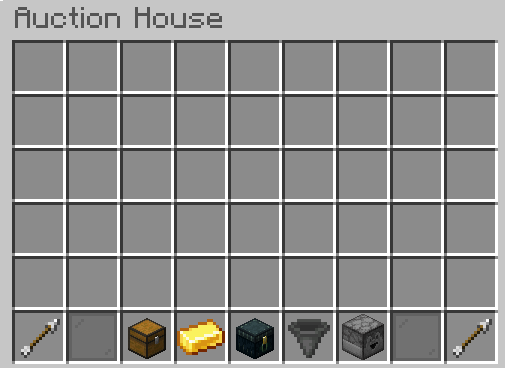
This is the Gui. The arrows are for each page, The Chest is for my listings, The Gold Bar is for Auction Info, The Enderchest is to collect your items, The Hopper is to sort the items by type, The Dropper is to sort bids or buy auction types.
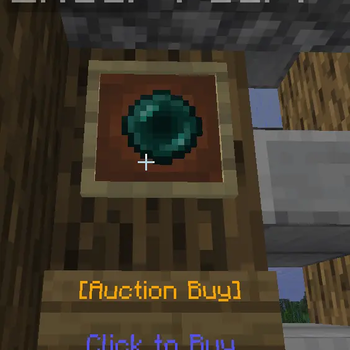
This screenshot shows the buy display type. You can create one by running /ah connect sell {price} (Then right click a Sign and Item Frame to sync them up)
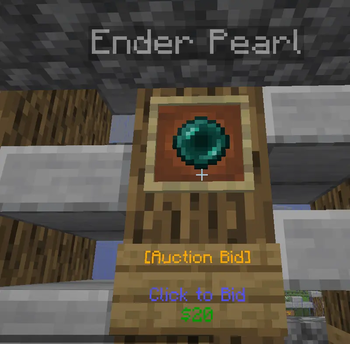
This screenshot shows the bid display type. You can create one by running /ah connect bid {Starting Bid Price} (Then right click a Sign and Item Frame to sync them up)
| Version | Minecraft | Loader | Download |
|---|---|---|---|
|
VIP Auctions 26.10 26.10 |
1.21, 1.21.1, 1.21.2, 1.21.3, 1.21.4, 1.21.5, 1.21.6, 1.21.7, 1.21.8, 1.21.9, 1.21.10, 1.21.11
|
folia, paper
|
Download |
|
VIP Auctions Alpha-1.0.1 Alpha-1.0.1 |
1.21.11
|
folia, paper
|
Download |
|
VIP Auctions Alpha-1.0.0 Alpha-1.0.0 |
1.21, 1.21.11
|
folia, paper
|
Download |