

VoteKick
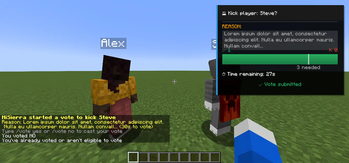
A democratic voting system that allows players to collectively remove disruptive players from the server through a clean, fair voting process.
Features
- Simple Voting Interface - Unobtrusive UI with F1/F2 keybinds or chat commands
- Anti-Abuse Protection - Prevents harassment and vote spam with cooldowns and immunity periods
- Configurable Client UI - Adjustable scaling, positioning, and visual options
- Real-time Vote Tracking - Live progress bars and vote counts
- Flexible Configuration - Extensive server-side settings for fine-tuning
Usage
Starting a Vote
/votekick <player> <reason>
/vk <player> <reason>
Voting
- Press F1 for YES (kick player)
- Press F2 for NO (keep player)
- Commands:
/vote yesor/vote no
Status
/vote status
Admin Commands
/votekick-admin cancel
/votekick-admin force
/votekick-admin reload
/votekick-admin history [page]
Requires the votekick.admin permission (or op level configured in permissions_admin_default_level).
cancel ends the active vote without a kick; force ends it as passed.
Configuration
Server Configuration
Located in config/votekick.properties:
# Basic Settings
vote_duration_seconds=30
vote_pass_percentage=0.6
minimum_players=2
cooldown_seconds=120

# Protection System
new_player_protection_enabled=true
post_kick_protection_enabled=true
harassment_detection_enabled=true
vote_threshold_modifiers_enabled=true

# Customization
require_kick_reason=true
allow_self_voting=false

# Permissions (default op levels)
permissions_enabled=true
permissions_start_default_level=0
permissions_vote_default_level=0
permissions_admin_default_level=2
permissions_exempt_default_level=2

# Vote History
vote_history_enabled=true
vote_history_max_entries=200
vote_history_retention_days=90
Client Configuration
Customize your voting experience through:
- ModMenu Integration - Graphical configuration screen
- Properties File -
config/votekick-client.propertiesfor manual editing
Options include UI scaling, panel positioning, sound controls, and animation settings.
Permissions
Permission nodes:
votekick.start— allow starting votesvotekick.vote— allow casting votesvotekick.admin— allow admin commandsvotekick.exempt— exempt a player from being vote-kicked
Defaults are controlled by permissions_*_default_level in the server config (0 = all, 2 = ops).
If a permissions API is present (Fabric Permissions API or LuckPerms on Fabric/NeoForge), the nodes above are checked;
otherwise the defaults apply.
LuckPerms setup
- Fabric: install
LuckPermsandfabric-permissions-apion the server. - NeoForge: install
LuckPermson the server.
Example grants:
/lp group default permission set votekick.start true
/lp group default permission set votekick.vote true
/lp group mod permission set votekick.admin true
/lp group mod permission set votekick.exempt true
Vote History
History is stored in config/votekick_history.json and follows the retention/max entry limits.
Anti-Abuse Features
- New Player Protection - Grace period for first-time joiners
- Post-Kick Immunity - Temporary protection after being kicked
- Harassment Detection - Automatic protection for repeatedly targeted players
- Vote Cooldowns - Prevents spam voting and target harassment
- Threshold Modifiers - Requires more votes to kick frequently kicked players
Requirements
- Fabric: Fabric API (required), ModMenu (optional for GUI configuration)
- NeoForge: no extra dependencies
- Must be installed on both client and server
Default Behavior
- Server operators and players with permission level 2+ are exempt from being vote-kicked.
- All other players can participate in voting (unless protected).
Compatibility
- Minecraft 1.20.1 (Fabric only)
- Minecraft 1.20.4, 1.20.6, 1.21.1, 1.21.4 (Fabric + NeoForge)
| Version | Minecraft | Loader | Download |
|---|---|---|---|
|
VoteKick 3.0.0 3.0.0+1.21.11-neoforge |
1.21.11
|
neoforge
|
Download |
|
VoteKick 3.0.0 3.0.0+1.21.10-neoforge |
1.21.9
|
neoforge
|
Download |
|
VoteKick 3.0.0 3.0.0+1.21.9-neoforge |
1.21.9
|
neoforge
|
Download |
|
VoteKick 3.0.0 3.0.0+1.21.8-neoforge |
1.21.8
|
neoforge
|
Download |
|
VoteKick 3.0.0 3.0.0+1.21.6-neoforge |
1.21.6
|
neoforge
|
Download |
|
VoteKick 3.0.0 3.0.0+1.21.4-neoforge |
1.21.4
|
neoforge
|
Download |
|
VoteKick 3.0.0 Fabric 1.21.6 3.0.0+1.21.6-fabric |
1.21.6
|
fabric
|
Download |
|
VoteKick 3.0.0 Fabric 1.21.4 3.0.0+1.21.4-fabric |
1.21.4
|
fabric
|
Download |
|
VoteKick 3.0.0 Fabric 1.21.11 3.0.0+1.21.11-fabric |
1.21.11
|
fabric
|
Download |
|
VoteKick 3.0.0 Neoforge 1.20.6 3.0.0+1.20.6-neoforge |
1.20.6
|
neoforge
|
Download |
|
VoteKick 3.0.0 Neoforge 1.21.1 3.0.0+1.21.1-neoforge |
1.21.1
|
neoforge
|
Download |
|
VoteKick 3.0.0 Neoforge 1.20.4 3.0.0+1.20.4-neoforge |
1.20.4
|
neoforge
|
Download |
|
VoteKick 3.0.0 Fabric 1.21.10 3.0.0+1.21.10-fabric |
1.21.10
|
fabric
|
Download |
|
VoteKick 3.0.0 Fabric 1.21.1 3.0.0+1.21.1-fabric |
1.21.1
|
fabric
|
Download |
|
VoteKick 3.0.0 Fabric 1.20.1 3.0.0+1.20.1-fabric |
1.20.1
|
fabric
|
Download |
|
VoteKick 3.0.0 Fabric 1.20.4 3.0.0+1.20.4-fabric |
1.20.4
|
fabric
|
Download |
|
VoteKick 3.0.0 Fabric 1.20.6 3.0.0+1.20.6-fabric |
1.20.6
|
fabric
|
Download |
|
VoteKick 2.0.0 (1.20.1-1.20.4) 2.0.0 |
1.20.1, 1.20.2, 1.20.3, 1.20.4
|
fabric
|
Download |
|
VoteKick 2.0.0 (1.21.4) 2.0.0 |
1.21.4
|
fabric
|
Download |
|
VoteKick 1.0.4 1.0.4 |
1.20.1, 1.20.2, 1.20.3, 1.20.4
|
fabric
|
Download |
|
VoteKick 1.0.4 1.0.4 |
1.21.4
|
fabric
|
Download |
|
VoteKick 1.0.3 1.0.3 |
1.20.1, 1.20.2, 1.20.3, 1.20.4
|
fabric
|
Download |
|
VoteKick 1.0.2 1.0.2 |
1.21.4
|
fabric
|
Download |
|
VoteKick 1.0.1 1.0.1 |
1.21.4
|
fabric
|
Download |
|
VoteKick 1.0.0 1.0.0 |
1.21.4
|
fabric
|
Download |