

VServerSigns
Turn ordinary Minecraft signs into animated, intelligent server portals.
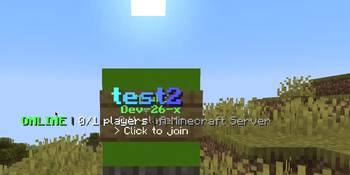
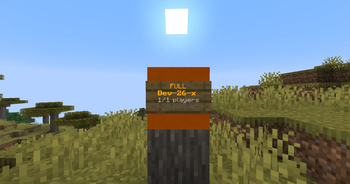
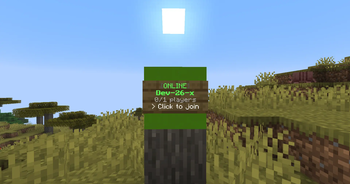
VServerSigns brings your lobby to life with real-time server signs for Paper and Folia. Show live player counts, capacity, MOTDs, ping, maintenance states, queues, and availability directly in the world—then send players to a named Velocity server or a public host:port with one click.
From a single survival sign to a complete multi-lobby network, VServerSigns gives you fast status updates, polished animations, smart routing, and powerful in-game management in one universal JAR.
No companion Velocity plugin is required. Install VServerSigns only on the Paper or Folia server that contains the signs.
Why VServerSigns?
- Live server data — online players, maximum slots, MOTD, ping, utilization, failure reason, and last update
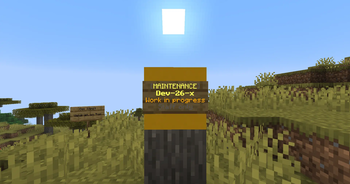
- Animated sign layouts — independent animations for online, full, offline, maintenance, and unknown states
- Velocity and direct transfers — connect through a registered Velocity server name or a public Minecraft address
- Smart server pools — route with least-players, round-robin, random, or first-available selection
- Built-in queues — standard and permission-based premium queues with live positions, timeouts, and fallbacks
- Maintenance tools — control individual signs or complete sign groups
- Personal access displays — unauthorized players see a private
ACCESS DENIEDsign without changing the sign for everyone else - Look previews — show a polished title with the server name, state, player count, and optional MOTD while looking at a sign
- Reusable profiles and presets — share layouts, permissions, backing blocks, particles, sounds, and titles across signs
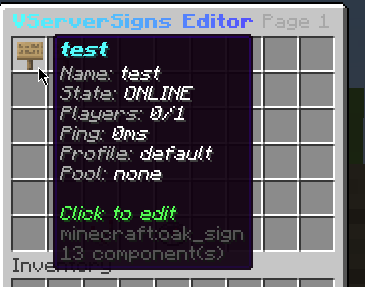
- Visual admin editor — manage signs, targets, profiles, pools, maintenance, and feature switches in-game
- PlaceholderAPI support — use placeholders from other plugins and expose VServerSigns data to them
- Performance-first updates — asynchronous, deduplicated status checks and cached rendering avoid unnecessary world updates
- Native Paper and Folia scheduling — region-safe sign rendering, player feedback, queues, and transfers
- One universal download — the same JAR supports every Paper and Folia version listed below
More than a server selector
Every managed sign can have its own:
- Display name and connection target
- Layout, animation, and reusable profile
- Access permission and personal locked design
- Server pool and fallback destination
- Maintenance state and sign group
- Status-dependent backing blocks
- Click sounds, particles, and look titles
VServerSigns protects managed signs and their supporting blocks from accidental destruction. Removing a sign through /vsign remove restores its original backing block.
Smart routing and server pools
Connect a sign to one server or an entire pool of backends. Pool status is calculated from the available members, and clicks are routed using one of four strategies:
LEAST_PLAYERSROUND_ROBINRANDOMFIRST_AVAILABLE
When a backend is full or unavailable, VServerSigns can try another pool member, use a configured fallback, or place the player into a queue.
Built-in queues
Players can wait safely inside the lobby while VServerSigns shows their queue tier, position, total queue size, sign, pool, and preferred backend in the actionbar.
Permission priorities make premium queues possible, configurable timeouts prevent endless waiting, and players are transferred as soon as capacity becomes available. They can inspect or leave the queue with:
/vsign queue status
/leavequeue
Queues are local to each lobby instance and require no database or proxy-side companion plugin.
Personal permission signs
Access restrictions do not have to make the lobby confusing. A player without the required permission can receive:
- A private four-line
ACCESS DENIEDsign design - A configurable locked title and subtitle
- One clean access-denied message per interaction
The normal animated sign remains visible to authorized players. The locked design is sent only to the affected player's client and is continuously protected from animation flicker.
Visual administration
Use /vsign editor to manage the plugin without digging through files. The editor provides access to signs, connection targets, profiles, pools, permissions, fallbacks, maintenance controls, and persistent global feature switches.
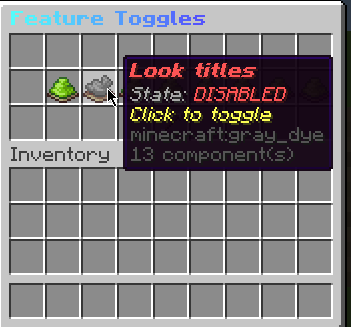
You can toggle systems such as animations, backing blocks, sounds, particles, look displays, personal locked signs, queues, and PlaceholderAPI integration while the server is running. Changes are stored separately so the editor does not overwrite your hand-edited configuration.
Clean, reusable configuration
config.yml— status checks, queue behavior, look previews, and general settingsmessages.yml— player and administrator messageslayouts.yml— active sign layouts and animationslayout-templates.yml— reusable bundled design presetsprofiles.yml— appearance, access, sound, particle, title, and block profilespools.yml— routing pools and fallback targetsgroups.yml— shared sign groups and maintenance statesigns.yml— registered signstoggles.yml— persistent feature switches from the editor
The bundled modern, minimal, and classic templates provide a polished starting point and can be customized with MiniMessage formatting.
Quick start
-
Put the universal VServerSigns JAR into the
pluginsdirectory of your Paper or Folia lobby. -
When using named Velocity targets, enable the compatible plugin-message channel in
velocity.toml:bungee-plugin-message-channel = true -
Look directly at a sign and create a destination:
/vsign create lobby velocity lobby /vsign create survival velocity survival game-servers /vsign create external direct play.example.net:25565 external-servers -
Open the visual manager:
/vsign editor
Direct targets transfer the client to the configured address. The address must therefore be publicly reachable and safe for direct player connections. Never expose an offline-mode backend directly.
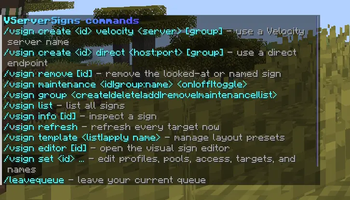
Useful commands
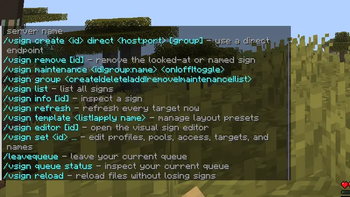
/vsign create <id> <velocity|direct> <target> [group]
/vsign remove [id]
/vsign info [id]
/vsign list
/vsign maintenance <id|group:name> <on|off|toggle>
/vsign group <create|delete|add|remove|maintenance|list> ...
/vsign set <id> <name|profile|permission|pool|fallback|target> <value...>
/vsign template <list|apply name>
/vsign refresh
/vsign reload
/vsign editor [id]
Commands include tab completion and granular permission nodes for administration, maintenance, editing, sign use, and maintenance bypasses.
PlaceholderAPI
PlaceholderAPI is optional. When installed, external %placeholders% can be used in layouts, titles, profiles, and messages. VServerSigns also registers its own sign and queue placeholders automatically—no separate expansion download is required.
Built for performance
Status requests are deduplicated per target, processed asynchronously on virtual threads, and limited by a fair concurrency queue. Only signs affected by changed data are scheduled for rendering. Static signs sleep between integrity checks, animated signs update only when their next frame is due, and unchanged signs are not written back to the world.
On Folia, VServerSigns uses the appropriate global, region, and entity schedulers instead of treating folia-supported: true as a compatibility shortcut.
Supported versions
Paper
- 1.21
- 1.21.1
- 1.21.3–1.21.11
- 26.1.1
- 26.1.2
- 26.2
Folia
- 1.21.4
- 1.21.5
- 1.21.6
- 1.21.8
- 1.21.11
- 26.1.2
- 26.2
PaperMC did not publish Paper releases for Minecraft 1.21.2 or bare 26.1. Folia support is listed only for versions officially published by PaperMC. VServerSigns is compiled and checked against every version shown above.
Requirements
- Java 21 for Paper/Folia 1.21.x
- Java 25 for Paper/Folia 26.x
- Velocity only for named proxy-server transfers
- PlaceholderAPI is optional
Privacy
VServerSigns uses anonymous bStats metrics under plugin ID 33189. It never reports server addresses, sign names, player identities, permissions, MOTDs, or configuration contents. Metrics can be disabled globally in the bStats configuration.
Build a lobby that feels alive—with server signs that actually know what is happening.

| Version | Minecraft | Loader | Download |
|---|---|---|---|
|
VServerSigns 2.3.0 2.3.0 |
1.21, 1.21.1, 1.21.3, 1.21.4, 1.21.5, 1.21.6, 1.21.7, 1.21.8, 1.21.9, 1.21.10, 1.21.11, 26.1, 26.1.1, 26.1.2, 26.2
|
folia, paper
|
Download |