

Customizable macro buttons over the chat screen. Click a button to send its attached message or command.
Client-side only — nothing to install on the server, works on any server.
Features
- Buttons over chat, macro sent with one click
- Two ways to edit: full-screen editor (
U) and editing right on top of an open chat (the[edit]button in the corner) — see the real chat layout while placing buttons - Drag to move, drag the corner to resize
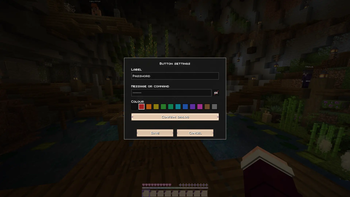
- 12 colours to choose from for each button
- Confirmation before sending: none / double click / dialog with the text
- Command field can be masked with an eye toggle — keep passwords off stream
- Editor background patterns: grid, dots, waves, hearts, stars, W letters
- Positions are stored as a fraction of the screen, so buttons stay put when the resolution changes
- Settings in
config/wchat.json, saved immediately
Controls
| Action | What it does |
|---|---|
U |
open the full-screen button editor |
[edit] in the chat corner |
edit right on top of the open chat |
| LMB on a button in chat | send the macro |
| LMB + drag in the editor | move a button |
| Drag the corner in the editor | resize a button |
| RMB in the editor | edit label, macro, colour, confirmation |
Delete in the editor |
remove the selected button |
U can be rebound in the controls settings.
Macros
Text starting with a slash is sent as a command, everything else as a regular chat message:
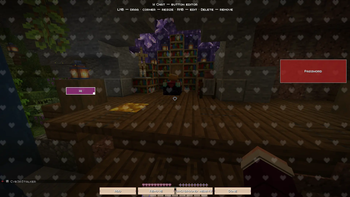
Full-screen editor with the hearts background pattern. Drag buttons to reposition, drag the corner to resize.
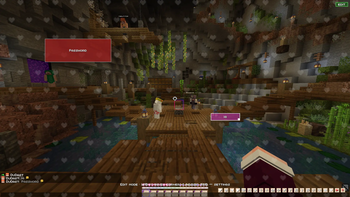
Toggle edit mode right on top of an open chat with the [EDIT] button — see the real chat layout while placing buttons.
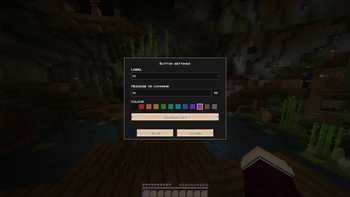
Set the label, message or command, and pick from 12 colours for each button.
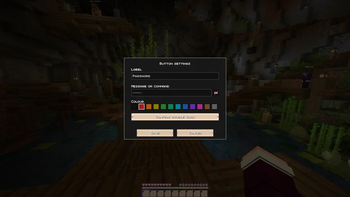
Require a double click before sending, and mask the command field with the eye toggle to keep passwords off stream.
Or require a full confirmation dialog before the macro is sent — the masked command stays hidden here too.