Way Too Many Binds
Search your keybinds by name and press them from a search box,
instead of hunting through the controls menu.




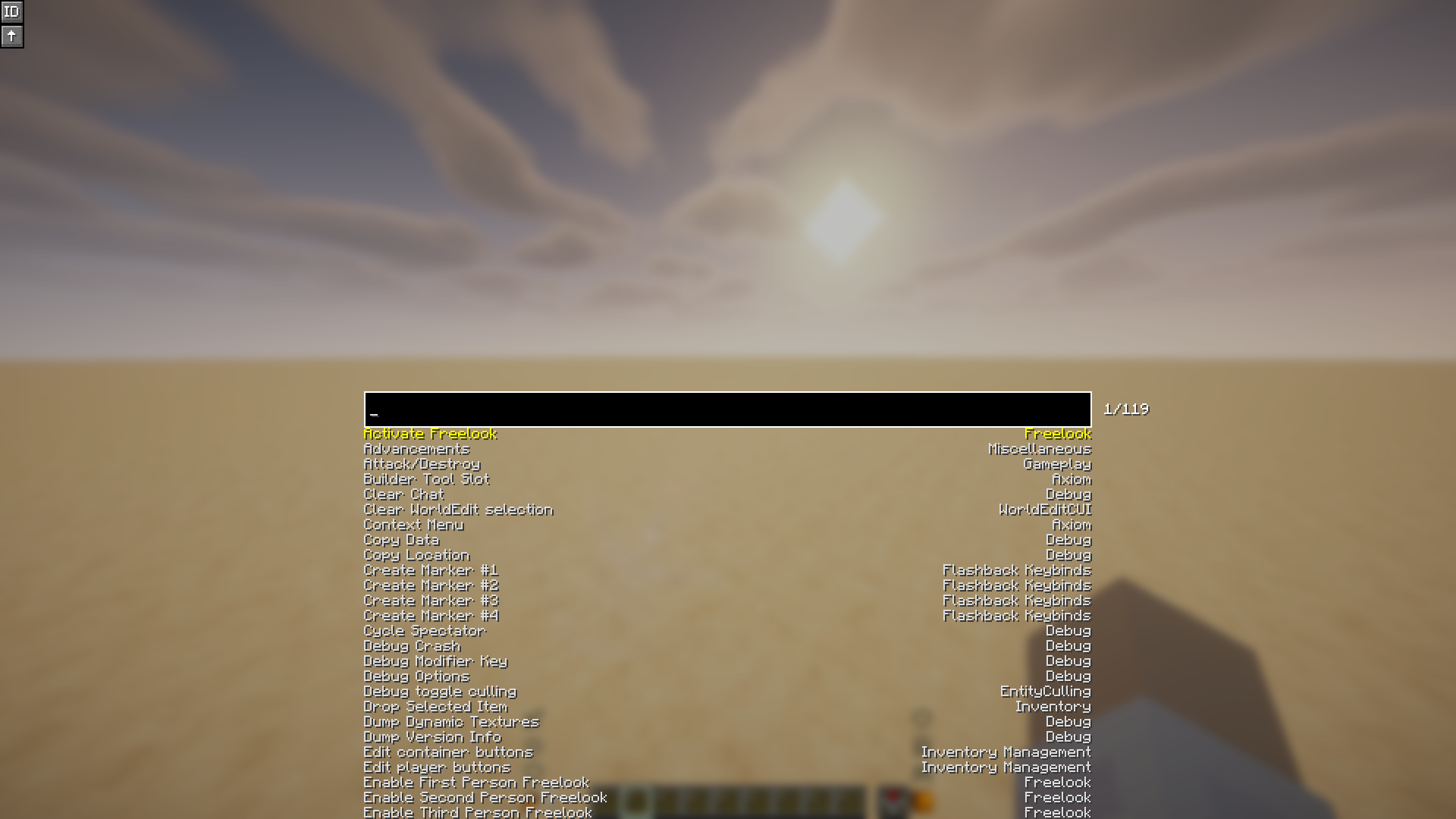
Once you have enough mods installed, the controls menu turns into a scroll marathon and every convenient key is already taken. This mod gives you one key that opens a search box: type part of a keybind's name, press Enter, and it fires the bind for you.
Handy for anything you use too rarely to justify a key of its own.
Usage
| Keybind | Default | What it does |
|---|---|---|
| Search Keybinds | Enter |
Opens the search screen |
| Reload Config | unbound | Re-reads the config file without restarting |
Inside the search screen:
| Input | Action |
|---|---|
| Type | Filter the list |
Up / Down, scroll wheel |
Move the selection |
Tab |
Move down one entry |
Enter, or click an entry |
Press the selected bind and close |
Escape |
Close without pressing anything |
The search matches a bind's name and category, and their translation keys too,
so key.inventory finds the same entry as Open/Close Inventory.
Two toggles sit in the top-left corner of the screen:
| Button | What it does |
|---|---|
ID |
Shows the raw bind and category ids beneath each entry |
↑ |
Also draws entries that scrolled off above the search box |
Configuration
Both toggles are saved to config/waytoomanybinds/config.json.
| Key | Default | Effect |
|---|---|---|
showBindIDs |
false |
Show raw ids beneath each entry |
drawUndeflowSuggestions |
false |
Draw entries above the search box |
The misspelling in the second key is part of the file format, so leave it written as it is here.
Supported versions
| Minecraft | Java | Notes |
|---|---|---|
| 26.2 | 25 | Minecraft ships unobfuscated, so Loom does not remap the mod |
| 1.21.11 | 21 | Built against Mojang mappings and remapped to intermediary |
Client-side only, so nothing is needed on the server. Requires Fabric API.
Building
The project uses Stonecutter to target
several Minecraft versions from a single source tree. Version-specific code is
selected with //? comments, and each target has its own properties in
versions/<version>/gradle.properties.
./gradlew buildAll          # build every supported version
./gradlew ":26.2:build"     # build a single version
Each version writes its jar to versions/<version>/build/libs/. There is no jar
in the repository root — the root project is only the Stonecutter controller.
To switch which version the IDE resolves against, edit the
stonecutter.active(...) call in stonecutter.gradle, or run the generated
stonecutterSwitchTo<version> task.
Adding a version
- Add it to
versions(...)insettings.gradle. - Create
versions/<version>/gradle.propertieswithminecraft_version,fabric_versionandjava_version. - Add it to the
minecraftmatrix in.github/workflows/build.ymland.github/workflows/publish.yml.
Credits
Based on TooManyBinds by Ryhon0, licensed GPL-3.0.
Not associated with NebelNidas and dzwdz's too-many-binds. The upstream mod this one is based on was given permission to use the name "Too Many Binds"; this one goes by "Way Too Many Binds". If you want support for Minecraft versions older than 1.20, use that mod instead.