

The easiest Stargate plugin to use.
This is a fork of the abandoned bukkit plugin https://dev.bukkit.org/projects/wormhole_x-treme by Lologarithm, alron, and lycano. For versions older than 1.1.2, please visit the bukkit link.





Features • Installation • Getting started • Gate types • Commands • Permissions • Configuration • Building from source
This fork's main focus is all around Stargates and simplicity specifically, while still keeping close to the actual franchise.
Features
- Gates from the franchise - The default Milky way gate, the most feature rich shape, and customizable as much as you want. Pegasus stargate from Stargate Atlantis, quicker to lock chevrons than Milky way, with a much darker look. Destiny from Stargate Universe, slower chevron lock but uses a portable DHD controller instead of a pillar to use the gate. Ori Supergate, as seen in Stargate: The Ark of Truth. At 101x101 blocks, it's great for any megabase.
- Permission plugin support - Integration with LuckPerms for manage what players can or cannot use. Optional - a permissions file can be used without a plugin.
- Iris password protection - Set IDCs for your stargates for security. Entities will get killed as they hit the Iris of a locked stargate.
- Anything can travel - Bring you pets along with you on a journey, or make a complex trap with arrows as stargates can also teleport other entities as well. Arrows will not lose any momentum when travelling through a stargate, which makes for the perfect trap.
- Unstable vortexes - When you dial a stargate, and the chevrons lock, you better stand back as an unstable vortex will shoot out from the stargate. It can deal damage to you if you get in the way, and will destroy any blocks. (Harmful vortex can be turned off in config)
- Networks - Keep your gates local by setting them to a custom network. This allows only stargates on the same network to visit each other, while other stargates can't access them.
- Create custom shapes - Easily create new gate shapes using the
/wxshapecommand, or by directly editing a file. The entire stargate is customizable, down to the material it uses, and how the vortex is formed. - Extra database support - Whether you prefer using MySQL/MariaDB or SQLite, it's extremely simple to setup. With SQLite being the default, you can set login information in the config and quickly convert the old database to the new one with
/wxconvertdb. - No required dependences - All other plugins and completely optional with WormholeXTreme, this plugin can run perfectly fine with nothing else installed!
- Toggle gate shapes - Don't want players to use a specific gate shape? Simply disable it with
/wxshape disable <ShapeName>.
Requirements
| Server version | Spigot or Paper, 1.20.4 to 26.3 |
| Java version | JDK 17 up to 25 |
| Optional Dependencies | Vault + EssentialsX (economy), LuckPerms (permissions) |
Installation
- Download the jar file from the Releases tab above.
- Drop it into your server's
plugins/folder. - Start the server. Wormhole X-Treme creates
plugins/WormholeXTreme/, which contains:Settings.txt, the main configurationGateShapes/, the gate designsWormholeXTremeDB/, the SQLite databaseGateShapePrices.txt, build prices when economy support is onPermissions.txt, permissions for servers without a permissions plugin
- Optionally, adjust the settings, then run
/wxreloador restart.
Updating
Replace the old jar with the new one and restart. Nothing else is needed:
- Settings added in a new version are written into your existing
Settings.txtwith their defaults. Your own values are kept. - If an old gate looks wrong after updating,
/wormhole updategate <gate|-all>rebuilds it with its current shape.
Getting started
Build a gate
The quickest way is to let the plugin build it for you:
- Run
/wxbuild Standard./wxbuildlistshows every available shape. - Place a button or lever on a block and press it. The gate builds itself around it, and that switch becomes the gate's DHD.
- Run
/wxcomplete <name>to name the gate and finish it.
You can also build the gate by hand from the shape's blocks (obsidian for the Standard gate), put a lever on the DHD block, flip it and then run /wxcomplete. Add idc=<code> to give the gate an iris, and net=<network> to put it on a network:
/wxcomplete supersecretroom idc=topsecret net=Private
Dial a gate
- Flip the gate's DHD lever. The gate activates and its chevrons lock.
- Run
/dial <gate>, for example/dial spawn. - Walk through. Flip the lever again to close the wormhole early.
If the gate you're dialling has its iris closed, give its code: /dial supersecretroom topsecret.
Dial signs
Shapes whose names end in SignDial have a spot for a dial sign, so they can be dialled without typing commands.
- Building one - It's the usual shape of the stargate, except the DHD pillar is extended to a 2x2. The DHD lever stays in the same place, but place a sign next to that lever. Put the desired gate name on the first line, and optionally a network name on the second line. Then flip the lever, and the stargate will automatically complete.
- Using one - Right click the sign to scroll through destinations. Left click goes in the opposite direction. Flip the lever once you've chosen a destination.
Iris
Give a gate an IDC with /wxidc <gate> <code>, or with idc= when completing it. This adds an iris lever to the gate. Anyone dialling in must give the code, or they're stopped at the iris.
Gate types
Milky Way gates
The classic type of gates, defined by the shape files in GateShapes/. The non-canon shapes are disabled by default. Enable them with /wxshape enable <shape>.
| Shape | Enabled by default |
|---|---|
| Standard, StandardSignDial | Yes |
| Super, SuperSignDial | Yes |
| Horizontal, HorizontalSignDial | Yes |
| Large, LargeSignDial | No |
| Small, SmallSignDial | No |
| Minimal, MinimalSignDial | No |
Pegasus gates
Built-in gates with a deepslate tile ring, sea lantern chevrons and a light blue iris. They use a normal DHD, like Milky Way gates.
Build one with /wxbuild Pegasus.
Destiny gates
Built-in gates with a polished blackstone ring and glowstone chevrons. As in the show, the ring spins to lock each chevron in turn. (Shown with a fancy chevron animation.)
Destiny gates have no DHD. You activate them with a Destiny DHD Controller:
- Build the ring, with
/wxbuild Destinyor by hand. - Hold a Destiny DHD Controller, stand within 10 blocks of the ring and run
/wxlink <GateName> idc=[IDC] net=[Network]. This completes the gate and links the controller to it. - Right-click the controller to activate the gate, then use
/dialas normal. Left-click toggles the iris.
The controller is a compass that always points at its linked gate. To link another controller to a gate that's already built, stand near the gate and run /wxlink <GateName> [IDC].
Crafting the controller:
| Gold Ingot | Glass Pane | Gold Ingot |
| Redstone | Echo Shard | Redstone |
| Gold Ingot | Obsidian | Gold Ingot |
Gates of each family can only dial gates of the same family. A Pegasus gate can't dial a Milky Way gate, and so on. Pegasus and Destiny gates can be switched off with
/wxt bonusgates false. Existing gates are kept and work again when switched back on.
Commands
For players
| Command | Function |
|---|---|
/dial <GateName> [IDC] |
Dial a stargate to complete the wormhole |
/wxlist [all|self|network <net>|player <name>] |
List available stargates |
/wxtop [count] |
The most visited stargates |
/wxcompass |
Point your compass at the nearest stargate |
/wxlink <name> [idc=] [net=] |
Complete a Destiny gate and link your controller to it |
For builders
| Command | Function |
|---|---|
/wxbuild <shape> |
Autobuild a gate of the desired shape |
/wxbuildlist |
List available shapes |
/wxcomplete <name> [idc=] [net=] |
Finish building a gate |
/wxidc <gate> [code] |
Show or set a gate's IDC |
/wxremove <gate> [-all] |
Remove a gate. -all also removes its blocks |
For admins
| Command | Function |
|---|---|
/wxt <setting> (alias /wormhole) |
Change settings and per-gate options in game (see below) |
/wxshape <create|edit|enable|disable|load|unload|remove> [shape] |
Create and manage gate shapes in game |
/wxgo <gate> [IDC] |
Teleport to a gate |
/wxforce <gate|-all> |
Force a gate closed, dark and with its iris open |
/wxreload [now] (alias /wxre) |
Reload the plugin |
/wxstatus [all] (alias /wxs) |
Show the plugin and database status |
/wxconvertdb <nxt|sqlite> |
Import gates from NovyXTreme, or move SQLite gates into MySQL/MariaDB |
All /wxt options
| Option | Function |
|---|---|
activate_timeout [secs] |
How long an activated gate waits to be dialled |
timeout [secs] |
How long a wormhole stays open |
cooldown <true|false|one|two|three> [secs] |
Use cooldowns |
restrict <true|false|one|two|three> [count] |
Build limits |
simple <true|false> |
Simple permissions mode |
custom <gate|-all> [true|false] |
Per-gate custom materials |
portalmaterial <gate> [material] |
A gate's event horizon material |
irismaterial <gate> [material] |
A gate's iris material |
lightmaterial <gate> [material] |
A gate's chevron material |
wooshdepth <gate> [0-5] |
How far a gate's unstable vortex reaches |
redstone <gate> [true|false] |
Redstone control for a gate |
owner <gate> [player] |
Show or change a gate's owner |
regenerate <gate|-all> |
Rebuild a gate's blocks |
updategate <gate|-all> |
Update a gate to its shape's current layout |
gateinfo [gate] |
Details about a gate |
kickback_count [n] |
How far a user gets pushed back when trying to use a stargate with a locked iris |
min_gate_distance [blocks] |
Minimum creation distance between gates |
bonusgates [true|false] |
Toggle Pegasus and Destiny gates |
toggle_gwm / show_gwm |
The arrival welcome message |
toggle_transport / show_transport |
The transport method |
permissions [provider] |
The permissions provider |
debug <level> |
Log level |
Permissions
Wormhole X-Treme works with any Bukkit permissions plugin. Without one, ops can do everything, and Permissions.txt decides what everyone else can do.
Standard permissions
| Permission | Default | Function |
|---|---|---|
wormhole.use.dialer |
everyone | Using /dial gates |
wormhole.use.sign |
everyone | Using dial-sign gates |
wormhole.use.compass |
everyone | /wxcompass |
wormhole.list.self |
everyone | /wxlist self |
wormhole.top |
everyone | /wxtop |
wormhole.network.use |
everyone | Using gate networks |
wormhole.build |
op | Building gates |
wormhole.build.all |
op | Building on any network |
wormhole.network.build |
op | Building on networks |
wormhole.remove.own |
op | Removing your own gates |
wormhole.remove.all |
op | Removing any gate |
wormhole.list.all |
op | /wxlist all |
wormhole.list.network |
op | /wxlist network |
wormhole.list.player |
op | /wxlist player |
wormhole.go |
op | /wxgo |
wormhole.shape |
op | /wxshape |
wormhole.config |
op | /wormhole settings |
wormhole.build.groupone / two / three |
none | Build limit groups |
wormhole.cooldown.groupone / two / three |
none | Use cooldown groups |
Wildcards such as wormhole.use.*, wormhole.build.*, wormhole.remove.*, wormhole.network.* and wormhole.cooldown.* are also available.
Simple mode
With SIMPLE_PERMISSIONS=true, four permissions cover everything:
| Permission | Default | Allows |
|---|---|---|
wormhole.simple.use |
everyone | Using gates |
wormhole.simple.build |
op | Building gates |
wormhole.simple.remove |
op | Removing gates |
wormhole.simple.config |
op | Changing settings |
Configuration
Everything lives in plugins/WormholeXTreme/Settings.txt. Every setting has a description in the file, and most can be changed in game with /wxt.
Gameplay settings
| Setting | Default | Description |
|---|---|---|
TIMEOUT_ACTIVATE |
30 |
Seconds an activated gate waits to be dialled |
TIMEOUT_SHUTDOWN |
38 |
Seconds a wormhole stays open. 0 keeps it open until something goes through |
WORMHOLE_KICKBACK_BLOCK_COUNT |
2 |
Blocks a user is pushed back from a busy gate (only used if "DEADLY_IRIS" is disabled) |
WORMHOLE_MAX_GATE_NAME_LENGTH |
50 |
Maximum length of a gate name |
WORMHOLE_MINIMUM_GATE_DISTANCE |
0 |
Minimum blocks between new gates. 0 turns the check off |
WORMHOLE_DANGEROUS_KAWOOSH |
false |
The unstable vortex hurts anyone standing in it |
WORMHOLE_KAWOOSH_DAMAGE |
10 |
Kawoosh damage in half-hearts |
WORMHOLE_DEADLY_IRIS |
false |
Hitting a closed iris kills the user instead of bouncing them back |
WORMHOLE_MOB_TRAVEL |
true |
Mobs travel through wormholes |
WORMHOLE_ITEM_TRAVEL |
true |
Dropped items travel through wormholes |
WORMHOLE_ARROW_TRAVEL |
true |
Arrows and tridents travel through wormholes |
WORMHOLE_BONUS_GATES |
true |
Pegasus and Destiny gates are available |
ALLOW_DESTINATION_GATE_SHUTDOWN |
false |
Players at the receiving gate can close the wormhole |
SHOW_GATE_WELCOME_MESSAGE |
true |
Show a welcome message on arrival |
Limits, cooldowns and economy
| Setting | Default | Description |
|---|---|---|
BUILD_RESTRICTION_ENABLED |
false |
Limit how many gates a player can build |
BUILD_RESTRICTION_GROUP_ONE / TWO / THREE |
1 / 2 / 3 |
Gates each build group may build |
USE_COOLDOWN_ENABLED |
false |
A cooldown between trips through a wormhole |
USE_COOLDOWN_GROUP_ONE / TWO / THREE |
120 / 60 / 30 |
Cooldown in seconds for each group |
ECONOMY_ENABLED |
false |
Charge players to complete a gate. Prices are in GateShapePrices.txt |
Database
SQLite needs no setup. To use MySQL or MariaDB, create an empty database and set:
| Setting | Default |
|---|---|
DATABASE_TYPE |
sqlite (or mysql / mariadb) |
DATABASE_HOST |
localhost |
DATABASE_PORT |
3306 |
DATABASE_NAME |
wormholextreme |
DATABASE_USERNAME |
root |
DATABASE_PASSWORD |
(empty) |
Change these settings to how you need them.
To move existing gates from SQLite into MySQL or MariaDB, run /wxconvertdb sqlite after changing config.
Permissions and other settings
| Setting | Default | Description |
|---|---|---|
PERMISSIONS_BACKEND |
bukkit |
Which permissions system to use |
SIMPLE_PERMISSIONS |
false |
Use the four simple-mode permissions |
PERMISSIONS_SUPPORT_DISABLE |
false |
Ignore any installed permissions plugin |
BUILT_IN_PERMISSIONS_ENABLED |
false |
Use the builtin permission levels |
WORMHOLE_USE_IS_TELEPORT |
false |
Only players with the use permission can travel |
USE_EVENT_OR_TP_TRANSPORT |
true |
Move players with events rather than teleports |
LOG_LEVEL |
INFO |
How much the plugin logs |
Custom gate shapes
Each file in GateShapes/ manages one gate, using these markers:
| Marker | Meaning |
|---|---|
[S] |
Gate frame block |
[P] |
Event horizon |
[I] |
Ignored, so any block can go here |
:L#n |
Chevron, lit in order n |
:W#n |
Kawoosh block, in order n |
:A |
Where the DHD switch goes |
:IA |
Where the iris switch goes |
:D |
Where the dial sign goes |
:N |
Where the name sign goes |
:EP / :EM |
Where players and minecarts arrive |
Standard.shape is the best choice for a base shape for new users. You can also design shapes in game with /wxshape create.
The finished jar is in target/. Every change is also built and tested automatically against each Spigot release from 1.20.4 to 26.3.
Credits
Wormhole X-Treme was created by Lologarithm and alron, carried on by lycano, and is now maintained by Dakto_.
A newer fork has been made, expanding past Stargates and focusing on a more complex system with other teleporters from the franchise. Created by Khan Jal.
NovyXtreme is created by Dograffe, for the Novylen Minecraft Server.
Released under the GNU General Public License v3. See CHANGELOG.txt for what's new in each version.
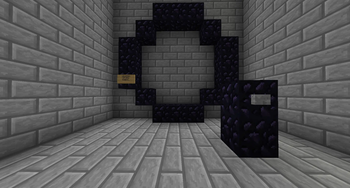
Deactivated standard gate
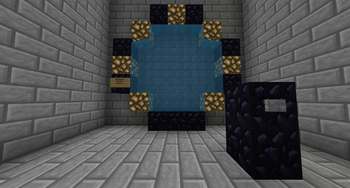
Activated standard gate
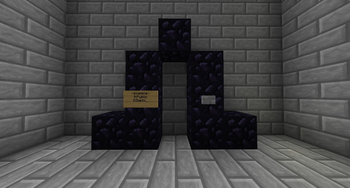
Deactivated small gate (minigate)
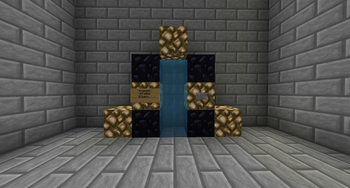
Activated small gate (minigate)
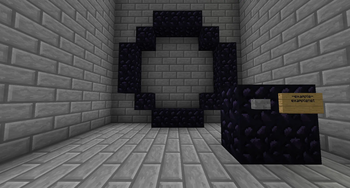
Sign dial gate before completion
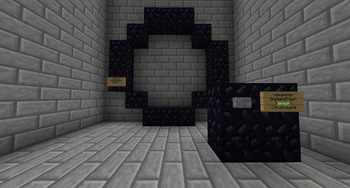
Complete sign dial gate
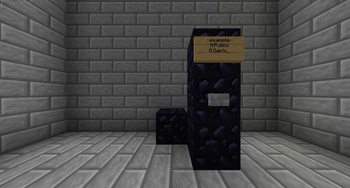
Deactivated minimal gate
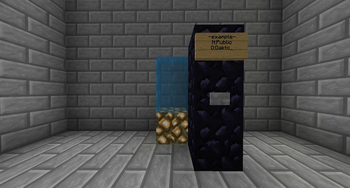
Activated minimal gate
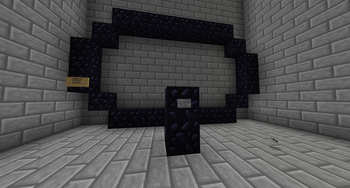
Deactivated large gate
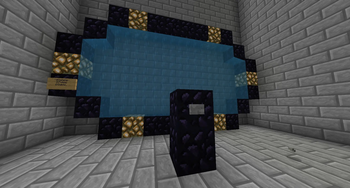
Activated large gate
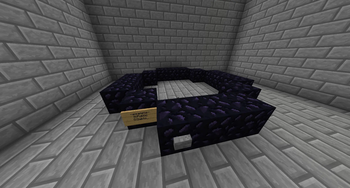
Deactivated horizontal gate
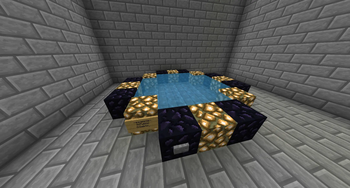
Activated horizontal gate
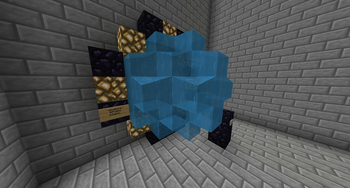
Standard gate with the woosh effect
| Version | Minecraft | Loader | Download |
|---|---|---|---|
|
WormholeXTreme 1.1.8 1.1.8 |
1.20, 1.20.1, 1.20.2, 1.20.3, 1.20.4, 1.20.5, 1.20.6, 1.21, 1.21.1, 1.21.2, 1.21.3, 1.21.4, 1.21.5, 1.21.6, 1.21.7, 1.21.8, 1.21.9, 1.21.10, 1.21.11, 26.1, 26.1.1, 26.1.2, 26.2, 26.3
|
paper, spigot
|
Download |
|
WormholeXTreme 1.1.7 1.1.7 |
1.20, 1.20.1, 1.20.2, 1.20.3, 1.20.4, 1.20.5, 1.20.6, 1.21, 1.21.1, 1.21.2, 1.21.3, 1.21.4, 1.21.5, 1.21.6, 1.21.7, 1.21.8, 1.21.9, 1.21.10, 1.21.11, 26.1, 26.1.1, 26.1.2, 26.2, 26.3
|
paper, spigot
|
Download |
|
WormholeXTreme 1.1.6 1.1.6 |
1.21, 1.21.1, 1.21.2, 1.21.3, 1.21.4, 1.21.5, 1.21.6, 1.21.7, 1.21.8, 1.21.9, 1.21.10, 1.21.11, 26.1, 26.1.1, 26.1.2, 26.2
|
paper, spigot
|
Download |
|
WormholeXTreme 1.1.5 1.1.5 |
1.21, 1.21.1, 1.21.2, 1.21.3, 1.21.4, 1.21.5, 1.21.6, 1.21.7, 1.21.8, 1.21.9, 1.21.10, 1.21.11
|
paper, spigot
|
Download |
|
WormholeXTreme 1.1.4 1.1.4 |
1.21, 1.21.1, 1.21.2, 1.21.3, 1.21.4, 1.21.5, 1.21.6, 1.21.7, 1.21.8, 1.21.9, 1.21.10, 1.21.11
|
paper, spigot
|
Download |
|
WormholeXTreme 1.1.3 1.1.3 |
1.21, 1.21.1, 1.21.2, 1.21.3, 1.21.4, 1.21.5, 1.21.6, 1.21.7, 1.21.8, 1.21.9, 1.21.10, 1.21.11
|
paper, spigot
|
Download |
|
WormholeXTreme 1.1.2 1.1.2 |
1.21, 1.21.1, 1.21.2, 1.21.3, 1.21.4, 1.21.5, 1.21.6, 1.21.7, 1.21.8, 1.21.9, 1.21.10, 1.21.11
|
paper, spigot
|
Download |