

Flow - Reimagining Communication in Minecraft
Elegance in Every Detail
Flow isn't just a chat plugin. It's a completely reimagined way of communicating in Minecraft, where every detail is meticulously crafted. Minimalist. Intuitive. Revolutionary.
✨ The Magic of Simplicity
-
Local Chat Communicate naturally with nearby players
-
Global Chat Add "!" at the start of your message - and the whole server will hear you
-
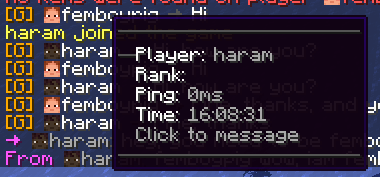
Smart Tooltips Hover for important information
-
Instant Messages Private communication with a single click
🎨 Social Features
-
Mentions Tag players with @username for instant notifications
-
Emojis Express yourself with built-in emoji support
-
Anti-Spam Smart protection against chat abuse
-
Chat Filter Keep conversations clean automatically
-
Ignore System Control who you interact with
🔧 Player Settings
-
Private Messages Control Enable or disable private messages
-
AFK System Set your status and custom AFK message
-
Personal Settings GUI Easy-to-use interface for all player settings
🎨 Limitless Customization
Customize Flow to your needs:
- Full PlaceholderAPI support
- Flexible message formats
- Interactive tooltips
- LuckPerms integration
⚡️ Performance
Built for speed:
- Asynchronous processing
- Optimized code
- Minimal overhead
🌟 Perfect for Any Server
| Server Type | Compatibility |
|---|---|
| Anarchy | ✓ |
| PvP | ✓ |
| Duels | ✓ |
| RPG | ✓ |
📝 Configuration Guide
Basic Settings
# Radius for local chat in blocks
local-chat-radius: 100

# Prefix for global messages
global-chat-prefix: '!'

# Time format for timestamps
time-format: 'HH:mm:ss'
Message Formats
Customize how messages appear in different chat types:
format:
  # Local chat format
  local: '%luckperms_prefix%%player_name% &8→ &f%message%'

  # Global chat format
  global: '&6[G] %luckperms_prefix%%player_name% &8→ &f%message%'

  # Private messages format
  private:
    outgoing: '&d→ &7%recipient%&8: &f%message%'
    incoming: '&dFrom &7%sender%&8: &f%message%'
Player Settings
Configure personal settings for each player:
settings:
  # Default AFK message
  default-afk-message: "I am currently AFK. I will respond when I return."

  # Default settings state
  default-settings:
    private-messages-enabled: true
    afk-status: false
Messages Customization
All plugin messages can be customized in messages.yml:
messages:
  private-messages:
    disabled-sender: "&cYou have private messages disabled!"
    disabled-recipient: "&cThis player has private messages disabled!"
    player-afk: "&7%player% is AFK: %message%"

  settings:
    private-messages-enabled: "&aPrivate messages enabled!"
    private-messages-disabled: "&cPrivate messages disabled!"
    afk-enabled: "&aAFK status enabled!"
    afk-disabled: "&cAFK status disabled!"
Hover Effects
Configure tooltips that appear when hovering over messages:
hover:
  enabled: true
  format:
    - '&8&m                              '
    - ''
    - '  &fPlayer: &7%player_name%'
    - '  &fRank: &7%luckperms_prefix%'
    - '  &fPing: &7%player_ping%ms'
    - ''
    - '  &fTime: &7%time%'
    - ''
    - '  &7Click to message'
    - ''
    - '&8&m                              '
Anti-Spam Protection
Prevent chat abuse with customizable limits:
anti-spam:
  enabled: true
  cooldown: 2        # Seconds between messages
  max-messages: 5    # Maximum messages
  time-window: 10    # Time window in seconds
Chat Filter
Keep your chat clean with word filtering:
chat-filter:
  enabled: true
  banned-words:
    - "word1"
    - "word2"
Emoji System
Add expressive emojis to your chat:
emojis:
  ':heart:': '❤'
  ':star:': '⭐'
  ':smile:': '☺'
  ':fire:': '🔥'
  ':rainbow:': '🌈'
  # And many more...
Mention System
Configure how player mentions work:
mentions:
  format: '§e@%player%§r'
  sound:
    enabled: true
    type: 'ENTITY_EXPERIENCE_ORB_PICKUP'
    volume: 1.0
    pitch: 1.0
  title:
    enabled: true
    text: '§eMention from %player%'
Color Schemes
Define default colors for chat elements:
colors:
  name: '&7'    # Player names
  arrow: '&8'   # Arrows in format
  message: '&f' # Message text
PlaceholderAPI Integration
Flow supports all PlaceholderAPI expansions:
%luckperms_prefix%- Player's prefix%luckperms_suffix%- Player's suffix%player_name%- Player's name%player_ping%- Player's ping%player_world%- Player's world
Permissions
flow.reload- Access to /flowreloadflow.bypass.filter- Bypass chat filterflow.bypass.antispam- Bypass anti-spamflow.emojis- Use emojis in chatflow.color- Use color codes in chat
Color Codes
Flow supports standard Minecraft color codes:
&0-9, &a-f- Colors&k- Magic&l- Bold&m- Strikethrough&n- Underline&o- Italic&r- Reset
Tips
- Use
&for color codes - Test your formats in-game with /flowreload
- Keep anti-spam values balanced
- Regular expressions are supported in chat filter
- Use hover tooltips to display additional information
- Customize click actions for interactive chat
💫 Commands
/msg
📦 Dependencies
Required:
- Paper 1.19+
- PlaceholderAPI
Optional:
- LuckPerms (for ranks and prefixes)
🚀 Installation
- Place plugin in plugins folder
- Install PlaceholderAPI
- Download required expansions:
/papi ecloud download luckperms /papi reload - Restart server
- Configure in config.yml
You can find Changelog Here
"Flow - the future of Minecraft communication"

| Version | Minecraft | Loader | Download |
|---|---|---|---|
|
flow 2.1.0 1.20.x 2.1.0 |
1.20, 1.20.1, 1.20.2, 1.20.3, 1.20.4, 1.20.5, 1.20.6
|
paper, purpur
|
Download |
|
flow 2.1.0 1.19.x 2.1.0 |
1.19, 1.19.1, 1.19.2, 1.19.3, 1.19.4
|
paper, purpur
|
Download |
|
flow 1.20.x 2.0 |
1.20, 1.20.1, 1.20.2, 1.20.3, 1.20.4, 1.20.5, 1.20.6
|
paper, purpur
|
Download |
|
flow 2.0 2.0 |
1.19, 1.19.1, 1.19.2, 1.19.3, 1.19.4
|
paper, purpur
|
Download |
|
flow 1.0-RELEASE 1.0 |
1.19, 1.19.1, 1.19.2, 1.19.3, 1.19.4
|
paper, purpur
|
Download |