XzHarvest
Make every harvest count.
XzHarvest turns ordinary farming into a complete SMP progression loop. Players discover rare crops, earn farming XP, sell harvests through a dynamic merchant, complete delivery contracts, compete on leaderboards and contribute to community harvest events.
It uses vanilla items and PersistentDataContainer identity, so no resource pack is required and rare harvests are never trusted by their display name or lore alone.
What players can do
Discover rare harvests
The default crop set includes wheat, carrots, potatoes, beetroot, cocoa, pumpkins, melons and nether wart. Each crop can reward four rare tiers:
| Tier | Default chance per eligible harvest | Default bonus XP |
|---|---|---|
| Fine | 8% | 1 |
| Golden | 2% | 3 |
| Enchanted | 0.5% | 10 |
| Giant | 0.1% | 50 |
Every crop has its own YAML file, so you can change its enabled state, rare-drop chances, names, lore, glint and participation in merchant, orders and events. Player-placed pumpkin and melon tracking is enabled by default to reduce placement-and-break farming abuse.
Earn farming XP
Eligible mature crops award normal Minecraft XP. Values are configurable per crop, and rare drops add their own XP bonus. XzHarvest buffers payouts every second to avoid spawning an orb for every crop. If the player has damaged Mending gear, the payout uses an XP orb when appropriate.
The default base values range from 0.20 XP for wheat, carrots, potatoes and beetroot to 0.35 XP for nether wart. Permission-based rank multipliers use the highest matching primary multiplier, while configured membership bonuses stack up to the configured total cap.
Sell and complete contracts
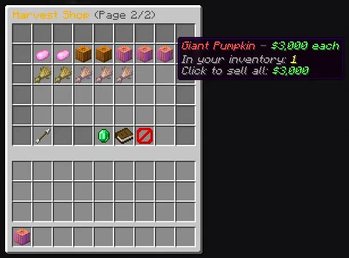
/harvest merchant opens the Harvest Merchant. It can sell supported vanilla crops and rare harvest items. Prices default to DYNAMIC, reset at 00:00, and stay inside each crop's configured minimum and maximum price.
/harvest orders opens the delivery board. A fresh configuration has 27 active order slots, a four-hour expiry and a one-hour completion cooldown. Safe contracts reserve a board slot until complete or expired. Risky contracts can require a stake and impose a deadline.
Merchant payments and the default money-based contract actions require Vault plus an economy provider. XzBank works as the provider on the XzPlugin stack, but any compatible Vault economy provider can be used.
Join Harvest Events
Staff can manually start configured community events. The bundled weekly_harvest_rush lasts one hour, has a 5,000-crop community goal and records each player's contribution. Qualifying participants and the top three contributors receive configured rewards.
The default event reward actions use PhoenixCratesLite commands. Install PhoenixCratesLite or replace those actions in events.yml before running the event. Events never start automatically.
Follow progress
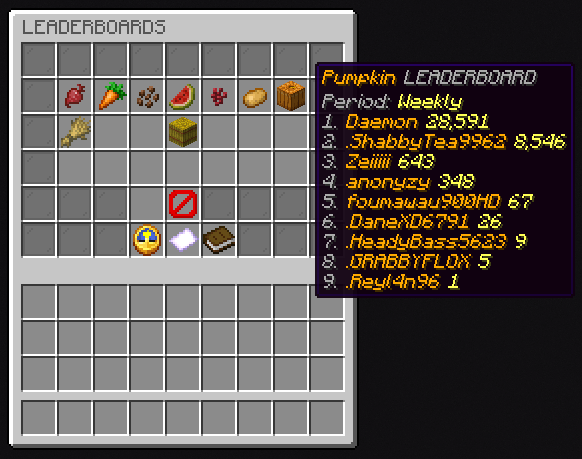
Players can view crop-specific or combined leaderboards for today, this week and all time. The default leaderboard period is weekly, uses Monday as the week start, caches for 60 seconds and displays up to ten entries.
Requirements
- Minecraft server version 1.21.11.
- Paper or Purpur.
- Java 21 or newer, following the Java requirement of your server software.
- XzCore 0.3.1.
Optional integrations:
- Vault plus an economy provider for merchant payments and bundled money contracts.
- PlaceholderAPI to register XzHarvest placeholders.
- ajLeaderboards to consume those placeholders in an external leaderboard plugin.
- PhoenixCratesLite for the default Harvest Event key rewards.
This is a server plugin. Players do not install it on their clients. It does not claim Folia support, a Fabric/Forge loader or a Bedrock-server implementation.
Install
- Install XzCore 0.3.1 first.
- Stop the server and back up the existing XzHarvest JAR,
plugins/XzHarvest/folder and database. - Put the single
XzHarvest-2.0.1.jarin the server'spluginsfolder. Keep only one active XzHarvest JAR. - Add the optional integrations you intend to use.
- Start the server normally, inspect its startup log, then run
/harvest version,/xzharvest modulesand/xzharvest data.
XzHarvest bundles five feature modules: rare drops, farming XP, merchant, orders and events. On first startup, it installs the bundled module JARs into plugins/XzHarvest/modules/.
Upgrade from an earlier XzHarvest build
Back up before changing the JAR. Existing extracted module JARs are intentionally preserved, so replacing only the main JAR does not replace them. Review and update the stock module JARs together with the main JAR when moving to a newer modular release.
Keep owner configuration and data. Run /xzharvest update after startup to review configuration currency. Run /xzharvest update confirm only when it reports an update that you want to apply. Use a full server restart for JAR changes. Do not use Bukkit /reload.
Default configuration files
plugins/XzHarvest/
├── config.yml
├── storage.yml
├── merchant.yml
├── orders.yml
├── shop.yml
├── leaderboard.yml
├── events.yml
├── xp.yml
├── audit.yml
├── messages.yml
├── menus.yml
├── modules.yml
├── crops/
│   ├── beetroot.yml
│   ├── carrot.yml
│   ├── cocoa.yml
│   ├── melon.yml
│   ├── nether_wart.yml
│   ├── potato.yml
│   ├── pumpkin.yml
│   └── wheat.yml
└── modules/orders/orders.yml
| File | What to configure |
|---|---|
config.yml |
Enabled worlds, debug mode and player-placed pumpkin tracking. The default world mode is a whitelist for world, survival and resource. |
storage.yml |
Storage backend. The default is XZCORE, which uses XzCore plugin-owned SQLite storage. |
crops/*.yml |
Crop enablement, rare tiers, merchant eligibility, order eligibility, event eligibility and block tracking. |
xp.yml |
Crop XP values, payout timing, Mending behavior, rare bonuses and multiplier permission nodes. |
merchant.yml |
Merchant pricing mode, reset time and base/minimum/maximum crop prices. |
shop.yml |
Harvest Merchant menu layout and sell-entry presentation. |
modules/orders/orders.yml |
Delivery board layout, currencies, requirements, rewards, stakes, expiry and order pool. The legacy root orders.yml can remain as a compatibility copy. |
events.yml |
Event goals, duration, broadcasts and participant or placement rewards. |
leaderboard.yml |
Periods, points, cache duration, result count and leaderboard menu layout. |
modules.yml |
Enables or disables bundled modules for the next server start. |
audit.yml |
Rare-drop audit logging and asynchronous audit batch settings. |
messages.yml and menus.yml |
Player-facing messages and shared menu defaults. |
Adding a new supported crop type is a code change. Configuration can adjust the eight bundled crop types, but cannot introduce an entirely new crop registry entry.
Commands
/harvest is an alias for /xzharvest.
| Command | Permission | Purpose |
|---|---|---|
/harvest |
xzharvest.help |
Open the harvest guide flow. |
/harvest top [crop|all] [today|weekly|all] |
xzharvest.top |
View farming leaderboards. |
/harvest merchant |
xzharvest.merchant |
Open the Harvest Merchant. |
/harvest orders |
None | Open delivery contracts. |
/harvest event |
None | Open the active event dashboard. |
/harvest event progress |
None | Show current event progress in chat. |
/harvest stats [crop|all] [today|weekly|all] |
xzharvest.admin.stats |
View aggregate farming statistics. |
/xzharvest version |
xzharvest.admin.version |
Show XzHarvest and storage status. |
/xzharvest modules [info|enable|disable] <id> |
xzharvest.admin.modules |
Inspect module health or schedule a module change for the next restart. |
/xzharvest merchant reroll |
xzharvest.admin.prices |
Reroll active merchant prices. |
/xzharvest merchant set <crop> <price> |
xzharvest.admin.prices |
Set a crop price within its configured bounds. |
/xzharvest event start <id> |
xzharvest.admin.event |
Manually start a configured event. |
/xzharvest event complete|fail|cancel |
xzharvest.admin.event |
End the active event with the selected result. |
/xzharvest event preview <id> |
xzharvest.admin.event |
Preview an event without starting it. |
/xzharvest reload |
xzharvest.admin.reload |
Reload supported XzHarvest configuration. |
/xzharvest give <player> [crop] <rarity> [amount] |
xzharvest.admin.give |
Give a reference rare harvest item. |
/xzharvest iteminfo |
xzharvest.admin.iteminfo |
Inspect the held item's XzHarvest identity. |
/xzharvest update [confirm] |
xzharvest.admin.update |
Check or apply safe configuration updates. |
/xzharvest data |
xzharvest.admin.data |
Show storage health and table counts. |
xzharvest.admin defaults to operators and grants all administrative XzHarvest permissions. Player permissions xzharvest.help, xzharvest.top and xzharvest.merchant default to true.
PlaceholderAPI
When PlaceholderAPI is installed, XzHarvest provides numeric placeholders in this format:
%xzharvest_points_<crop|all>_<today|weekly|all>%
Examples:
%xzharvest_points_all_weekly%
%xzharvest_points_pumpkin_all%
%xzharvest_points_wheat_today%
%xzharvest_points_carrot_weekly%
Troubleshooting
| Symptom | Check |
|---|---|
| Merchant is unavailable | Confirm Vault is installed and an economy provider is registered. |
| Event key rewards do not run | Install PhoenixCratesLite or change the configured reward actions. |
| No rare drops or XP | Confirm the world is allowed, the crop is mature, the player is not in Creative/Spectator and the crop configuration is enabled. |
| A module is disabled | Run /xzharvest modules info <id>, then inspect the module configuration and restart after an enable or disable change. |
| A new default is missing | Run /xzharvest update first. Review the report before using confirm. |
| Storage is unhealthy | Run /xzharvest data and check that XzCore is ready. |